
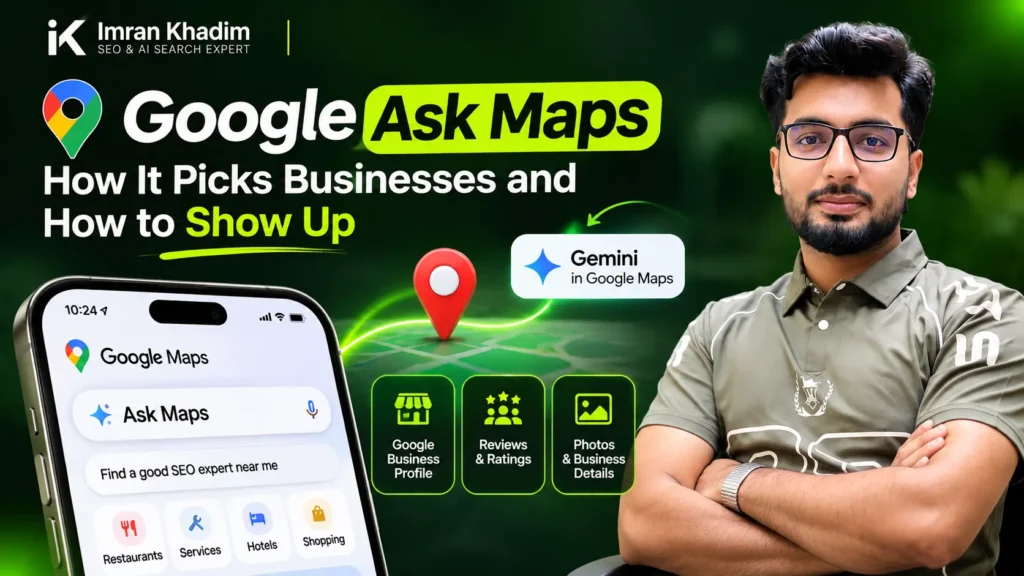
Ask Maps is a conversational search feature inside Google Maps. It uses Google’s Gemini AI models to help people find places and get answers to questions about real-world locations. Traditional Google Maps searches often start with a short keyword. For example:
- Dentist in Lahore
- Car repair near me
- Best coffee shops in London
- Restaurants near my location
Ask Maps allows users to ask more detailed questions in normal language.
For example:
- Which restaurants in Lahore have outdoor seating and good food?
- Where can I find a dentist who offers emergency appointments?
- Which car rental companies offer airport pickup?
- Find a family-friendly place with parking near me.
Instead of making users open many listings and read every review, Ask Maps can bring useful information together in a conversational answer. Google says Ask Maps uses information from more than 300 million places and contributions from more than 500 million people. This includes community reviews and other information that helps people understand places before visiting them.
<Cite refs={["turn891675search1","turn891675search0"]}/>When Did Google Launch Ask Maps?
Google announced Ask Maps on 12 March 2026. The first rollout started in the United States and India for Android and iOS users. Google introduced it as a new way to explore places through natural-language questions and personalised recommendations.
<Cite refs={["turn891675search1","turn891675search0"]}/>However, the feature has expanded since its first launch. On 6 August 2026, Google announced that Ask Maps was expanding to Australia, Brazil, Canada, Indonesia, Japan, Mexico, and more than 150 countries and territories in English.
<Cite refs={["turn183682view0","turn183682view1"]}/>This means the original US-and-India launch information is no longer the complete availability picture.
What about Pakistan?
Google’s August announcement describes a rollout across more than 150 countries and territories, but it does not provide a complete country-by-country list in the announcement. Google’s main Maps feature page also still displays a US-and-India availability note.
Therefore, I would not claim that Ask Maps is definitely available or unavailable in Pakistan without checking the feature on a current local Google Maps account. For Pakistani business owners, the sensible approach is to prepare their listings now and check the Google Maps app regularly for access.
How Does Ask Maps Find and Recommend Businesses?
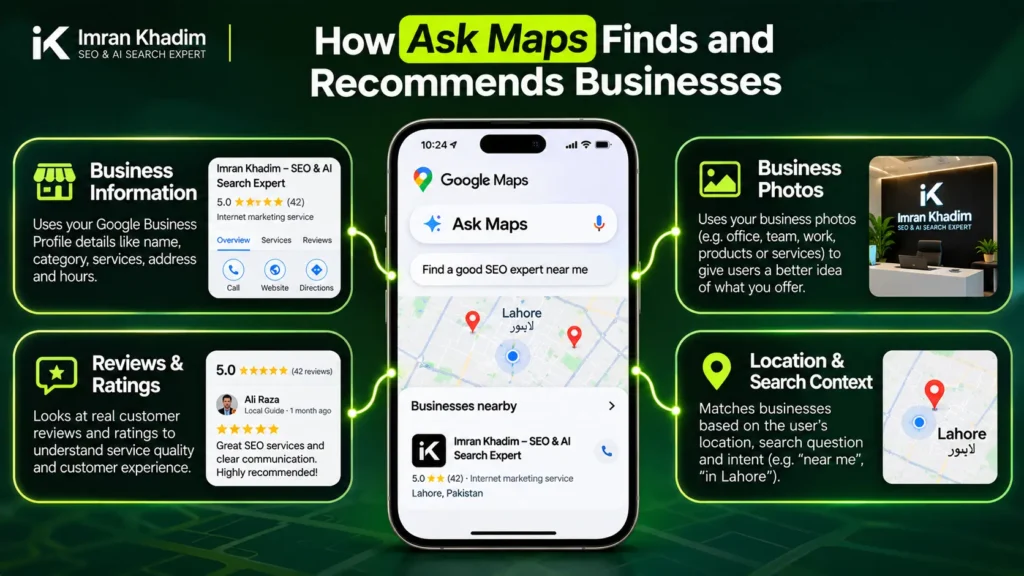
Google has not published a complete ranking formula for Ask Maps. It has not confirmed that a particular number of reviews, photos, or profile updates will make a business appear.However, Google has explained that the feature uses its Maps information, community contributions, and Gemini models to understand questions and suggest useful places.
There are several types of information local businesses should pay attention to.
1. Google Maps Business Information
Google Maps contains information about businesses and places, such as their names, locations, categories, and other details. When someone asks for a service in a particular area, accurate business information helps Google understand which places may match the request.
For example, imagine someone asks:
“Find a car rental company near Dubai Airport that offers luxury vehicles.”
A business with clear location details and accurate car rental information is easier to understand than a listing with missing or confusing details. This is one reason your Google Business Profile ranking strategy should begin with accurate business information rather than adding keywords without a clear purpose.
2. Customer Reviews and Community Contributions
Reviews help people understand the experience other customers have had with a business. Google says Ask Maps uses information from its large community of contributors. Reviews and other contributions help keep Maps useful and provide real-world details about places.
<Cite refs={["turn891675search1","turn183682view0"]}/>For example, a customer may mention that a restaurant has:
- Helpful staff.
- Outdoor seating.
- Family-friendly space.
- Good vegetarian options.
- Easy parking.
These details can help another person decide whether the place matches their needs. Business owners should encourage genuine customer feedback and respond to reviews professionally. Never buy reviews or ask customers to write something that does not reflect their real experience.
3. Business Photos and Visual Information
Photos give people a better idea of what a business looks like. A restaurant may upload pictures of its dining area, food, and outdoor seating. A dental clinic may show its reception, treatment rooms, and equipment. A car rental company may add genuine photos of the vehicles it offers. Google Maps also allows community members to contribute photos and other updates.
Google has not confirmed that uploading more photos directly improves Ask Maps rankings. Still, accurate photos help customers understand what they can expect when they visit. Use genuine, recent images instead of stock photos that do not represent your actual business.
4. Location and Search Context
The user’s question and location matter when finding suitable places. For example, someone asking for a restaurant near their current location needs a different answer from someone planning a dinner in another city.
Ask Maps can also personalise recommendations using places a user has searched for or saved in Google Maps. Google has explained that these personal preferences can help it provide more .relevant suggestions
<Cite refs={["turn891675search1","turn183682view0"]}/>This means two people may not always receive identical recommendations for the same type of question. A business owner should therefore avoid assuming that one test result represents what every customer will see.
What We Know and What Google Has Not Confirmed
| Information | What We Know |
|---|---|
| Place information | Ask Maps uses information from Google Maps |
| Reviews | Google identifies community reviews as a source of useful information |
| Community contributions | Google says more than 500 million contributors help keep Maps useful |
| Photos | Maps supports photo contributions and business images |
| Personalisation | Recommendations can use places people have searched for or saved |
| Exact ranking formula | Google has not published a complete selection formula |
| Guaranteed review or photo count | No official target has been announced |
The important point is that these are useful areas to maintain, not a confirmed list of ranking factors with fixed weights.
How to Prepare Your Google Business Profile for Ask Maps
Your Google Business Profile is an important place to manage how your business appears on Google Search and Maps. You should not treat it as a profile that only needs to be completed once. Business details, services, opening hours, photos, and customer feedback need regular attention. If you already work on local search, many of these tasks will be familiar. You can use my complete local SEO checklist to review the wider work involved in improving your local presence.
Here are the main areas to check.
1. Choose the Correct Business Category
Your primary category should describe what your business actually does.
For example:
- A dental clinic should use an appropriate dental category.
- A car rental company should use a relevant car rental category.
- A restaurant should select the category that best describes its food business.
- A construction company should choose the most suitable contractor or building category.
Do not select unrelated categories just because you think they may bring more searches. Add secondary categories only when they genuinely describe other important parts of your business.
2. Add Accurate Services
Your profile should explain the services you actually provide.
For example, a dental clinic may offer:
- General dentistry.
- Teeth whitening.
- Dental implants.
- Emergency dental care.
- Orthodontic treatment.
A car rental business may offer:
- Airport car rental.
- Luxury car rental.
- Monthly car rental.
- Economy car rental.
- Chauffeur services, if genuinely provided.
Keep your services updated when your business changes. Avoid adding services that you do not offer. This may attract the wrong customers and create confusion.
3. Keep Your Business Hours Updated
Incorrect opening hours can create a poor customer experience. Imagine someone asks Maps to find a clinic that is open in the evening. Your profile shows that you are open until 9 PM, but your actual closing time is 6 PM.
- The customer may travel to your business and find it closed.
- Check your regular hours, special holiday hours, and temporary closures.
- Update them whenever your operating schedule changes.
4. Add Genuine Business Photos
Photos help customers understand your business before visiting. Upload clear pictures that represent your real location, services, products, staff, or vehicles.
For example:
| Business Type | Useful Photos |
|---|---|
| Dental clinic | Reception, treatment rooms, equipment |
| Restaurant | Food, dining area, entrance |
| Car rental | Available vehicles, interior, exterior |
| Construction company | Completed projects, work in progress |
| Retail shop | Storefront, products, interior |
Use good lighting and clear images. Avoid adding unrelated pictures simply to increase the number of photos.
5. Build a Consistent Review Process
Customer reviews should be part of your normal business process. After completing a service, politely ask customers to share their honest experience.
- You can send a review link through WhatsApp, email, or a follow-up message.
- Respond to both positive and negative reviews. Keep your replies professional and useful.
- Do not offer payment or rewards in exchange for positive reviews.
The goal is to build genuine customer feedback, not to create an artificial review count.
How to Test Whether Ask Maps Recommends Your Business
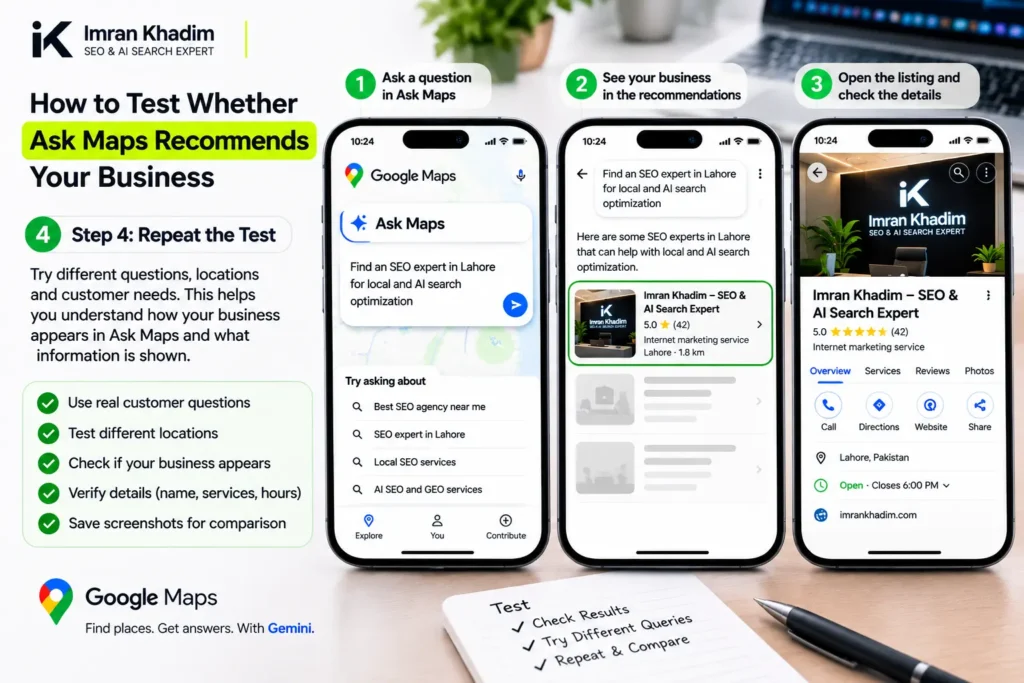
You do not need to wait for a new SEO report to start checking your business. If Ask Maps is available on your Google account and device, you can test it with questions that real customers might ask. The best approach is to use specific questions about your services, location, and customer needs.
Step 1: Open Google Maps
Open the Google Maps app on your Android or iPhone. Make sure the app is updated. Check whether the Ask Maps option is available in your account. You can also follow Google’s official instructions for asking questions in Maps. If the feature is not available on your account, do not use a VPN result as proof that it is officially supported in your market.
Step 2: Ask Questions About Your Industry
Use natural questions rather than testing only your business name.
For example:
| Industry | Example Ask Maps Question |
|---|---|
| Dental | Which dental clinics near Lahore offer teeth whitening? |
| Car Rental | Which car rental companies near Dubai Airport offer luxury cars? |
| Restaurant | Which restaurants near me have outdoor seating? |
| Construction | Which building contractors in London offer home extensions? |
| Retail | Where can I find a shop selling computer accessories nearby? |
These questions help you understand whether the results match the type of business and service you want to promote.
Step 3: Check the Results
When Ask Maps gives an answer, review the suggested businesses.
Look for:
- Is your business included?
- Is the business location correct?
- Are the services described accurately?
- Does the answer match the customer’s request?
- Are the photos and other details correct?
- Does the result provide useful links or map information?
Do not focus only on whether your business appears first. A useful result should also match the customer’s needs and provide accurate information.
Step 4: Repeat the Test
One search is not enough to understand how a local business appears. Try different questions, locations, and customer needs.
- For example, a dental clinic can test emergency dentistry, teeth whitening, and dental implants separately.
- A car rental company can test airport pickup, luxury vehicles, and monthly rentals.
Record the date, question, location, and result. This gives you a useful record to compare later.
How to Track Ask Maps Visibility
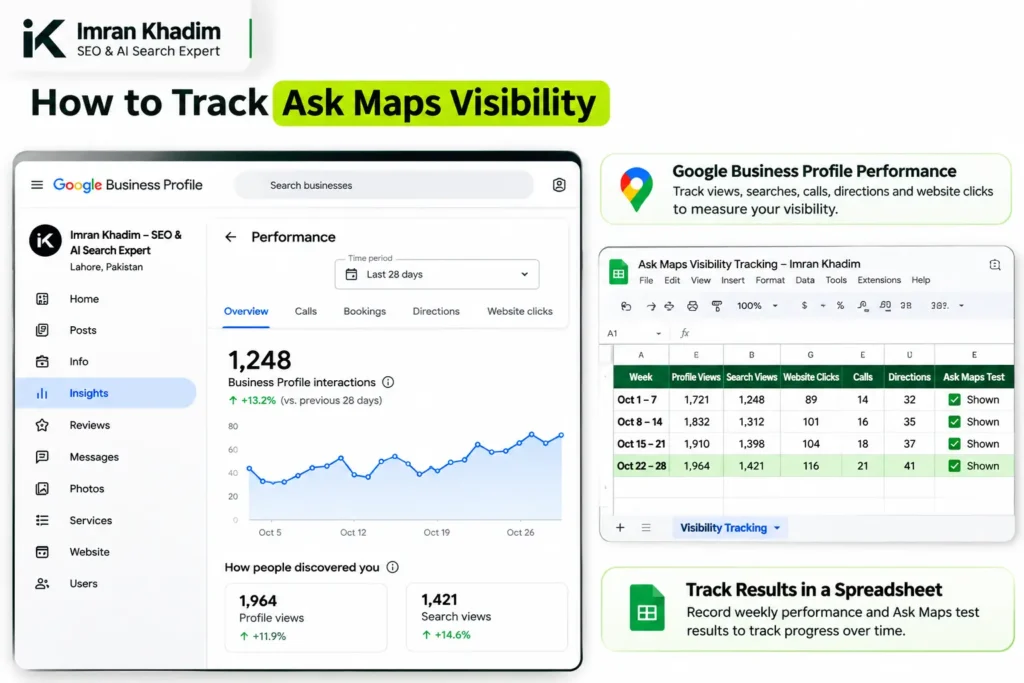
This is where many businesses may become confused.
Ask Maps provides conversational recommendations, while standard Google Maps reporting measures other types of activity. Google has not announced a separate, dedicated Ask Maps performance report in Google Business Profile. So you should not treat every increase in Maps activity as proof that Ask Maps is responsible.
1. Check Your Google Business Profile Performance
Open your Google Business Profile performance section.
Review the available metrics, such as:
- Searches that showed your profile.
- Views of your business profile.
- Calls.
- Website clicks.
- Direction requests.
These numbers help you understand your wider local visibility and customer actions. However, they do not tell you exactly how many people found you through Ask Maps.
2. Record Your Ask Maps Tests Separately
Create a simple spreadsheet to record your own tests.
| Date | Location | Customer Question | Business Appeared? | Details Correct? |
|---|---|---|---|---|
| 3 Nov | Lahore | Dental clinic with emergency appointments | Yes / No | Yes / No |
| 3 Nov | Dubai | Luxury car rental near airport | Yes / No | Yes / No |
| 3 Nov | London | Contractor for home extensions | Yes / No | Yes / No |
Add the source or screenshot of each result when possible.This will help you compare different tests without confusing them with normal Google Maps performance data.
3. Watch Standard Maps Impressions
Google Business Profile performance data can help you monitor your overall Maps visibility. Some early industry reporting about Ask Maps suggested that standard Maps impressions would continue to be used rather than a separate Ask Maps metric. However, this should not be treated as a confirmed, dedicated reporting feature from Google.
<Cite refs={["turn891675search6"]}/>Keep your regular Maps data and your manual Ask Maps test records separate.That will make your reporting more honest and useful.
What Should Pakistani Businesses Do Before Wider Adoption?
Ask Maps was first launched in the United States and India, and Google later announced a much wider English-language rollout. However, the availability of individual features can vary by market, account, device, and language. Pakistani business owners should check their own Google Maps accounts instead of assuming that every Ask Maps feature is already available locally. Even if a particular feature is not visible on your account, there is useful preparation work you can do now.
1. Complete Your Google Business Profile
Make sure your business name, category, address, phone number, opening hours, and services are correct. If you serve customers across different areas, describe your real service locations accurately. Do not add fake branches or locations.
2. Improve Your Website’s Local Information
Your website should clearly explain:
- What your business does.
- Which services you provide.
- Where you operate.
- How customers can contact you.
- What makes your service useful to customers.
Create separate service pages when they answer different customer needs.
For example, a Lahore dental clinic may need separate pages for dental implants, teeth whitening, and emergency dentistry. A business website should support its Google Business Profile rather than show conflicting information.If you need help improving your website’s local visibility, explore my Local SEO services.
3. Collect Genuine Customer Reviews
- Make it easy for customers to share their experiences.
- Use a simple follow-up process after a completed job or appointment.
- Encourage honest feedback and respond to customers in a professional way.
4. Add Real Photos Regularly
Use photos of your actual business, products, staff, and completed work. Keep them current. For a construction company, recent project photos can help people understand the type of work it completes. For a restaurant, real food and dining-area photos give customers a better idea of the experience.
5. Check Your Competitors
Search for businesses in your industry and location.
- Compare their profile information, services, photos, reviews, and website details with yours.
- Look for missing information rather than copying their content.
- You can use tools from my guide to the best local SEO tools to support your wider local research.
Common Mistakes Businesses Should Avoid
Ask Maps is a new way to explore places, but that does not mean businesses should make random changes to their listings.
Avoid these mistakes:
| Mistake | Better Approach |
|---|---|
| Adding unrelated business categories | Use accurate categories |
| Buying fake reviews | Collect genuine customer feedback |
| Uploading unrelated stock photos | Use real business photos |
| Creating fake locations | Show only genuine business locations |
| Repeating keywords in business descriptions | Explain services naturally |
| Assuming one test proves visibility | Repeat tests with different questions |
| Treating Maps impressions as Ask Maps clicks | Keep manual test records separately |
| Expecting guaranteed recommendations | Focus on accurate and useful business information |
Google has not published a formula that guarantees a business will appear in Ask Maps.Avoid anyone promising a fixed ranking position or guaranteed recommendation through a secret optimisation method.
Does Ask Maps Replace Traditional Local SEO?
- No. Ask Maps adds a conversational way for people to discover places, but traditional Google Maps and local search remain important.
- Customers still search for services, compare nearby businesses, read reviews, check opening hours, and visit business websites.
- Your Google Business Profile, website, customer experience, and local information still need attention.
- The best approach is to improve the basics that help customers understand and trust your business.
- A complete profile, useful service pages, genuine reviews, accurate contact details, and real photos are sensible priorities whether someone finds you through a normal Maps search or an AI-powered feature.
- Ask Maps should be treated as another way people may discover local businesses—not a reason to ignore the rest of your local SEO work.
Frequently Asked Questions
1. What is Google Ask Maps?
Ask Maps is a conversational AI feature inside Google Maps. It uses Gemini to answer questions about places and help people find businesses, locations, and activities that match their needs.
2. When did Google launch Ask Maps?
Google announced Ask Maps on 12 March 2026. It initially started rolling out in the United States and India on Android and iOS.
3. Is Ask Maps available in Pakistan?
Google announced an English-language expansion to more than 150 countries and territories in August 2026. However, its announcement does not provide a complete country-by-country list. Pakistani users should check their Google Maps app and account for actual availability.
4. Does Ask Maps use Google Business Profile information?
Ask Maps uses Google Maps place information and community contributions. Business owners should keep their Google Business Profile details accurate, but Google has not published a complete list of the exact profile fields used in every recommendation.
5. Do reviews help a business appear in Ask Maps?
Google has confirmed that community reviews and contributions are part of the information used by Maps. Genuine customer feedback is useful for people comparing businesses. However, Google has not confirmed a minimum review count or a guaranteed ranking benefit.
6. Do photos improve Ask Maps visibility?
Photos help customers understand a business and its services. Google has not confirmed that uploading a particular number of photos directly improves Ask Maps rankings. Use genuine and relevant images to represent your business accurately.
7. Can I track Ask Maps rankings in Google Business Profile?
Google Business Profile provides performance data for your wider local presence. However, a separate dedicated Ask Maps visibility report has not been officially documented. You can test the feature manually and record your results separately.
8. Is Ask Maps the same as Gemini?
No. Gemini is Google’s AI model family, while Ask Maps is a conversational feature built into Google Maps. It uses Gemini capabilities together with Maps information to answer questions about places.
9. Should local businesses prepare for Ask Maps now?
Yes. Businesses can improve their profiles, website information, services, photos, and customer feedback now. These improvements are useful for local customers even if Ask Maps is not yet available on every account or in every market.