

People are no longer using only Google to find businesses. They also ask ChatGPT, Perplexity, Claude, and Gemini for recommendations, comparisons, and service information. This creates a new question for business owners: does AI mention my business when potential customers search for my services? You do not need expensive software to find out. You can start with a simple monthly check using customer questions and a Google Sheet, then move to paid tools when your tracking needs become more advanced.
In this guide, you will learn how to track brand mentions in ChatGPT and other AI platforms, create a free tracking sheet, understand important visibility metrics, and compare paid monitoring tools. The focus is on measuring your existing AI visibility, not repeating general guides about getting your website cited.
What Does AI Brand Monitoring Mean?
AI brand monitoring means checking whether AI tools mention your business when answering questions from potential customers. For example, someone might ask ChatGPT, “Which SEO consultants help small businesses in the UK?” You can check whether your business appears in the answer and whether ChatGPT links to your website. This helps you understand how AI platforms present your brand during customer research.
There are two important types of visibility. A brand mention happens when an AI answer includes your business name, even if it does not link to your website. An AI citation happens when the answer links to your website or another page as a source. These results are not the same: your business may be mentioned without a link, or your website may be cited without being recommended as the main option.
Why Should You Track AI Mentions?
Traditional SEO reports show how your website performs in search engines, but they do not tell you everything about how AI tools describe your business. Your website may receive organic traffic from Google while ChatGPT mentions two competitors when someone asks for a service recommendation. Without checking AI answers, you may miss this difference and have no clear idea of how your brand appears in AI search.
Regular tracking helps you understand whether ChatGPT mentions your business, which competitors appear, and whether AI platforms use your website as a source. It can also show whether your business appears in location-based questions and how AI describes your services. These findings can help you decide where to improve your online presence. For a wider understanding of this topic, read my guide to AI search and GEO strategy.
How to Track Brand Mentions in ChatGPT for Free
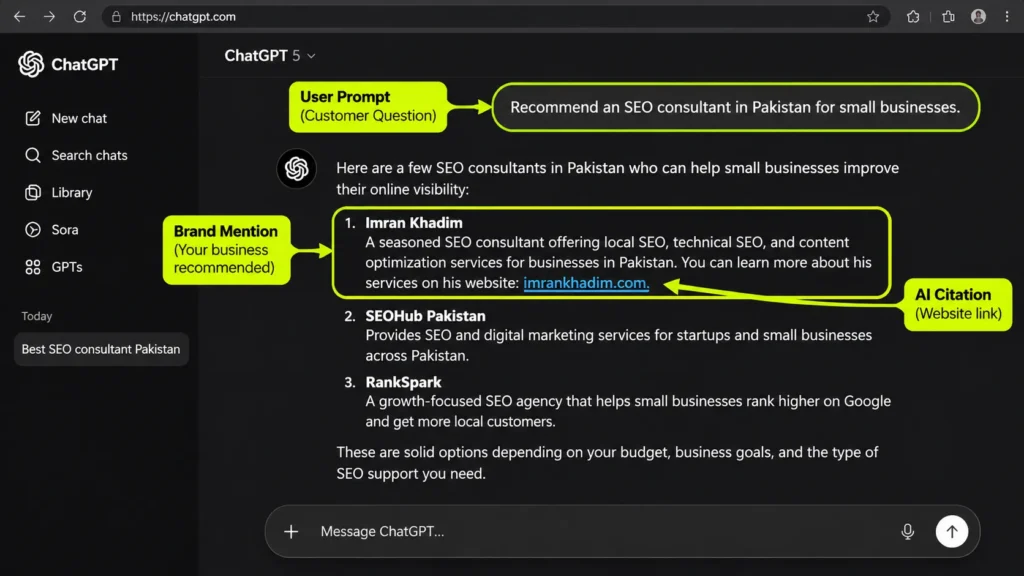
You can start tracking without buying any software. The free method uses a fixed list of customer questions, manual checks, and a Google Sheet. It is suitable for small businesses, freelancers, and agencies that want to understand their current AI visibility without adding another monthly expense.
Step 1: Choose Your Important Customer Questions
Start with 10 to 20 questions that real customers might ask before choosing a business. Do not use only your business name in every question because that will not show whether AI recommends you naturally. Include general service questions, location-based searches, service comparisons, and questions about your brand. For example, an SEO consultant could use the following prompts:
| Type | Example prompt |
|---|---|
| General service | Which SEO consultants help small businesses? |
| Location-based | Recommend an SEO consultant in Lahore |
| Service-specific | Who provides technical SEO audits for WordPress websites? |
| Comparison | Which SEO agencies work with local service businesses in the UK? |
| Brand-specific | What does Imran Khadim offer in SEO? |
| Competitor comparison | Compare SEO consultants for small businesses in the UK |
Use questions that match your services, target customers, and locations. If your business serves both the UK and Pakistan, create separate location-based prompts for each market. Keep your first list simple so you can repeat the same checks every month.
Step 2: Check the Same Questions on AI Platforms
Open ChatGPT and enter your first question. Record the answer, business names, and any website citations. Repeat the process with Perplexity, Claude, and Gemini if those platforms matter to your audience. Keep the question wording consistent across platforms so you can compare the results more fairly.
Also record the date, platform, country, and language used for each check. AI answers can vary depending on location, available search features, and conversation context, so one result should not be treated as a permanent ranking. For better comparisons, use a similar setup each time and avoid changing your prompts without recording the changes.
Step 3: Record the Results in Google Sheets
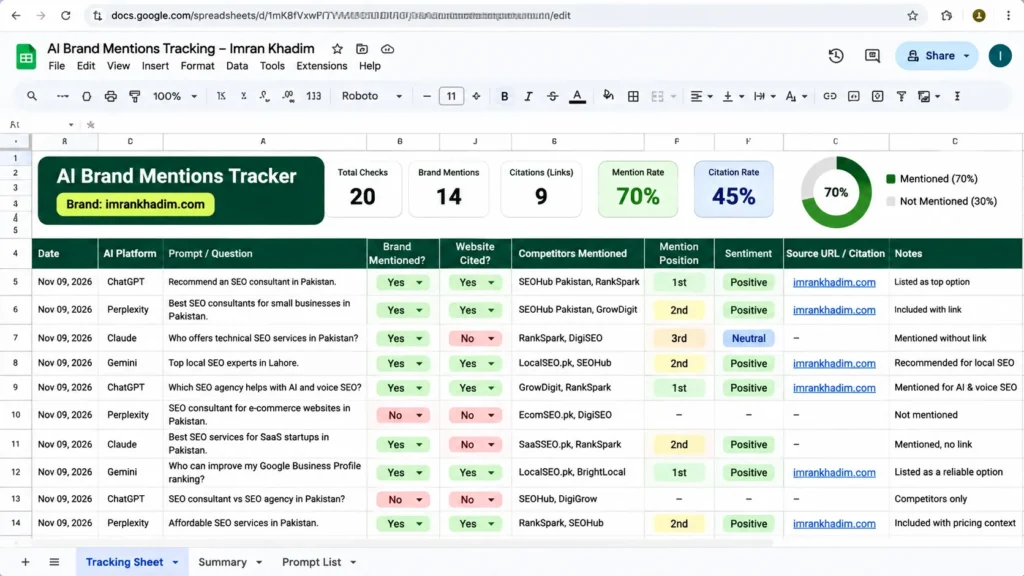
Create a Google Sheet with one row for each prompt and platform combination. Add columns for the date, AI platform, exact prompt, target location, brand mention, website citation, competitors, mention position, sentiment, source URL, and notes. This gives you one place to store your findings instead of relying on memory or scattered screenshots.
| Column | What to record |
|---|---|
| Date | Date of the check |
| AI platform | ChatGPT, Perplexity, Claude, or Gemini |
| Prompt | Exact question entered |
| Target location | UK, US, Pakistan, or city |
| Brand mentioned | Yes or No |
| Website cited | Yes or No |
| Competitors mentioned | Names of other businesses |
| Mention position | First, middle, or last |
| Sentiment | Positive, neutral, or negative |
| Source URL | Link to the cited page |
| Notes | Important observations |
Step 4: Calculate Your Basic AI Visibility
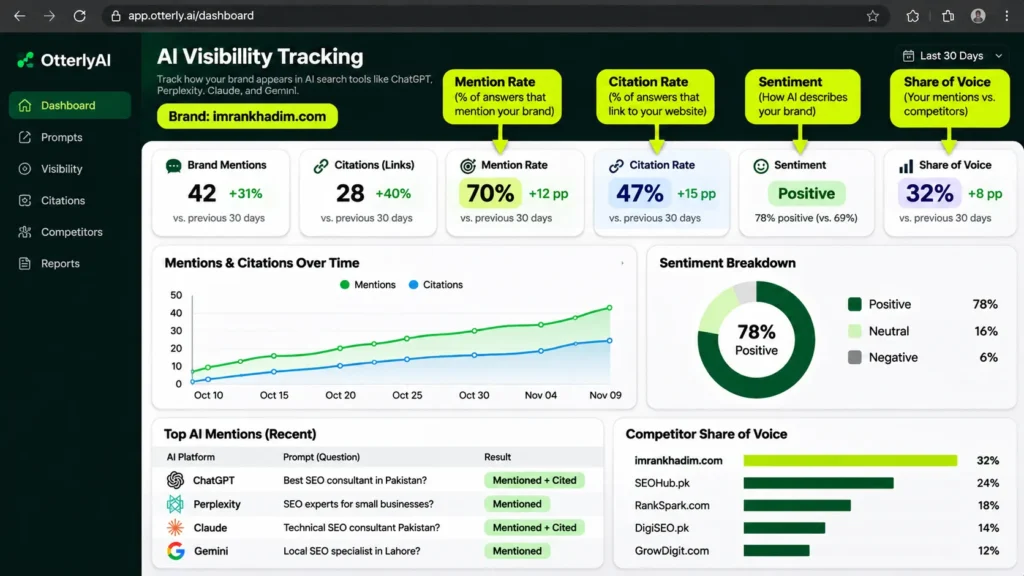
You can use a simple percentage to understand how often your brand appears in your tracked answers. Divide the number of answers mentioning your business by the total number of answers checked, then multiply the result by 100. For example, if you check 20 prompts and your business appears in 6 answers, your mention rate is 30%.
AI Mention Rate = (Answers Mentioning Your Brand ÷ Total Answers Checked) × 100
This percentage describes only your selected prompts and platforms. It does not mean your business has 30% visibility across the entire internet or every AI search. You can calculate a separate citation rate by counting answers that link to your website. Keeping these numbers separate gives you a clearer view of brand presence and website citations.
Step 5: Repeat the Check Every Month
Run the same prompts once a month and compare the results. Look for changes in brand mentions, website citations, competitor appearances, and the sources used in AI answers. Do not make decisions based on one unusual result because AI responses can change between checks. A repeated pattern across several months is more useful for understanding whether your visibility is improving or declining.
What Should You Measure in AI Visibility Tracking?
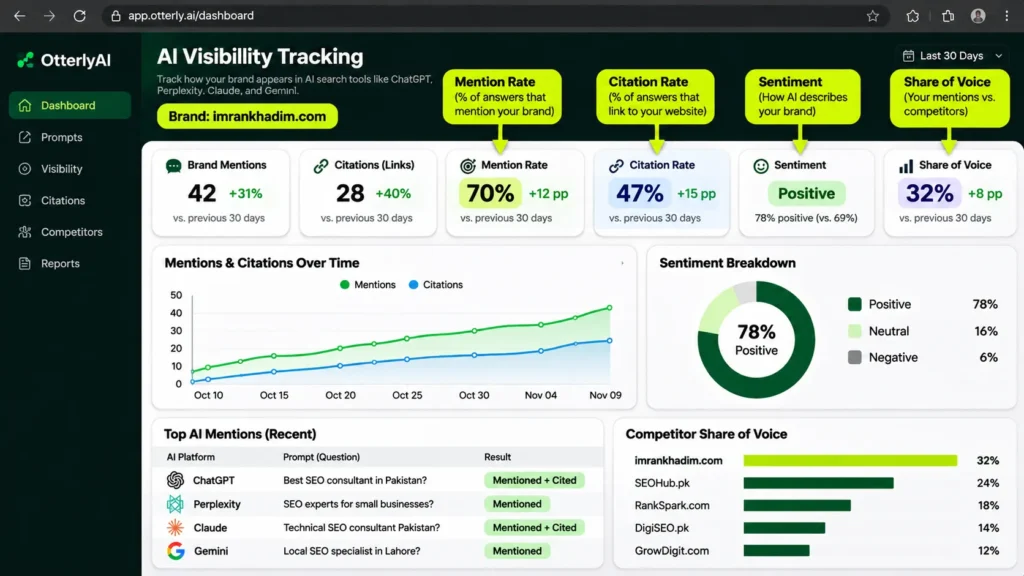
A useful tracking system should measure more than whether your business name appears. You should also record citations, competitor mentions, sentiment, and the position of your brand in the answer. These metrics help explain what is happening instead of giving you a simple yes-or-no result.
| Metric | Meaning | Why it matters |
|---|---|---|
| Brand mentions | Answers that include your business name | Shows brand presence |
| Citations | Answers linking to your website | Shows when your pages are used as sources |
| Mention rate | Percentage of answers mentioning your brand | Helps compare monthly results |
| Citation rate | Percentage of answers citing your website | Measures source visibility |
| Competitor mentions | How often competitors appear | Helps compare your presence |
| Sentiment | Positive, neutral, or negative description | Shows how AI describes your brand |
| Share of voice | Your mentions compared with competitors in the tracked set | Helps measure relative visibility |
These metrics are useful only when you understand how they were collected. Always record the number of prompts, platforms, and locations behind your report. Do not compare two percentages if the number of questions or tracking conditions are very different.
Best AI Visibility Tracking Tools
Manual tracking works well when you manage one business and check a small number of questions each month. However, agencies and growing companies may need scheduled monitoring, competitor comparisons, multiple locations, and reports for clients. Paid tools can reduce manual work, but their features, supported platforms, and pricing should be checked before you subscribe.
1. OtterlyAI
OtterlyAI is designed to monitor brand visibility across AI search platforms. Its features include prompt tracking, brand visibility reports, citation analysis, and AI search reporting. Its official pricing page lists a Lite plan at $29 per month, while higher plans support more prompts and additional reporting features. Some AI platforms may be available through add-ons, so check the current plan details on the OtterlyAI pricing page before subscribing.
Best for: Small businesses and marketers who want scheduled AI visibility checks without building a manual tracking system.
2. Peec AI
Peec AI focuses on AI search analytics for brands and marketing teams. It allows users to monitor prompts across supported AI models and review visibility, position, sentiment, and share-of-voice data. Its plans offer different prompt limits, projects, and reporting features, while higher plans may include options such as multi-country tracking and Looker Studio integration. You can compare the current features and prices on the Peec AI pricing page.
Best for: Marketing teams and agencies that need regular reporting across several brands, prompts, or markets.
3. Ahrefs Brand Radar
Ahrefs Brand Radar helps businesses explore how brands appear in AI answers. It can show brand mentions, citations, competitors, and visibility across supported AI platforms. It also offers custom prompt tracking for businesses that want to monitor specific customer questions. Its wider visibility data and custom tracking serve different purposes, so review the available features and costs on the official Ahrefs Brand Radar page.
Best for: SEO professionals and established brands that need competitor research, wider market visibility data, and custom prompt monitoring.
Paid AI Monitoring Tools Compared
| Tool | Main strength | Suitable for |
|---|---|---|
| OtterlyAI | Scheduled prompt tracking and brand reports | Small businesses and marketers |
| Peec AI | Multi-model analytics and reporting | Marketing teams and agencies |
| Ahrefs Brand Radar | Wider visibility research and custom prompts | SEO professionals and established brands |
| Google Sheets | Flexible manual tracking at no software cost | Beginners and small businesses |
No tool can show every possible AI answer. Each platform has its own data sources, prompt limits, supported models, and reporting methods. Review these details before comparing results or choosing a subscription.
When Should You Pay for an AI Brand Monitoring Tool?
You do not need paid software just because AI search is growing. First, decide how often you need to check your visibility and how much time manual tracking takes. A business with one website and 10 to 20 prompts may be able to manage everything in Google Sheets. An agency handling several clients may need automated checks and reports to save time.
| Your situation | Recommended approach |
|---|---|
| One small business with 10–20 prompts | Start with Google Sheets |
| Checking visibility once a month | Manual tracking is usually enough |
| Managing several client websites | Consider a paid tracking tool |
| Need frequent prompt monitoring | Compare OtterlyAI and Peec AI |
| Need wider competitor research | Explore Ahrefs Brand Radar |
| Need client-ready reports | Choose a tool with suitable exports or integrations |
A paid tool becomes useful when manual checks take too much time, you manage several locations, or clients expect regular reports. Before buying, confirm that the tool supports your target countries, languages, AI platforms, and custom questions. You should pay for features that solve a real reporting problem, not simply because a tool offers a long list of features.
Common AI Brand Monitoring Mistakes
Avoid checking only branded prompts because asking AI about your business by name does not show whether it recommends you naturally. Do not change your questions every month without recording the changes, and do not treat a single AI answer as proof of long-term visibility. Most importantly, keep brand mentions separate from website citations because they measure different things.
Another common mistake is ignoring location and competitors. Your business may appear in a search for Lahore but not for Islamabad, or it may be mentioned less often than competing businesses. Keep your tracking process consistent and connect your findings with your wider AI and voice SEO strategy.
Frequently Asked Questions
How can I check if ChatGPT mentions my business?
Enter relevant customer questions into ChatGPT and check whether your business appears in the answers. Record the exact prompt, date, mention, and any website citation in a spreadsheet. Repeat the same checks monthly to compare the results.
Is there a free tool to track AI brand mentions?
Yes. You can use ChatGPT and other AI platforms manually with Google Sheets. This method does not provide automatic monitoring, but it is enough to start tracking a small set of customer questions without paying for software.
What is the difference between an AI mention and an AI citation?
A mention means the AI answer includes your business name. A citation means the answer links to a website or page as a source. Your business can receive a mention without receiving a citation, so record both separately.
How often should I track AI visibility?
For most small businesses, monthly tracking is a useful starting point. Agencies and larger brands may need more frequent checks to monitor several prompts, locations, and competitors.
Which AI visibility tracking tool should I use?
It depends on your needs. OtterlyAI offers scheduled prompt monitoring, Peec AI provides multi-model analytics, and Ahrefs Brand Radar supports wider visibility research and custom prompt tracking. Compare their current features and pricing before choosing.
Final Thoughts
You do not need an expensive AI monitoring subscription to understand whether AI tools mention your business. Start with 10 to 20 customer questions, check them on relevant platforms, and record the results in Google Sheets. Measure brand mentions and website citations separately, include competitors in your checks, and repeat the process every month.
Once manual tracking becomes difficult or you need regular client reports, consider a paid tool such as OtterlyAI, Peec AI, or Ahrefs Brand Radar. The goal is not to collect more numbers; it is to understand where your business appears, how AI describes it, and whether your visibility is changing over time.