

Your website traffic has dropped, and you are wondering whether Google AI Overviews are responsible. You may still appear in search results, but fewer people are clicking through to your website. This can be worrying, especially when your business depends on Google to bring new customers.
But before changing your SEO strategy, check one important thing: are you losing website visitors, or are you actually losing customers? These are two different problems. Some informational searches now get answers directly on Google, while people looking for a local service may still need to visit a website, compare providers, check reviews, or contact a business.
This guide explains how to check an AI Overviews traffic drop, analyse your Google Search Console data by page type, protect the pages that generate leads, and decide which content needs less attention.
Why Are AI Overviews Affecting Website Traffic?
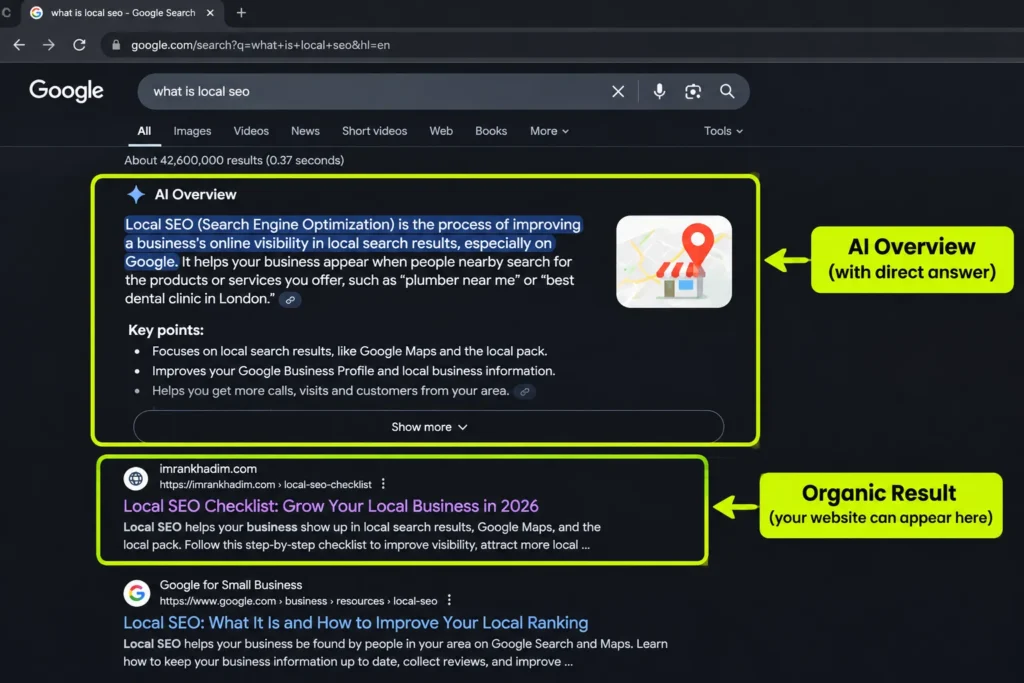
Google AI Overviews provide AI-generated summaries at the top of some search results. They help users understand a topic without opening several websites. When someone gets a complete answer directly on Google, they may not need to click through to the pages that helped provide the information.
This can affect informational content more than pages where customers need to take action. For example, someone searching “What is local SEO?” may find enough information in an AI Overview. But someone searching “emergency plumber near me” may still need a local provider’s phone number, service area, prices, and availability.
Research shows that the effect on clicks can be significant, although the size of the impact depends on the search type and website. A Seer Interactive study published in April 2026 analysed 5.47 million queries across 53 brands and found lower organic click-through rates for searches with AI Overviews than for searches without them. Its data also showed differences between cited and non-cited websites. These findings are useful context, but they do not predict the exact impact on every local business. Read the Seer Interactive research.
First, Check Whether You Have Lost Traffic or Leads
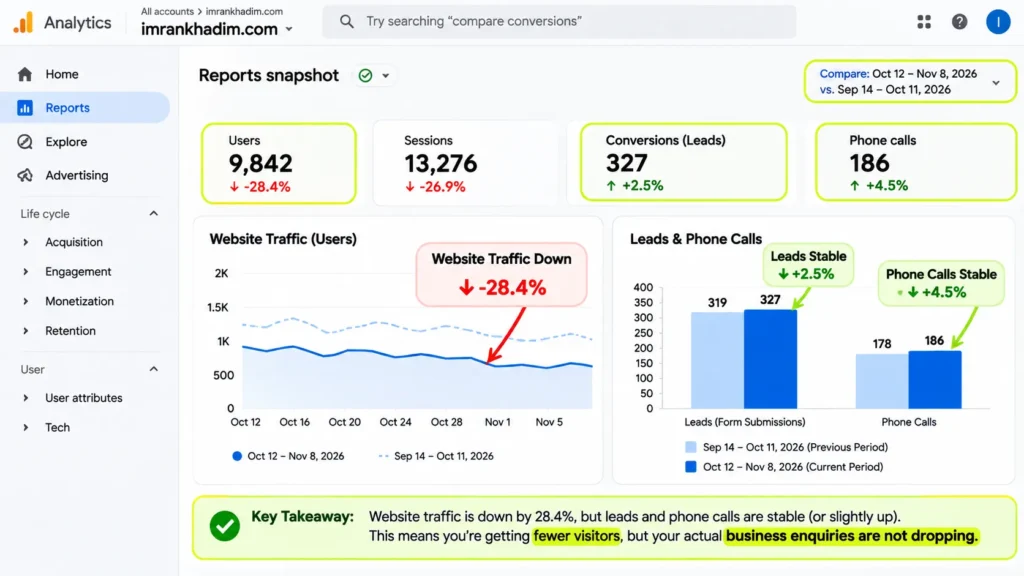
A drop in organic sessions does not always mean your business is getting fewer customers. Some websites attract visitors through informational articles, while their service pages generate enquiries and phone calls. If informational traffic falls but service enquiries remain stable, the business impact may be smaller than the traffic report suggests.
Start by comparing three areas: organic website clicks, important service-page performance, and actual business enquiries. Check phone calls, contact forms, booking requests, and qualified leads from organic search. If website traffic has fallen by 25% but enquiries have stayed the same, you have a different problem from a business whose traffic and leads have both dropped.
| What changed? | What it may mean | What to check |
|---|---|---|
| Blog clicks fell, leads stayed stable | Informational traffic loss | Blog pages and enquiry trends |
| Blog clicks and leads both fell | Possible wider business impact | Landing pages and conversions |
| Service-page clicks fell | Important commercial visibility loss | Service queries and rankings |
| Impressions stayed stable, clicks fell | Lower click-through rate | Search appearance and query intent |
| Impressions and clicks both fell | Reduced search visibility or demand | Rankings, indexing, seasonality |
Do not make major SEO decisions using total traffic alone. Separate the pages that educate people from the pages that help customers choose and contact your business.
How to Check an AI Overviews Traffic Drop in Google Search Console
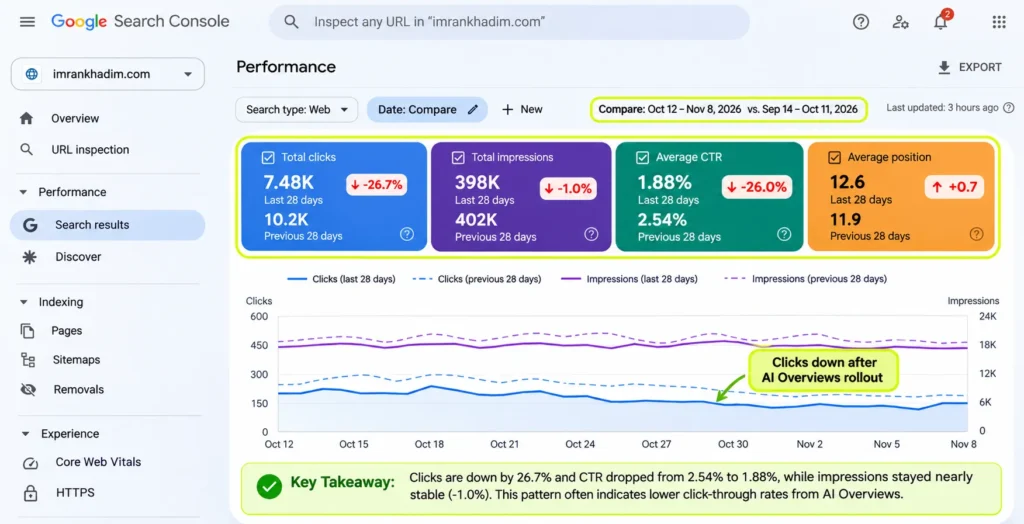
Google Search Console gives you the data needed to investigate changes in clicks, impressions, CTR, and average position. Its Performance report also lets you compare dates and group results by pages, queries, countries, and devices. You can use these filters to find which parts of your website have lost traffic instead of treating every page as one group. See Google’s official Performance report guide.
Step 1: Compare the Right Date Ranges
Open Google Search Console and select your website property. Go to Performance → Search results, then choose a date range that gives you enough data. Compare the latest 28 days with the previous 28 days, or compare the same period year over year if your business has seasonal demand.
Keep the comparison periods similar. For example, comparing December with January may show seasonal changes rather than an AI Overviews effect. Check clicks, impressions, CTR, and average position together. A fall in clicks with stable impressions may point towards a CTR problem, while falling impressions can indicate a wider visibility or demand issue.
Step 2: Analyse Pages Instead of Only Total Traffic
Select the Pages tab in the Performance report. Export the data and group your URLs into useful page types, such as service pages, location pages, blog posts, and category pages. Compare clicks and impressions for each group to find where the largest changes happened.
| Page type | Example | Main business purpose |
|---|---|---|
| Service pages | Emergency plumbing, dental implants | Generate enquiries |
| Location pages | Plumber in Manchester | Attract local customers |
| Blog posts | How much does a boiler repair cost? | Answer research questions |
| Comparison pages | Service A vs Service B | Help customers choose |
| Contact pages | Contact and booking pages | Convert visitors |
This step is important because an informational blog losing clicks does not have the same value as a service page losing enquiries. If your service pages are stable but several blog posts have lost traffic, focus your investigation on those posts first.
Step 3: Check Queries and Search Intent
Open the Queries tab and look for the searches that have lost clicks. Separate informational searches such as “what is SEO?” from commercial searches such as “local SEO consultant in London”. This helps you understand whether the traffic loss is happening on questions that Google can answer directly or searches where customers are looking for a provider.
Also check country and device filters. A page may perform differently in the UK and US, or on mobile and desktop. Google’s Search Console data can be filtered by these dimensions, so you can avoid making decisions based on one combined number. Google’s guide to understanding Search Console performance explains how to explore pages, queries, countries, and devices.
Step 4: Look at CTR and Average Position Together
Suppose a service page had 1,000 impressions and 80 clicks before the change. Its CTR was 8%. Later, it receives 1,000 impressions but only 50 clicks, reducing CTR to 5%. If average position has stayed similar, the page may be getting fewer clicks even though its visibility has not changed much.
Now consider a different result: impressions fall from 1,000 to 500, while CTR stays at 8%. This suggests the page is appearing less often, so you should investigate demand, rankings, indexing, and query coverage. CTR alone cannot prove that AI Overviews caused the loss. It is one clue that needs to be checked alongside other data.
What Local Businesses Should Protect First
Your highest priority should be the pages that help customers contact or choose your business. These pages often contain details that a short AI summary cannot fully replace, such as service coverage, pricing conditions, availability, proof of work, customer reviews, and booking options.
For example, a local roofing company should protect its roof repair, roof replacement, and location pages. A dental clinic should pay attention to treatment pages, appointment information, and location details. Make these pages useful and specific, with clear contact options and accurate information about what the business provides.
Review your local SEO checklist to check whether your business information, local pages, and important website details are properly maintained. If your website is not appearing for important searches at all, use this separate guide on why a website may not show on Google.
What Content Should You Stop Writing?
Do not stop publishing helpful content just because AI Overviews exist. Instead, stop producing articles that repeat information already available on hundreds of websites without adding anything useful for your customers. Basic definitions, short generic answers, and broad topics with no connection to your services may attract visitors who never become customers.
Before creating another blog post, ask whether it helps someone make a decision, understand your service, compare options, or solve a real customer problem. Add original examples, real project experience, clear pricing information where possible, and useful advice based on your work. If you cannot add anything different or valuable, improve an existing page instead of publishing another similar article.
| Content type | Recommended action |
|---|---|
| Generic definitions | Reduce low-value publishing |
| Repeated basic FAQs | Combine related answers where useful |
| Service comparisons | Add clear differences and buying advice |
| Local cost guides | Include realistic factors and conditions |
| Case studies | Show real work and outcomes |
| Service and location pages | Keep accurate and useful |
The aim is not to publish more pages. It is to make every important page useful to the people who may become customers.
A Simple 30-Day Recovery Plan
You do not need to rebuild your whole website after seeing a traffic drop. Start with a short review that identifies which pages have lost clicks and whether those pages generate business enquiries. Then focus on the changes that can protect or improve your commercial results.
| Time | Action | Expected result |
|---|---|---|
| Days 1–7 | Export Search Console data and group pages by type | Identify where traffic has fallen |
| Days 8–14 | Review service pages and local landing pages | Find important commercial gaps |
| Days 15–21 | Improve weak pages and remove unnecessary repetition | Make content more useful |
| Days 22–30 | Track clicks, enquiries, calls, and form submissions | Measure business impact |
Record your starting figures before making changes. Compare the same date ranges again after 30 days, but remember that SEO improvements may take longer to appear. Do not judge the whole strategy from a few days of data.
Frequently Asked Questions
Do Google AI Overviews reduce website traffic?
They can reduce clicks for some searches because users may get answers directly on Google. The impact varies by query type, industry, website, and whether a page is cited. Check your own Search Console data instead of assuming every traffic decline has the same cause.
Should local businesses stop writing blog posts?
No. Businesses should focus on content that helps customers make decisions, understand services, and solve real problems. Avoid publishing large numbers of generic articles that offer no additional value.
How can I tell if AI Overviews caused my traffic drop?
Compare clicks, impressions, CTR, and average position for affected pages and queries. Check whether the searches are informational or commercial, and review when the decline began. Search Console does not by itself prove that an AI Overview caused a specific traffic change.
Should I focus on traffic or leads?
Track both, but give more attention to qualified enquiries, calls, bookings, and sales. Traffic helps explain website visibility, while leads show whether your website is helping the business grow.
Which pages should I improve first?
Start with service pages and location pages that attract customers. Then review informational pages that have lost clicks but still support your services or customer decisions.
Final Thoughts
An AI Overviews traffic drop does not automatically mean your SEO has failed. The important question is whether your business is losing valuable customers or mainly losing visitors who wanted a quick answer. Use Google Search Console to separate service pages, location pages, and blog posts, then compare clicks, impressions, CTR, and actual enquiries.
Protect the pages that bring calls and leads, improve content that helps customers make decisions, and stop spending time on articles that add no real value. Your goal should not be to recover every lost click. It should be to attract the right people and turn more of them into customers.


One Comment