
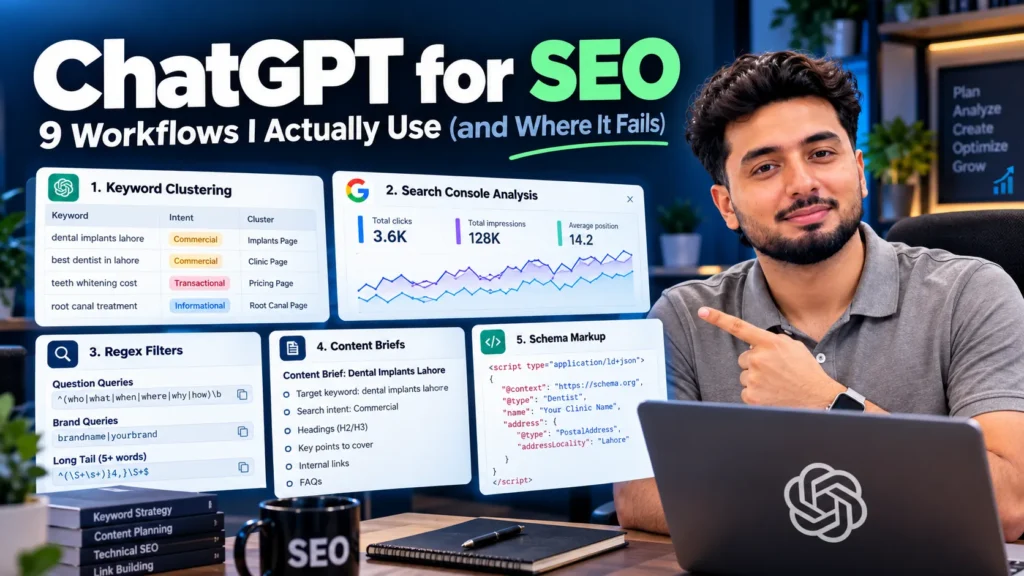
ChatGPT is useful for SEO when you give it your own data and ask it to sort, draft or explain. Good uses include clustering a keyword export by intent, finding patterns in Search Console data, writing regex filters, drafting briefs, titles and meta descriptions, generating schema and redirect rules, and editing drafts. It is weak at anything that needs live search data. It cannot give real search volumes, it does not see the SERP your customers see, and it can invent facts and sources. Google allows AI-assisted content but warns that mass producing pages without added value can break its scaled content abuse policy.
The rule behind every workflow: your data in, a draft out
Most “ChatGPT for SEO” guides list 50 prompts. The prompts are rarely the problem. The problem is asking ChatGPT for facts it does not have.
Every workflow below follows the same pattern:
- You supply the data: a keyword export, a Search Console file, your notes, the page’s own text.
- ChatGPT does the sorting or drafting: grouping, rewriting, formatting, explaining.
- You check the result: against the SERP, a validator or the source file.
When I break this rule and ask ChatGPT to “find keywords” or “tell me what ranks”, the output looks confident and is often wrong. When I follow it, ChatGPT saves hours on the dull parts of SEO work.
A prompt structure that gets usable output
Long role-play prompts add little. Five parts do the job:
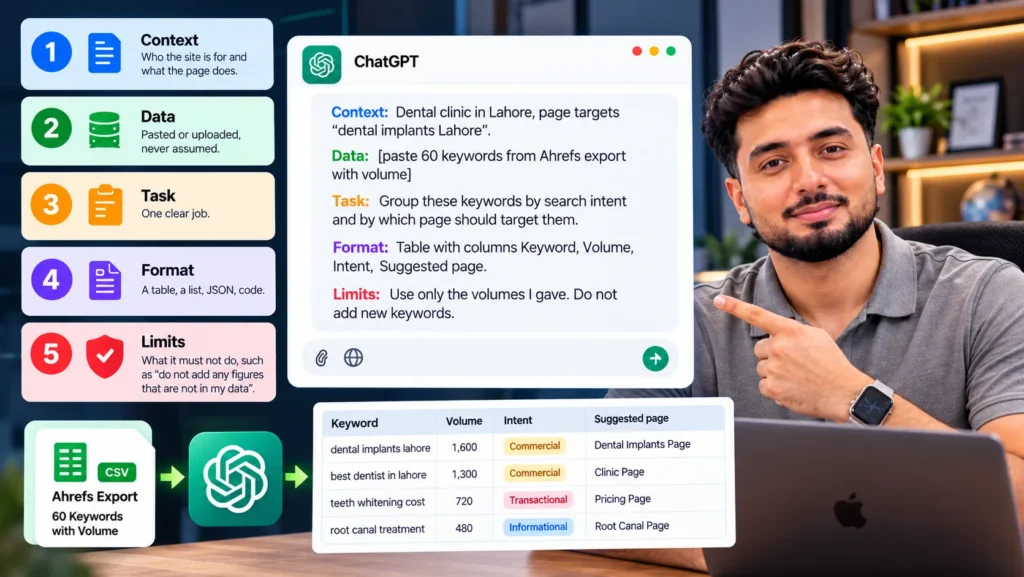
- Context: who the site is for and what the page does.
- Data: pasted or uploaded, never assumed.
- Task: one clear job.
- Format: a table, a list, JSON, code.
- Limits: what it must not do, such as “do not add any figures that are not in my data”.
The example below comes from dental SEO work, but the same structure fits any niche.
Context: Dental clinic in Lahore, page targets "dental implants Lahore".
Data: [paste 60 keywords from Ahrefs export with volume]
Task: Group these keywords by search intent and by which page should target them.
Format: Table with columns Keyword, Volume, Intent, Suggested page.
Limits: Use only the volumes I gave. Do not add new keywords.
The “limits” line matters most. It stops ChatGPT filling gaps with made up numbers.
The 9 workflows
| # | Workflow | Time saved | Main risk | How to check |
|---|---|---|---|---|
| 1 | Keyword clustering | High | Groups terms Google treats differently | Compare SERPs for borderline terms |
| 2 | Search Console analysis | High | Wrong totals on large files | Recheck key numbers in Sheets |
| 3 | Regex filters | Medium | Syntax Search Console does not support | Test the filter in Search Console |
| 4 | Content briefs | High | Generic outline | Add your own angle and experience |
| 5 | Titles and meta descriptions | Medium | Wrong length counts | Count characters yourself |
| 6 | Schema markup | Medium | Invented properties or values | Rich Results Test |
| 7 | Redirects, robots.txt, hreflang | Medium | A typo can block or break pages | Test on staging first |
| 8 | Outreach emails | Medium | Generic, spam-like tone | Personalise every email |
| 9 | Editing your own drafts | High | AI phrasing creeps in | Read the final version aloud |
1. Clustering a keyword export by intent
Export 200 to 1,000 keywords from Ahrefs, Semrush or Search Console. Paste or upload them and ask ChatGPT to group them by intent and by the page that should target each group.
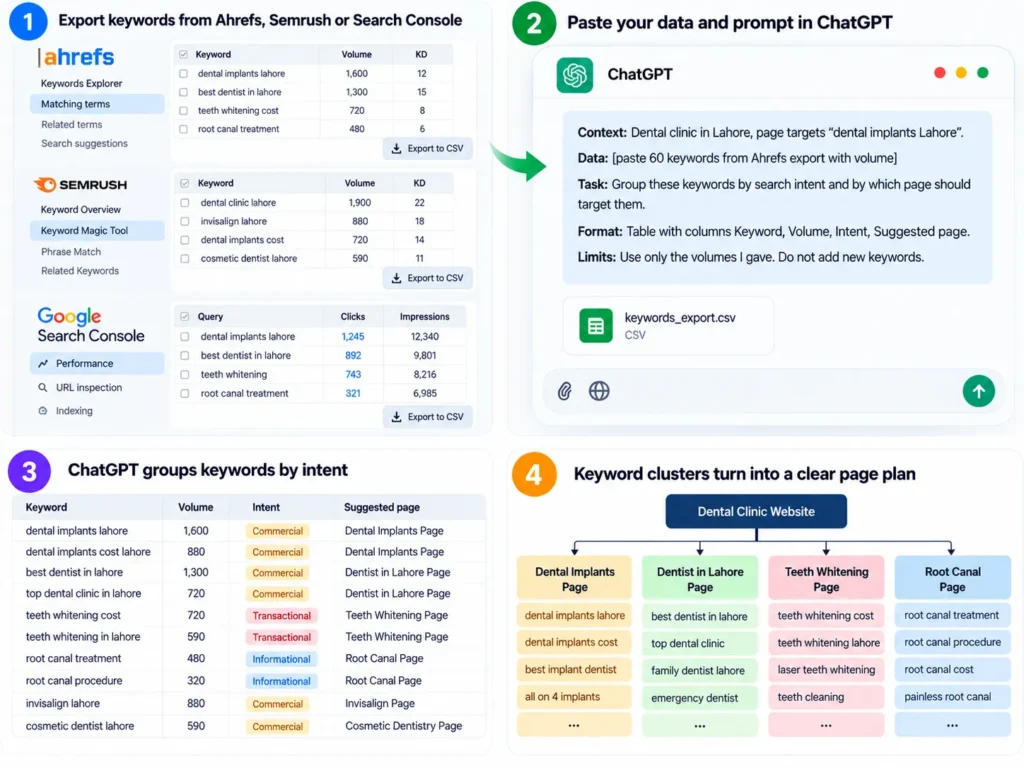
This turns a long, messy list into a page plan in minutes. It also shows which keywords belong on an existing page instead of a new one, which helps prevent two of your pages competing for the same search.
Where it fails: ChatGPT groups by meaning. Google groups by results. “SEO audit” and “SEO audit checklist” sound similar but often show different pages. For any group you are unsure about, search both terms. If the top results share fewer than three or four URLs, they probably need separate pages.
2. Finding patterns in Search Console data
Export the Performance report (queries and pages) as a CSV and upload it. Useful questions:
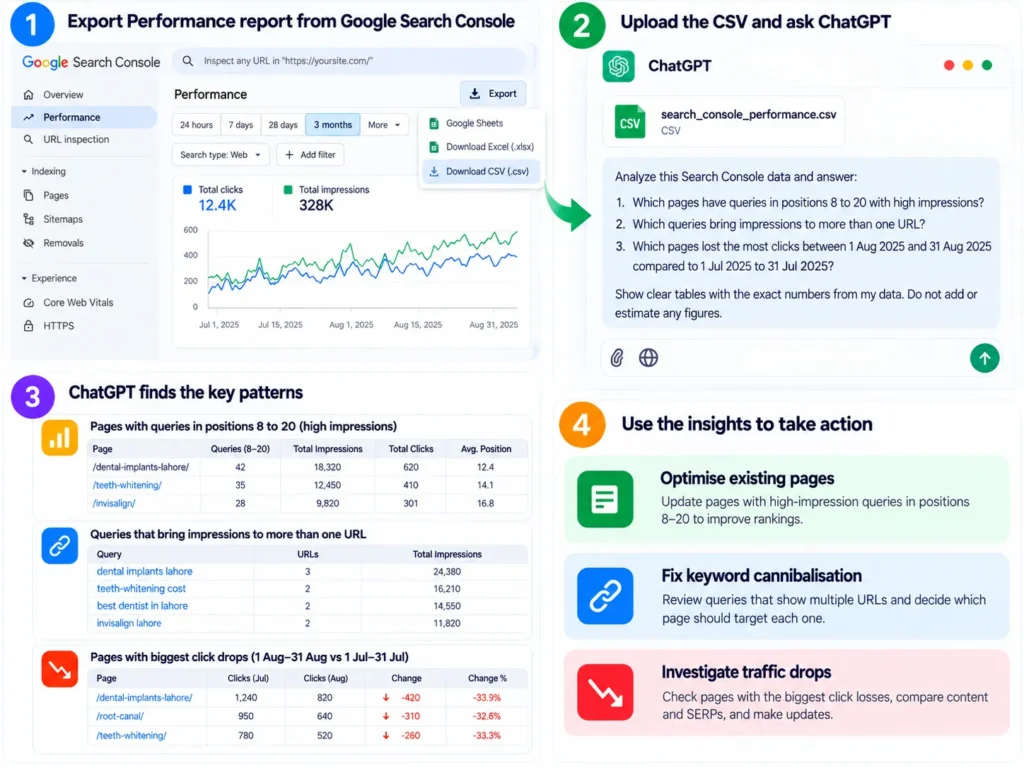
- Which pages have queries in positions 8 to 20 with high impressions?
- Which queries bring impressions to more than one URL?
- Which pages lost the most clicks between two date ranges?
ChatGPT’s data analysis feature runs code on your file, which is far better than asking it to read numbers from pasted text.
Where it fails: large files get sampled or cut, and totals can be wrong. Always ask it to show the formula it used, then recheck the two or three numbers you will act on in Google Sheets. Treat “queries on multiple URLs” as a shortlist to investigate, not proof of a problem.
3. Writing regex filters for Search Console
Search Console lets you filter queries and pages with regular expressions. ChatGPT writes these well when you describe what you want in plain words:
- Question queries:
^(who|what|when|where|why|how|is|can|does|should)\b - Brand queries:
imran|khadim|imrankhadim - Long tail queries (five or more words):
^(\S+\s+){4,}\S+$
Where it fails: Search Console uses the RE2 regex syntax, which does not support lookaheads like (?!...). ChatGPT often suggests them anyway. If you need to exclude something, use the “Doesn’t match regex” option instead. Always paste the filter into Search Console and check the results make sense.
4. Drafting content briefs
Give ChatGPT the target keyword, the H2s from the top five ranking pages (copied by you), the People Also Ask questions you saw, and your own notes on what you know that competitors do not. Ask for a brief with a suggested structure, questions to answer and data the writer must supply.
Where it fails: without your notes, the brief simply averages the competitors. That produces a page no better than what already ranks. The section “What I know that they don’t” is the part only you can fill. These on-page SEO factors are a good checklist to run the finished brief against.
5. Writing title tags and meta descriptions
Filter Search Console for pages with high impressions and low CTR. For each one, paste the current title, the main query and what the page offers. Ask for five title options under 60 characters and three meta descriptions under 155.
Where it fails: ChatGPT counts characters badly. It will say a title is 58 characters when it is 71. Count them yourself in a sheet with =LEN(). Google also measures titles in pixels and may rewrite them, so test changes on a few pages and compare CTR after four weeks before rolling out widely.
6. Generating schema markup
Paste the visible content of a page and ask for JSON-LD for the right type, such as LocalBusiness, Product, Article or FAQPage. ChatGPT handles the nesting and brackets well, which saves time.
Where it fails: it often adds properties with no value on the page, invents opening hours, or uses types Google does not support for rich results. Google’s own guidance says structured data must match the visible content. Run every block through the Rich Results Test and the Schema Markup Validator, and delete anything not on the page.
7. Drafting redirects, robots.txt rules and hreflang
For a site migration, give ChatGPT a two column list of old and new URLs and ask for redirect rules for your server (Apache .htaccess, Nginx or a WordPress plugin import format). It can also draft robots.txt rules and hreflang tag patterns, and explain an error from a Screaming Frog export in plain words.
Where it fails: one wrong character in robots.txt can block an entire site. One wrong redirect pattern can send every page to the homepage. Test on a staging site, check the robots.txt report in Search Console, and crawl a sample after launch. If you are not sure what an error means, my list of technical SEO issues explains the common ones and their fixes.
8. Drafting outreach and digital PR emails
Give ChatGPT the target site, the specific article you want to be added to or the journalist’s request, and what you can genuinely offer: data, a quote, a resource. Ask for a short email under 120 words.
Where it fails: the first draft usually sounds like every other outreach email editors delete. It may also invent a statistic to make the pitch stronger. Rewrite the opening line yourself with something specific about their page, and remove any claim you cannot back up. The approaches in my link building strategies guide work better with fewer, more personal emails.
9. Editing your own drafts
This is where I get the most value. Paste a section you wrote and ask ChatGPT to:
- Point out sentences that are unclear or too long.
- Check whether the first two sentences answer the heading directly.
- List questions a reader might still have.
- Flag claims that need a source.
Where it fails: if you ask it to “rewrite” instead of “review”, it replaces your voice with its own. Phrases like “plays a vital role” and endless lists of three creep in. Ask for comments, then make the edits yourself. A structured content optimization review works the same way: diagnosis first, writing second.
Where ChatGPT fails for SEO
Each workflow above has its own risk. Some problems apply across all of them.
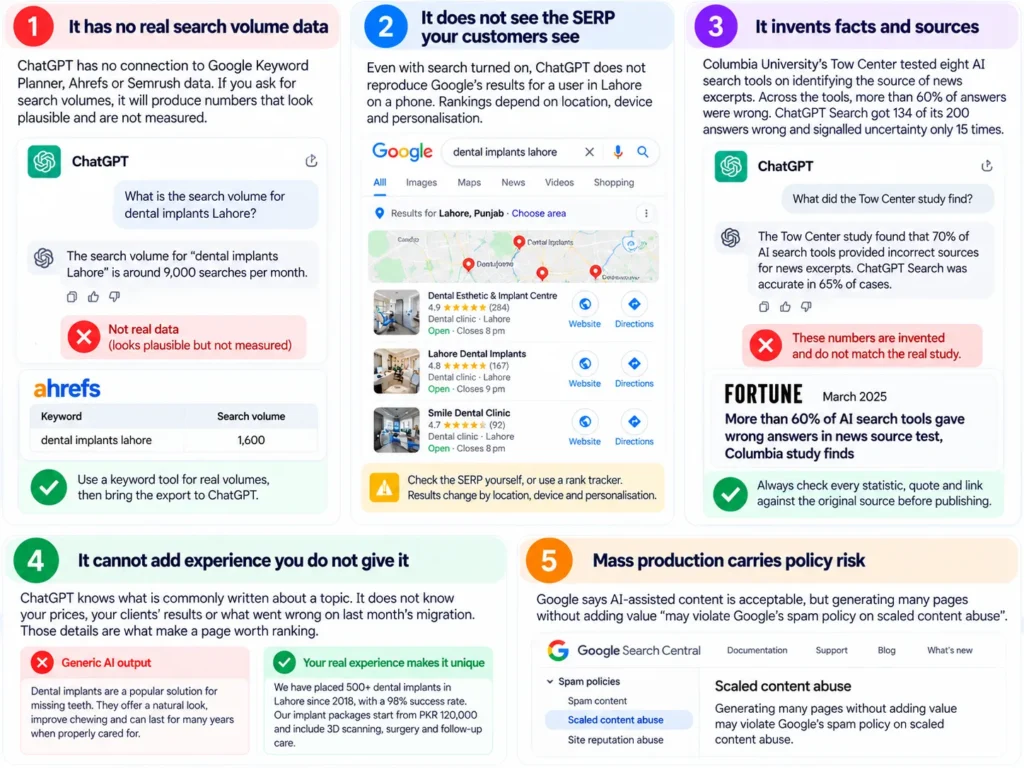
It has no real search volume data
ChatGPT has no connection to Google Keyword Planner, Ahrefs or Semrush data. If you ask for search volumes, it will produce numbers that look plausible and are not measured. Use a keyword tool for volumes, then bring the export to ChatGPT.
It does not see the SERP your customers see
Even with search turned on, ChatGPT does not reproduce Google’s results for a user in Lahore on a phone. Rankings depend on location, device and personalisation. Check the SERP yourself, or use a rank tracker.
It invents facts and sources
Columbia University’s Tow Center tested eight AI search tools on identifying the source of news excerpts, as reported by Fortune in March 2025. Across the tools, more than 60% of answers were wrong. ChatGPT Search got 134 of its 200 answers wrong and signalled uncertainty only 15 times. For SEO, that means every statistic, quote and link in AI output needs checking against the original.
Google’s own guidance on generative AI content says the same: models predict likely words, not verified facts, so all AI generated content should be fact checked before publishing, including titles, meta descriptions, structured data and alt text.
It cannot add experience you do not give it
ChatGPT knows what is commonly written about a topic. It does not know your prices, your clients’ results or what went wrong on last month’s migration. Those details are what make a page worth ranking.
Mass production carries policy risk
Google says AI-assisted content is acceptable, but generating many pages without adding value “may violate Google’s spam policy on scaled content abuse”. Fifty city pages that differ only in the city name are a risk whether a person or ChatGPT wrote them.
What I never hand over to ChatGPT
- Final facts: prices, legal rules, medical claims, statistics.
- Strategy decisions: which pages to build, merge or delete.
- Publishing: nothing goes live without a human reading it in full.
- Client data I am not allowed to share: check your client agreement before uploading their Search Console or analytics exports, and remove names where needed.
- Anything about what ranks today: that comes from Search Console, rank trackers and the live SERP.
ChatGPT versus dedicated SEO tools
ChatGPT is a reasoning and writing assistant. SEO tools are measurement systems. You need both, for different jobs.
| Job | Use ChatGPT | Use an SEO tool |
|---|---|---|
| Search volume and difficulty | No | Ahrefs, Semrush, Keyword Planner |
| Rankings and SERP features | No | Search Console, rank trackers |
| Backlink data | No | Ahrefs, Semrush, free checkers |
| Crawling a site | No | Screaming Frog, Sitebulb |
| Grouping and labelling data | Yes | Some tools, less flexibly |
| Drafting titles, briefs, schema | Yes | Some tools, with templates |
| Explaining errors in plain words | Yes | Rarely |
For link data specifically, my list of free backlink checker tools covers options that cost nothing.
Which ChatGPT plan is enough for SEO work
| Plan | Cost | Good enough for |
|---|---|---|
| Free | Free | Occasional drafting, regex, short edits |
| Go | Rs 1,400 a month in Pakistan (launch price, October 2025) | Regular drafting and more file uploads |
| Plus | $20 a month | Daily use, larger data files, higher limits on research tools |
Prices and limits change often, so check OpenAI’s current plans before you pay. For most freelancers and small businesses, the deciding factor is file uploads. If you regularly analyse Search Console or crawl exports, a paid plan saves time.
Using ChatGPT for SEO is different from ranking in ChatGPT
This guide is about ChatGPT as a tool for your SEO work. Getting your business mentioned inside ChatGPT’s answers is a separate goal, with its own steps such as allowing OpenAI’s search crawler and earning mentions on trusted sites. My AI search strategy guide covers that side.
For Google’s AI answers specifically, see how to rank in Google AI Overviews.
Frequently asked questions
Can ChatGPT do keyword research?
Partly. It can suggest topics, questions and related terms, and it is good at grouping keywords by intent. It cannot give real search volumes or difficulty scores. Get those from a keyword tool, then use ChatGPT to sort and plan.
Does Google penalise content written with ChatGPT?
Not for being AI-assisted. Google judges content on quality, not on how it was made. It does act against pages produced at scale without added value, under its scaled content abuse policy, and it says all AI output should be fact checked before publishing.
Is ChatGPT good for writing meta descriptions?
Yes, as a starting point. It produces useful variations quickly. Check the character counts yourself, because ChatGPT often miscounts, and make sure each description matches what the page actually offers.
Can ChatGPT do a technical SEO audit?
No. It cannot crawl your site or see your server logs. It can explain issues from a crawler export, prioritise them and draft fixes such as redirect rules. Use a crawler like Screaming Frog for the audit itself.
Can ChatGPT replace an SEO consultant?
It can replace some hours of routine work. It cannot see your rankings, judge which trade-off is right for your business, or take responsibility for a migration going wrong. It works best in the hands of someone who can spot when its answer is wrong.
Is it safe to upload Search Console data to ChatGPT?
Check your plan’s data settings and your client agreements first. On personal plans, you can turn off the setting that allows your chats to be used for model training. Remove client names or sensitive URLs if you are not sure.