
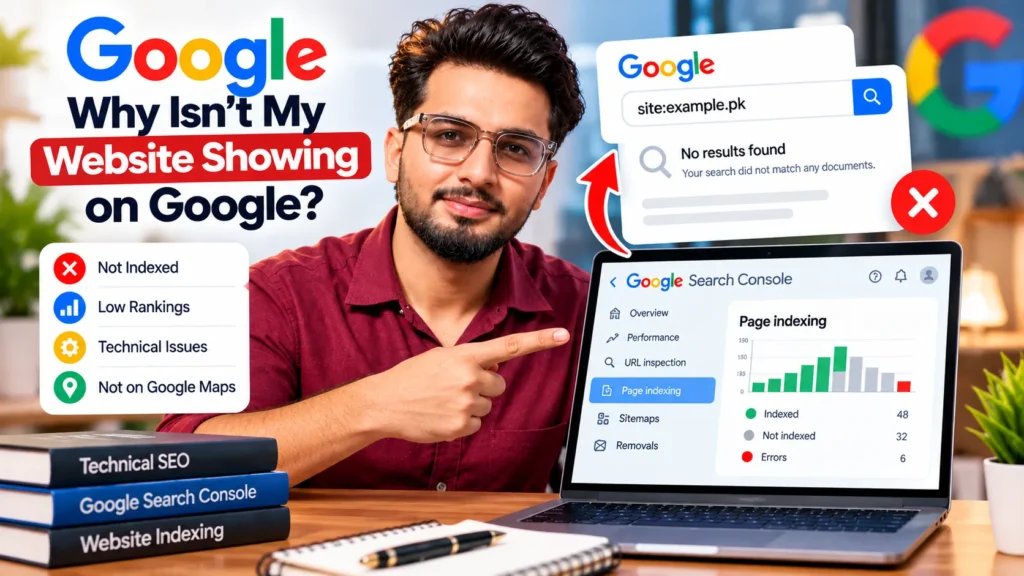
A website usually does not show on Google for one of three reasons: Google has not indexed it yet, it is indexed but ranks too low for the words you are searching, or (for local businesses) the Google Business Profile is missing or weak. To find out which, search site:yourdomain.com on Google, then check the URL Inspection tool and Page indexing report in Google Search Console. New sites can take a few weeks to appear, while blocked or broken pages will not appear until the problem is fixed.
Step one: check whether Google has your site at all
Before fixing anything, find out which problem you have. It takes two minutes.
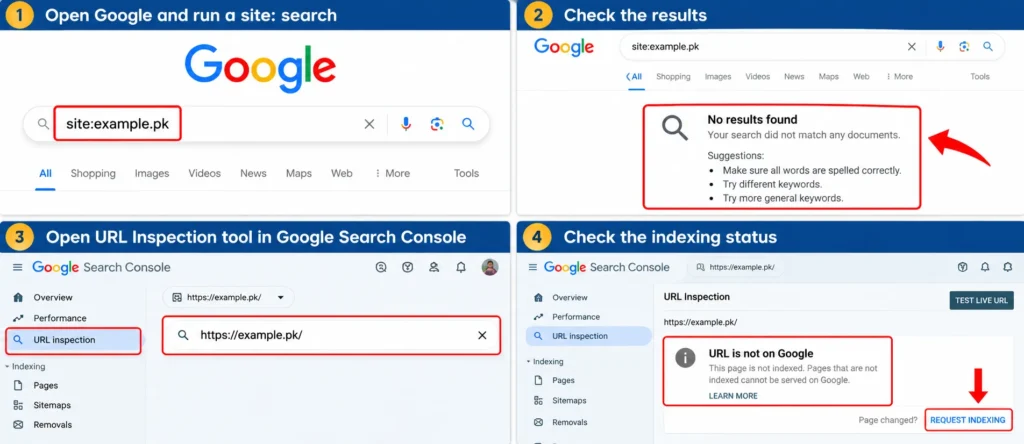
Run a site: search
Type site:yourdomain.com into Google, replacing it with your own domain, for example site:example.pk. Then read the result:
| What you see | What it usually means |
|---|---|
| No results at all | Google has not indexed any page of your site |
| Only the homepage or a few pages | Google knows the site but has not indexed most pages |
| Many pages listed | The site is indexed; the problem is ranking, not indexing |
| Old pages, old titles or a previous business | Google has not recrawled since recent changes, or the domain has a history |
The site: search is a quick check, not a full count. Google itself says it does not necessarily return every indexed URL, so use it to spot big problems only.
Use the URL Inspection tool
For an exact answer on one page, open Google Search Console, paste the page address into the search bar at the top and press Enter. The tool tells you whether the URL is on Google and, if not, why. If you have never set up Search Console, verifying your site there is the single most useful thing you can do before anything else.
Three different problems behind “not on Google”
“My website is not on Google” can mean three very different things. Each has its own causes and its own fix.
| Problem | How you can tell | Where to look |
|---|---|---|
| Not indexed | site: shows nothing or very little; URL Inspection says “URL is not on Google” | Settings, robots.txt, noindex tags, sitemap, server errors |
| Indexed but not ranking | site: shows your pages, but you cannot find them for your main keywords | Content, competition, links, search intent |
| Not on Google Maps | Your website appears, but your business is missing from the map results | Google Business Profile, categories, reviews, distance |
Work through the section that matches your situation. Fixing ranking problems on a site that is not indexed wastes time, and the reverse is also true.
Why Google has not indexed your website
If Google has no record of your pages, one of the following is almost always the cause. Most of them are technical SEO problems that can be fixed in a day once they are found.
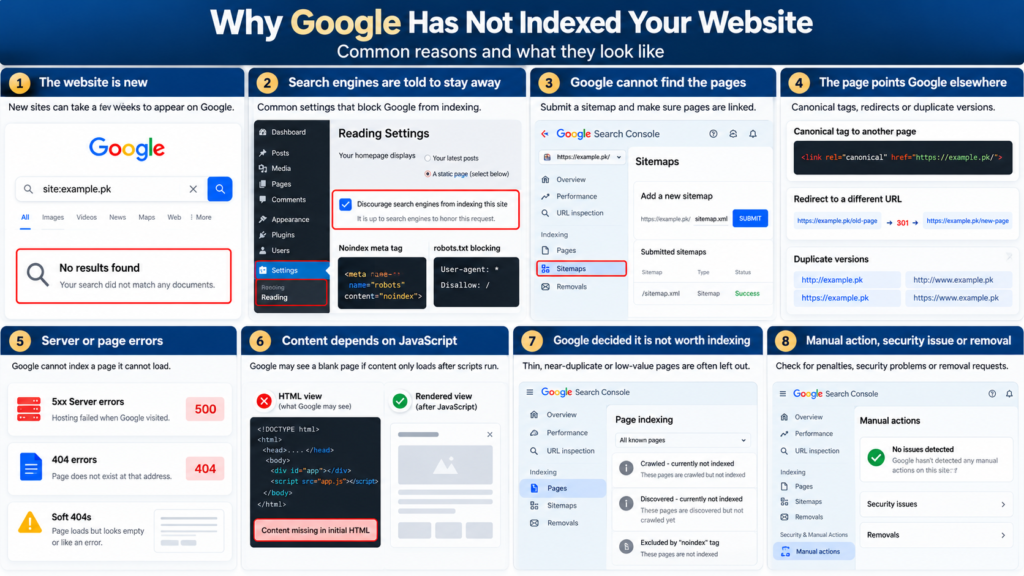
The website is new
Google says it can take a few weeks to notice a new site or changes to an existing one. A site launched last week with no links pointing to it may simply not have been discovered yet.
You can speed this up by verifying the site in Search Console, submitting an XML sitemap, and getting a link from somewhere Google already crawls, such as your social profiles, a business directory or a partner’s website.
Search engines are being told to stay away
This is the most common cause on new sites in Pakistan, usually left behind by the developer after the build.
- WordPress setting. Under Settings, Reading, the box “Discourage search engines from indexing this site” is often ticked during development and never unticked. It adds a noindex instruction to every page.
- Noindex tag. A
<meta name="robots" content="noindex">tag, or anX-Robots-Tag: noindexheader, tells Google not to show the page. SEO plugins such as Rank Math and Yoast can set this per page or per post type. - robots.txt blocking. A line such as
Disallow: /in yoursite.com/robots.txt stops Google from crawling the whole site. - Password or staging protection. Pages behind a login, a “coming soon” plugin or a staging password cannot be crawled.
WordPress sites are especially prone to these settings problems, and they are the first things checked in any WordPress SEO review.
Google cannot find the pages
Google discovers pages by following links and reading sitemaps. A page that nothing links to is an orphan page and may never be found.
- Submit your XML sitemap in Search Console under Sitemaps.
- Make sure important pages are linked from the menu or from other pages.
- Avoid links that only work through JavaScript clicks or forms, which Google may not follow.
The page points Google somewhere else
Sometimes Google finds the page but is told another URL is the main version.
- Canonical tags pointing to a different page, often the homepage, make Google index that page instead.
- Redirects send Google to a different URL. Redirect chains and loops can stop indexing altogether.
- Duplicate versions of the same site (http and https, www and non-www) split signals if they are not redirected to one version.
Server or page errors
Google cannot index a page it cannot load.
- 5xx server errors mean the hosting failed when Google visited. Cheap or overloaded shared hosting often causes this.
- 404 errors mean the page does not exist at that address.
- Soft 404s are pages that load but look empty or like an error, such as a category with no products.
Content that depends on JavaScript
Sites built entirely in JavaScript frameworks can show a blank page to Google if the content only appears after scripts run. Google can render JavaScript, but it takes longer and can fail. Check the rendered HTML and screenshot in the URL Inspection tool to see what Google actually sees.
Google decided the page is not worth indexing
Google does not index every page it finds. Thin pages, near-copies of other pages, auto-generated text and empty tag or archive pages are often left out. These show up as “Crawled – currently not indexed” in Search Console.
A manual action, security issue or removal request
Less common, but serious:
- Manual actions: check Security & Manual Actions, Manual actions in Search Console. A manual action can remove pages or the whole site from results.
- Security issues: a hacked site with malware or spam pages can be flagged or dropped.
- Removals tool: someone with Search Console access may have asked Google to hide a URL temporarily.
If you find a manual action, it needs a proper clean-up and reconsideration request. A structured Google penalty recovery process covers that.
What the Page Indexing report statuses mean
The Page indexing report in Search Console lists every URL Google knows about and why some are not indexed. These are the statuses you will see most often.
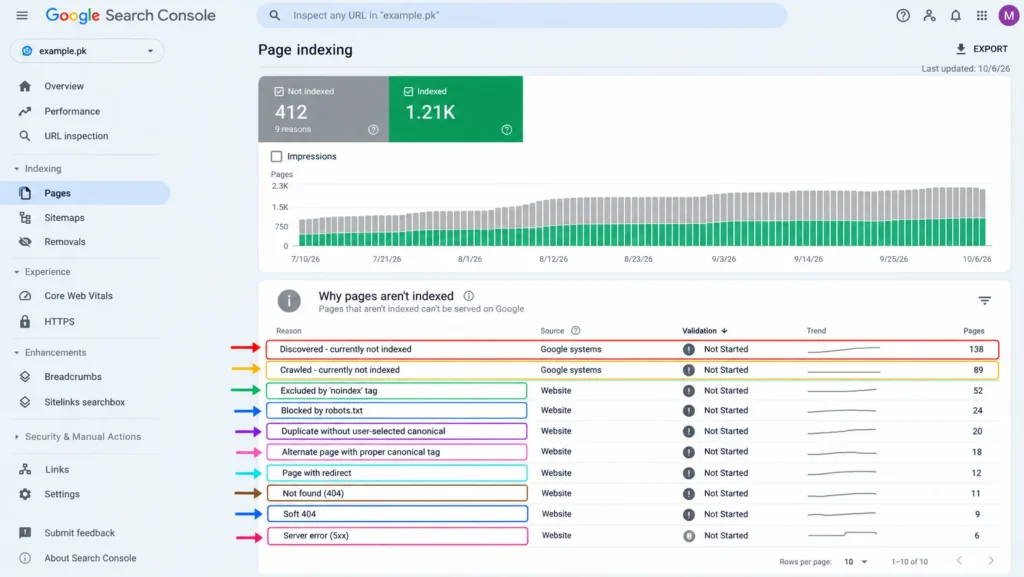
| Status in Search Console | What it means | What to do |
|---|---|---|
| Discovered – currently not indexed | Google knows the URL but has not crawled it yet | Improve internal links to the page; check that the server is not slow |
| Crawled – currently not indexed | Google visited the page but chose not to index it | Improve or merge thin or duplicate pages |
| Excluded by ‘noindex’ tag | The page asks not to be indexed | Remove the noindex tag if the page should appear |
| Blocked by robots.txt | Google is not allowed to crawl the page | Edit robots.txt if the block is a mistake |
| Duplicate without user-selected canonical | Google sees the page as a copy of another | Add a canonical tag or make the page unique |
| Alternate page with proper canonical tag | The page correctly points to another version | Usually no action needed |
| Page with redirect | The URL redirects elsewhere | Usually no action needed; update internal links to the final URL |
| Not found (404) | The page does not exist | Restore it or redirect to the closest live page |
| Soft 404 | The page looks empty or like an error | Add real content or return a proper 404 |
| Server error (5xx) | The server failed when Google visited | Check hosting, caching and server logs |
Not every non-indexed URL is a problem. Redirects, filtered URLs and alternate versions are meant to stay out of the index. Focus on pages you actually want people to find.
Why your site is indexed but you still cannot find it
If site: shows your pages, Google has them. The issue is where they rank. These are the usual reasons.
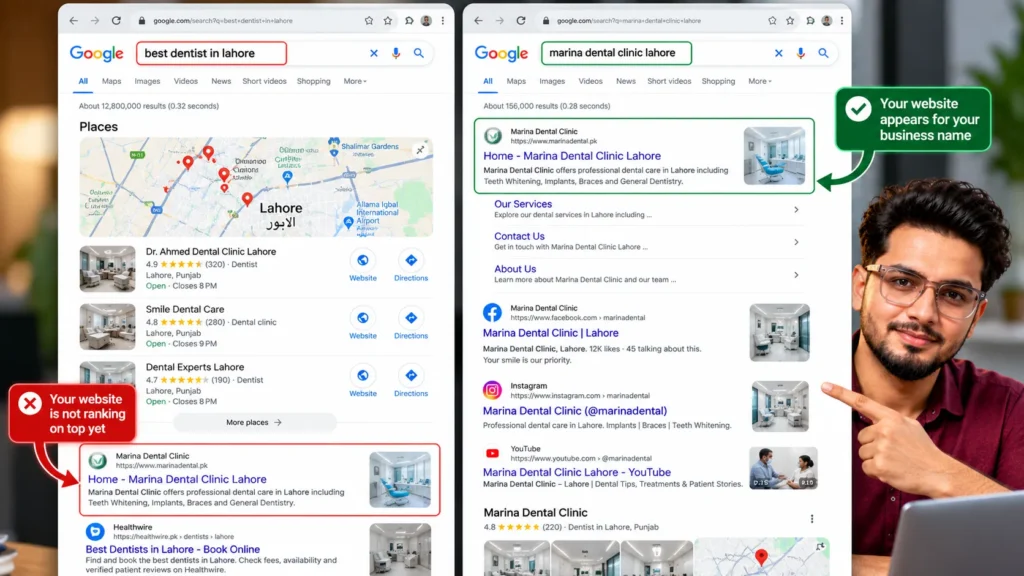
You are searching for a word you do not rank for yet
Searching “best dentist in Lahore” and not seeing your clinic does not mean your site is missing. It means other pages rank higher for that phrase. Search your exact business name first. If you appear for your name but not for services, the site is indexed and needs ranking work.
The competition is stronger
Established sites with more content, more links and longer histories usually outrank new ones. A new site rarely reaches page one for broad, competitive terms in its first few months.
Your pages do not match what people are searching for
Google ranks the type of page that best answers a search. If people searching your keyword want a list of options and you have a single sales page, it will struggle. Pages built around one clear topic, with the right title, headings and internal links, are what on-page SEO fixes.
Thin or outdated content
Pages with a few lines of text, no prices, no details and no answers to common questions give Google little reason to rank them. Rewriting and expanding weak pages through content optimisation often moves rankings faster than adding new ones.
Few links from other websites
Links from relevant, trusted sites are still one of the main signals Google uses to judge authority. A site with no links at all usually ranks only for its brand name. Earning relevant mentions from suppliers, local press and industry sites is the core of off-page SEO.
Results change with location, device and history
Google results are not the same for everyone. Someone in Karachi and someone in Lahore can see different results for the same search, especially for local services. Check rankings in an incognito window, and use Search Console’s Performance report for your real average positions.
Your brand name is a common word
If your business is called “Prime Solutions” or “Smart Tech”, thousands of other pages share those words. Search the full name with your city or product, for example “Prime Solutions Lahore”, to check whether you appear.
Rankings dropped after a Google update
If you used to appear and suddenly stopped, compare the drop date with Google’s published core and spam update dates. A drop that matches an update usually points to content quality or link problems rather than indexing.
Why your business is not showing on Google Maps
Google Maps and the local pack (the map with three businesses at the top of local searches) work separately from normal website results. A site can rank well and still be missing from the map.
- No Google Business Profile, or a profile that is not verified yet.
- Wrong primary category, such as “Medical clinic” when patients search for “Dentist”.
- Distance. Google weighs how close a business is to the person searching. A business in DHA will rarely appear for someone searching in Johar Town.
- Few or no reviews compared with nearby competitors.
- Inconsistent name, address and phone number across the web.
- A suspended profile, often after adding keywords to the business name or using a virtual office address.
Getting into the map results is a separate discipline. My local SEO work covers profiles, reviews and citations for businesses that depend on calls and walk-ins.
How to get your website on Google: a fix order
Work through these in order. Each step depends on the one before it.
- Verify the site in Google Search Console and use the version visitors actually see, including https and www or non-www.
- Check URL Inspection on your homepage. If it says “URL is not on Google”, read the reason it gives.
- Remove any blocks. Untick the WordPress discourage setting, remove unwanted noindex tags and fix robots.txt.
- Submit your XML sitemap in the Sitemaps section.
- Fix errors in the Page indexing report, starting with server errors and pages you care about most.
- Request indexing for your most important pages in URL Inspection. There is a daily limit, so use it for key pages only.
- Strengthen thin pages before asking Google to index them again.
- Get a few genuine links from your social profiles, directories, suppliers and partners.
- Create or claim your Google Business Profile if you serve customers in a specific area.
- Track progress in the Performance report rather than by searching yourself every day.
If you would rather have someone check all of this for you, my free SEO audit covers indexing, technical errors and what is holding rankings back.
How long it takes to appear after fixing
Fixing the problem does not make pages appear instantly. Google needs to recrawl them first.
| Situation | Typical wait after fixing |
|---|---|
| Brand new site, sitemap submitted, a few links | A few days to a few weeks |
| Noindex or robots.txt block removed | Days to a few weeks, depending on crawl frequency |
| Single page sent through Request indexing | Often days, but not guaranteed |
| Thin pages rewritten | Weeks, once Google recrawls and reassesses them |
| Ranking for competitive keywords | Several months of content and link work |
| Manual action removed after reconsideration | Days to weeks after Google accepts the request |
Google does not guarantee indexing or a timeline. Requesting indexing many times for the same URL does not speed it up.
Things that will not get you on Google
Some common advice wastes time or money.
- Paying Google for organic listings. Google does not accept payment to include or rank pages in normal results. Paid placement is only possible through Google Ads, which shows clearly labelled ads; my guide to Google Ads cost in Pakistan explains how that works.
- Submitting to hundreds of search engines. Paid “submission” services add nothing. Search Console is free and enough.
- Resubmitting the sitemap every day. Once submitted, Google rechecks it on its own.
- Buying backlinks in bulk. Cheap link packages can lead to a manual action, making the problem worse.
- Stuffing keywords into pages. Repeating a keyword does not help pages get indexed or ranked.
When to get professional help
Many indexing problems are simple settings that any site owner can fix. Get help when:
- Search Console shows errors you do not understand, or no errors at all while pages still do not appear.
- The site was recently moved to a new domain, new platform or new design and traffic disappeared.
- You see a manual action or security issue.
- Pages are indexed but have not ranked after several months of real effort.
Frequently asked questions
How do I check if my website is on Google?
Search site:yourdomain.com on Google. If no results appear, your site is not indexed. For an exact answer on a single page, use the URL Inspection tool in Google Search Console, which shows whether that URL is on Google and why if not.
How long does it take for a new website to show on Google?
Google says it can take a few weeks to notice a new site. Submitting a sitemap in Search Console and getting a link from an already-indexed site, such as your social profile or a directory listing, usually speeds this up.
Why is my website showing on Google but not when I search my keywords?
Your site is indexed but ranks low for those keywords. Stronger competitors, thin content, pages that do not match search intent and a lack of links from other sites are the usual causes.
Why is my website not showing on Google after a redesign?
Common causes are a noindex tag or robots.txt block left from the staging site, missing 301 redirects from old URLs, changed URLs without updated internal links and removed content. Check the Page indexing report and URL Inspection for the main pages straight away.
Does Google charge to list my website?
No. Appearing in Google’s normal search results is free. Only Google Ads, which appear as labelled sponsored results, cost money.
Why does my website show on my phone but not on someone else’s?
Google personalises results by location, language, device and search history. Your own visits can also make your site appear more often for you. Use an incognito window and the Search Console Performance report to see how you really rank.
What does “Discovered – currently not indexed” mean?
It means Google knows the URL exists but has not crawled it yet. Better internal links, a faster server and stronger page content usually help Google move it into the index.