
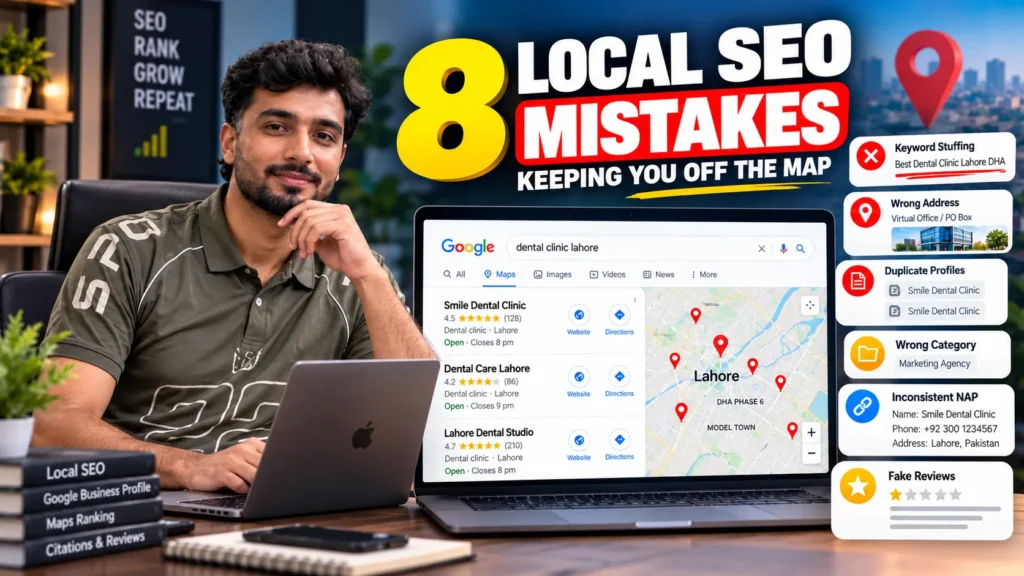
The local SEO mistakes that most often keep businesses out of Google Maps are: adding keywords or a city to the business name, using an address Google does not accept or a misplaced map pin, having duplicate profiles, choosing the wrong categories, showing different names, addresses or phone numbers across the web, collecting reviews in ways Google prohibits, running a website that does not support the profile, and expecting one location to rank across a whole city. Google ranks local results on relevance, distance and prominence, and each mistake damages one of those three.
How Google decides who appears on the map
Google’s own help pages say local results are based mainly on three things:
- Relevance: how well your Business Profile matches the search
- Distance: how far your business is from the person searching
- Prominence: how well known your business is, including reviews, ratings and links from other websites
Google also states that there is no way to request or pay for a better local ranking. That is useful to know when someone offers to “guarantee” a map pack position.
Each mistake below either weakens one of these signals or breaks Google’s Business Profile guidelines. Some only hold you back; others can get the profile suspended. They are the problems I see most often when auditing businesses for local SEO in Lahore, Karachi and Islamabad.
The 8 mistakes and how serious each one is
| # | Mistake | Signal it hurts | Risk level |
|---|---|---|---|
| 1 | Keywords or city in the business name | Guideline violation | High: suspension |
| 2 | Wrong address type or misplaced map pin | Distance, trust | High |
| 3 | Duplicate profiles for one location | Relevance, trust | High |
| 4 | Wrong primary category or too many categories | Relevance | Medium to high |
| 5 | Mismatched name, address and phone across the web | Prominence, trust | Medium |
| 6 | Reviews collected in ways Google prohibits | Prominence | High: review removal or suspension |
| 7 | A website that does not back up the profile | Relevance, prominence | Medium |
| 8 | Expecting one location to rank across the whole city | Distance | Low risk, high frustration |
1. Stuffing keywords or a city into the business name
Names like “Best Dental Clinic Lahore DHA” or “Rent A Car Islamabad Cheap Rates” are common in Pakistan. They break Google’s Business Profile guidelines, which say that including unnecessary information in a business name is not permitted and could result in suspension.
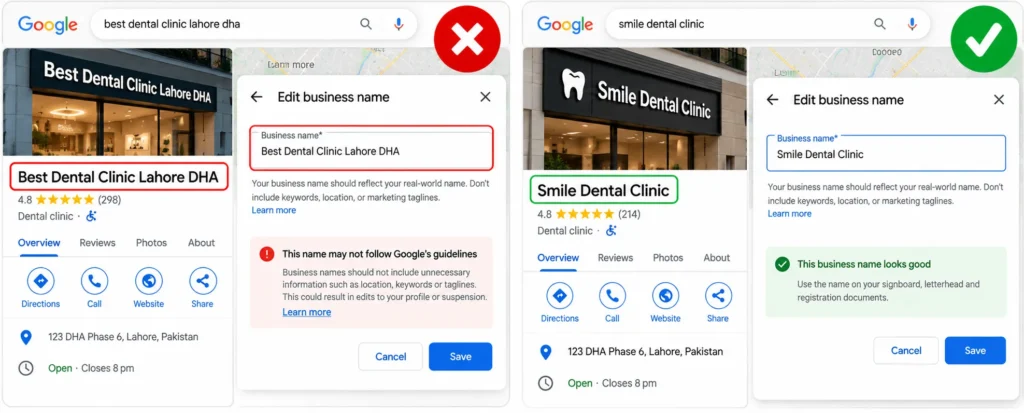
Google’s own example makes the line clear: “Equinox SOHO” can be acceptable when that is the real branded name, while “Equinox near SOHO” is not. Marketing taglines are also excluded.
Why it backfires:
- Competitors and users can suggest an edit to your name, and Google may accept it.
- A keyword-stuffed name is one of the most common triggers for suspension.
- Short-term ranking gains disappear the moment the name is corrected.
What to do: use the name on your signboard, letterhead and registration documents. Put services and areas in your categories, description, services list and website instead.
2. Using the wrong address or a misplaced pin
Your address and map pin decide where Google thinks you are, which controls the distance part of local ranking.
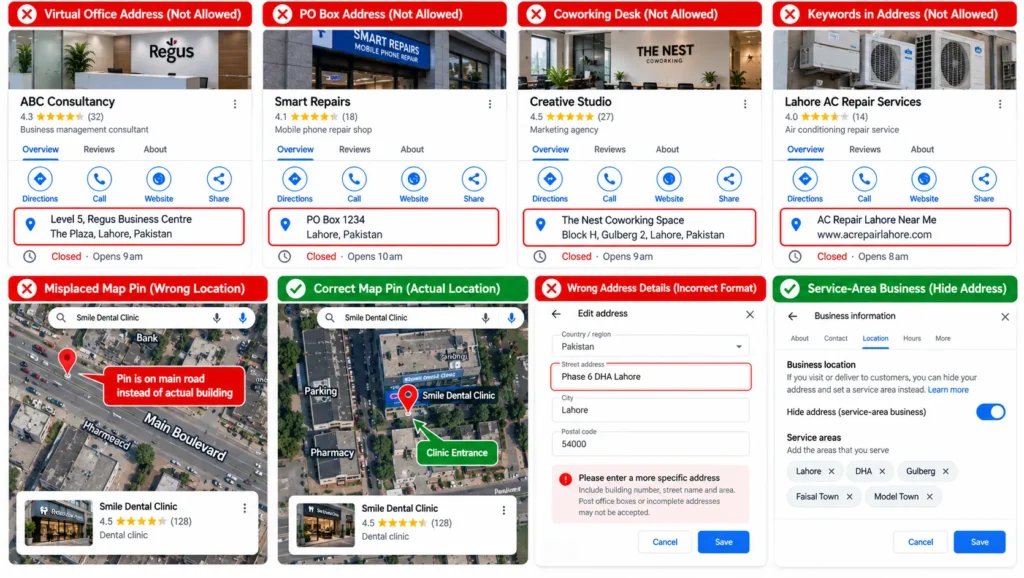
Addresses Google does not accept
- Virtual offices and rented mailing addresses where the business does not operate
- PO boxes and remote mailboxes
- Coworking desks without permanent signage and staff during business hours
- Keywords or URLs typed into the address lines
Problems specific to Pakistani addresses
Plot numbers, block names and phases are not always mapped accurately. A clinic in “Phase 6, DHA” can end up with a pin in the wrong phase, or a shop in a plaza can show on the main road instead of the building.
How to check: search your business on Google Maps and switch to satellite view. Make sure the pin sits on your actual entrance.
Service-area businesses that visit customers, such as plumbers, AC repair, home tutors and mobile car washes, should hide their address in the profile and set service areas instead. Google’s guidelines say service-area businesses should hide their address from customers.
3. Having more than one profile for the same location
Duplicate profiles are more common than most owners realise. They appear when:
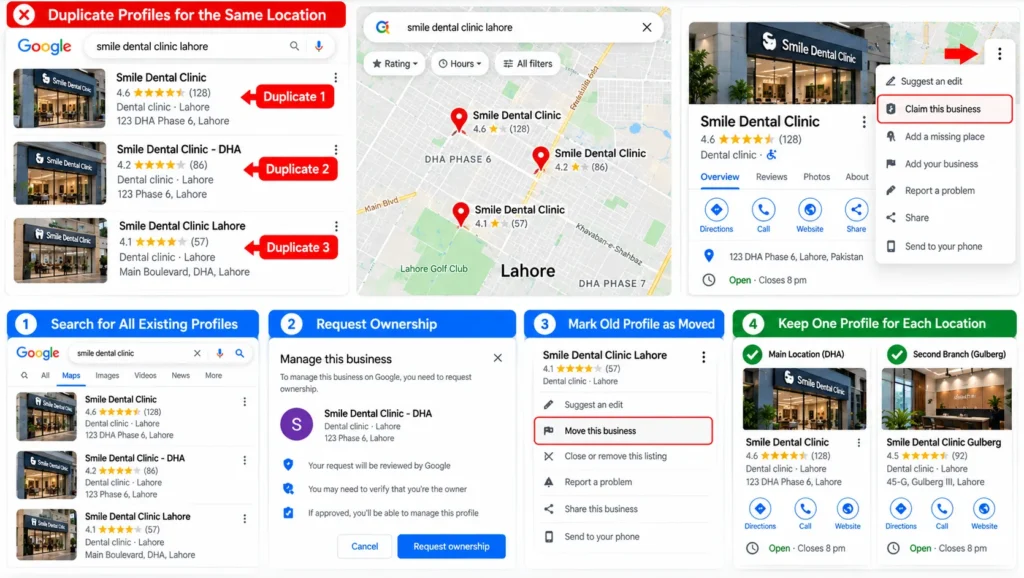
- A previous owner or manager created a profile you cannot access
- An employee or marketing agency created a new one instead of claiming the existing listing
- Google auto-generated a listing from directory data
- A business moved and created a new profile without closing the old one
Google’s guidelines state there should be only one profile per business location and that creating more than one page for a location is not allowed. Duplicates split reviews and calls between listings, and can confuse Google about which details are correct.
How to fix it:
- Search your business name, phone number and old addresses on Google Maps.
- Request ownership of any listing you do not control.
- Mark a moved business’s old listing as relocated, or ask Google support to merge or remove duplicates.
Separate profiles are allowed for genuinely separate locations, and in some cases for individual practitioners or departments that meet Google’s rules. Multi-branch clinics are a common example, which is one reason dental SEO work starts with untangling profiles before anything else.
4. Choosing the wrong categories
The primary category is one of the strongest relevance signals on your profile. Getting it wrong can hide you from the searches that matter.
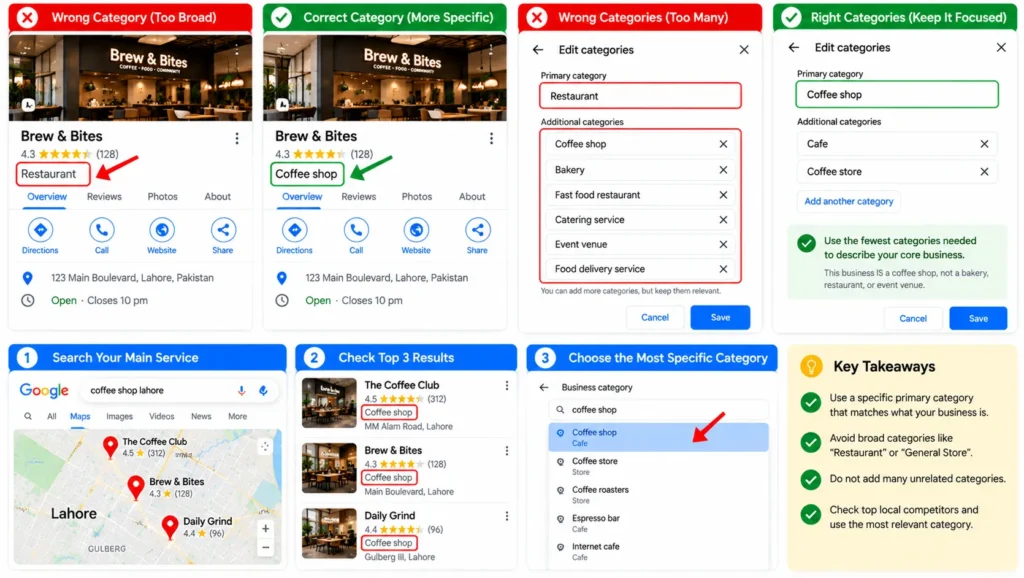
Common category mistakes:
- Choosing a broad category such as “Medical clinic” when patients search for “Dentist”
- Picking a category for something the business offers rather than what it is
- Adding many loosely related secondary categories
Google advises choosing the fewest categories needed to describe your core business, and frames them as completing the sentence “This business IS a”, not “This business HAS a”. A restaurant that has a play area is still a restaurant, not a playground.
How to choose: search your main service in your area, open the top three map results and note their primary categories. Then pick the most specific category that is true for your business.
5. Showing different details across the web
Your business name, address and phone number (NAP) should match everywhere: your website, Google Business Profile, Facebook page, Instagram bio and business directories.
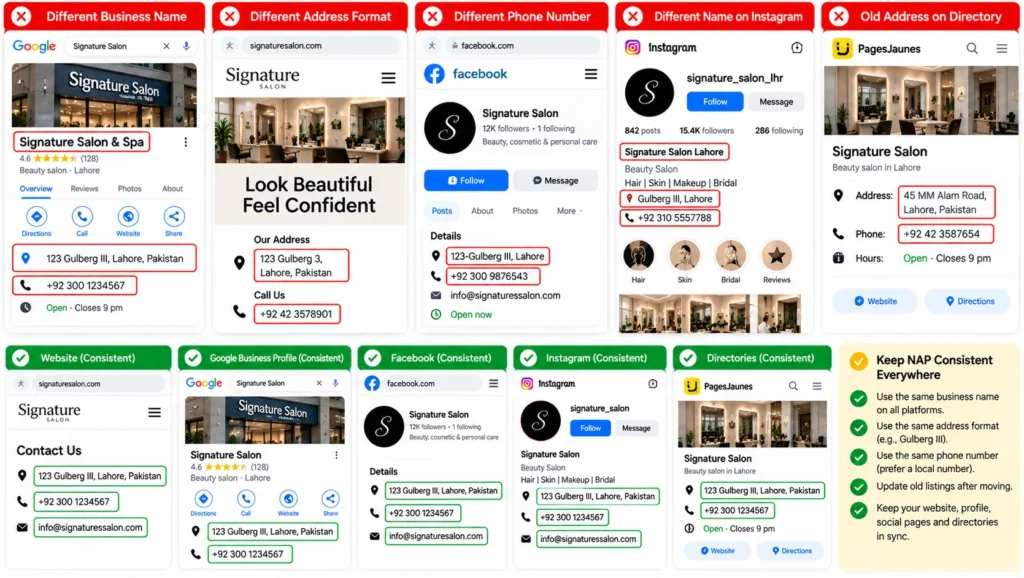
How mismatches happen in Pakistan:
- Different spellings of the same area, such as “Gulberg III” and “Gulberg 3”, or Urdu and English versions of the address
- A landline on the website but a mobile number on the profile
- An old address left on directories after moving
- A WhatsApp number used in some places and a call centre number in others
Google’s guidelines also ask for a phone number that connects directly to your business location and is under your control, with a local number preferred over a central helpline.
How to fix it: choose one exact format for your name, address and phone, then update your website footer and contact page first, followed by your profile, social pages and the directories that list you. Getting listed consistently on relevant Pakistani directories is one of the safest link building strategies for local businesses.
6. Collecting reviews the wrong way
Reviews are a major part of prominence, and Google’s review rules have become stricter. In April 2026 Google updated its Maps user-generated content policy, adding clauses against directing staff to collect a set number of reviews or reviews with specific content, such as naming a staff member.
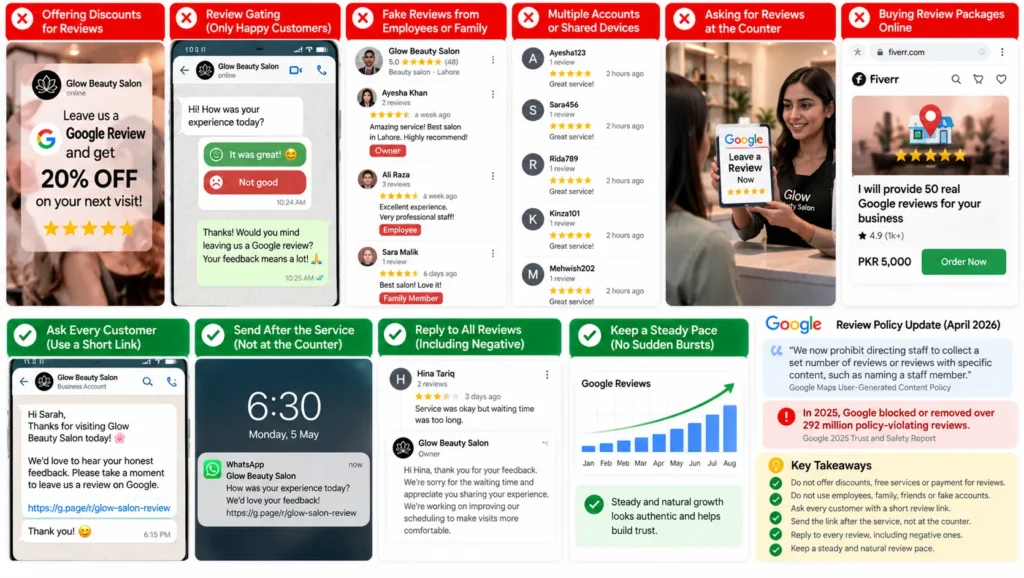
Review practices Google prohibits:
- Offering discounts, free services or payment for reviews
- Review gating: asking only customers you expect to be happy
- Reviews from employees, owners, family members or vendors
- Posting reviews from multiple accounts or shared devices
- Pressuring customers to leave a review while still on the premises
- Buying review packages from online sellers
Google’s 2025 Trust and Safety report says it blocked or removed over 292 million policy-violating reviews in 2025. Penalties can include losing the ability to receive new reviews, existing reviews being unpublished, a public warning on your profile and, for repeated violations, suspension.
A safe review system:
- Ask every customer, not just happy ones, with your short review link
- Send it on WhatsApp after the service, not at the counter
- Reply to every review, including negative ones, calmly and without promotional offers in the reply
- Keep a steady pace instead of sudden bursts
Many cheap SEO offers sell “GMB optimisation” that turns out to be bought reviews. If a provider lists it as a single line, ask what it includes; this is one of the vague items covered in my guide to SEO packages.
7. Running a website that does not support the profile
Your website is one of the main ways Google confirms what your business does and where. A weak site holds back a strong profile.
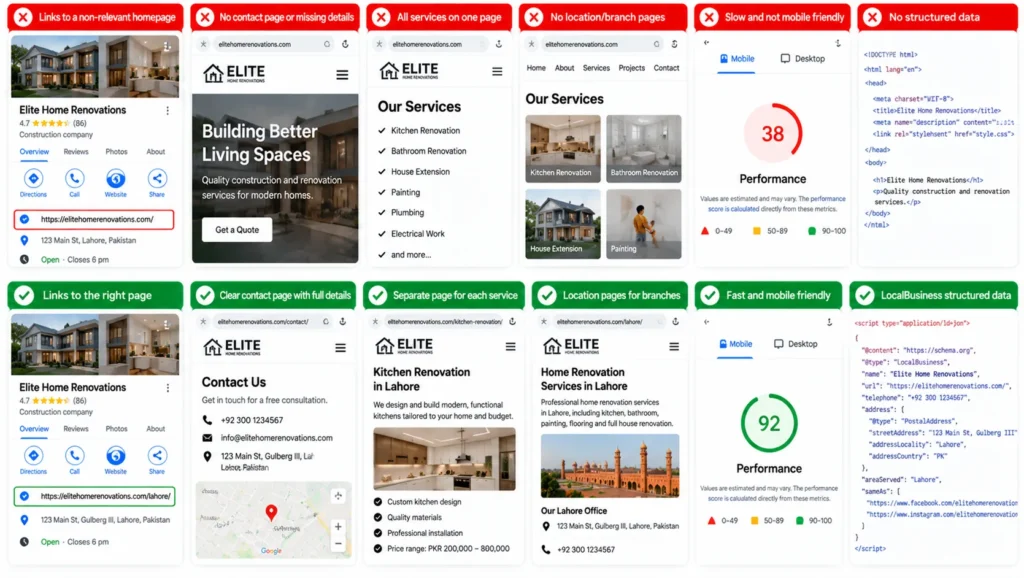
Common website mistakes for local businesses:
- The profile links to a homepage that does not mention the service or area
- No contact page with full name, address, phone and an embedded map
- One page listing every service, instead of a page per main service
- No location pages for branches
- Slow pages that are hard to use on a phone
- No LocalBusiness structured data
What to fix first:
- Link the profile to the most relevant page, usually the homepage for one location or a branch page for multi-location businesses
- Create a page for each main service, with real details, prices or price ranges and photos
- Add clear call and WhatsApp buttons near the top on mobile
Most local searches happen on phones, and a slow or awkward page wastes the clicks the profile earns. Testing pages on mid-range phones over mobile data is part of mobile SEO.
Service pages also need clear titles, headings and internal links between related services; the page-level basics are covered in my list of on-page SEO factors.
8. Expecting one location to rank across the whole city
This is the mistake behind most “my SEO is not working” complaints. Distance is part of how Google ranks local results, so a single location in DHA Lahore will rarely appear in the map pack for someone searching in Johar Town or Shahdara, however well the profile is optimised.
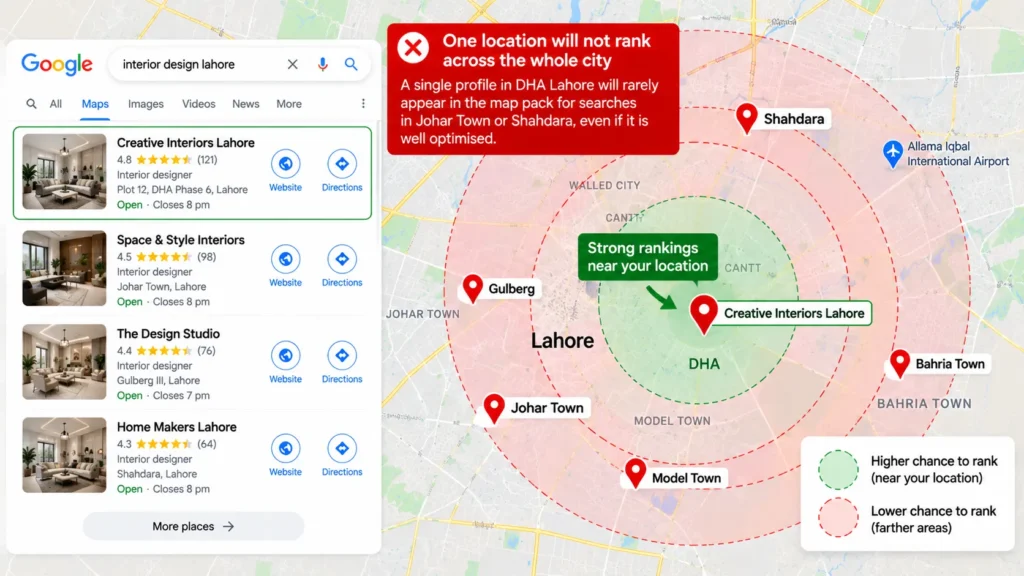
What this means in practice:
- Strong businesses usually dominate a radius around their location, which shrinks in dense, competitive areas
- Rankings checked from your own office look better than they do for customers across the city
- Adding fake addresses in other areas breaks Google’s guidelines and risks suspension
What works instead:
- Measure rankings with a geo-grid tool such as Local Falcon, which checks positions from many points around your location
- Build website pages and content that target nearby areas you genuinely serve
- Open a real branch, with staff and signage, if you need map visibility in another part of the city
- Use paid search for areas your map listing cannot reach; the trade-offs are covered in SEO vs PPC
A five-minute check for all eight mistakes
| Check | How to do it | Problem if |
|---|---|---|
| Business name | Compare profile name with your signboard | Extra keywords, city or tagline |
| Map pin | Open your profile in Google Maps satellite view | Pin not on your entrance |
| Duplicates | Search your phone number on Google Maps | More than one listing appears |
| Category | Compare with top three competitors | Broader or less accurate than theirs |
| NAP | Compare website footer, profile and Facebook page | Any difference in spelling or number |
| Reviews | Look at review dates and reviewer profiles | Bursts of reviews or staff reviewers |
| Website link | Click the website button on your profile | Generic page with no address or service details |
| Reach | Search your main service from different areas | You only appear close to your location |
What to do if your profile is already suspended
If your profile has disappeared or shows a suspension notice:
- Do not create a new profile. That usually makes the problem worse.
- Fix the cause first: remove keywords from the name, correct the address and remove any prohibited content.
- Gather evidence: photos of your signboard and premises, a utility bill or business registration, and a short video showing the location and entrance.
- Submit an appeal through Google’s Business Profile appeal process and include your evidence.
Appeals can take days or weeks. Fixing the cause before appealing gives the best chance of reinstatement.
How long until fixes show on the map
| Fix | Typical time to see a change |
|---|---|
| Name, category or address correction | Days to a few weeks after Google reviews the edit |
| Duplicate removal or merge | Weeks, depending on Google support |
| NAP clean-up across directories | Several weeks to a few months |
| Steady review growth | Builds over months |
| New service and location pages | Weeks to months, once Google indexes them |
If the business still does not appear at all after these fixes, the problem may be indexing or verification rather than ranking; the wider causes are covered in why a website is not showing on Google.
Frequently asked questions
Why is my business not showing on Google Maps?
The most common reasons are an unverified or suspended profile, a business name or address that breaks Google’s guidelines, duplicate listings, the wrong primary category, or searching from too far away. Check each of these before assuming the profile needs more posts or photos.
Can I add keywords to my Google Business Profile name?
No. Google’s guidelines say adding unnecessary information to the business name is not permitted and could lead to suspension. Use your real-world name and put services in categories, the description and your website.
Does Google allow virtual office addresses?
No. Virtual offices, PO boxes and rented mailing addresses are not eligible. Coworking spaces are allowed only with permanent signage and staff present during business hours.
Is it allowed to offer a discount for Google reviews?
No. Offering payment, discounts or free services for reviews breaks Google’s policies. Asking only happy customers, known as review gating, is also prohibited. Ask every customer with a simple review link instead.
How many categories should I choose on Google Business Profile?
Choose the fewest categories that describe your core business. Pick the most specific primary category, and add secondary categories only if they describe what your business is, not just a service it offers.
Why do I rank in my area but not across the city?
Distance is part of how Google ranks local results, so each location tends to rank around its own area. To appear in other parts of the city, build relevant website content for areas you serve, open a real branch or use paid search.
Do I need a website if I have a Google Business Profile?
A profile can rank without a website, but a good website strengthens relevance and prominence, gives Google more information about your services and converts more visitors into calls and messages.