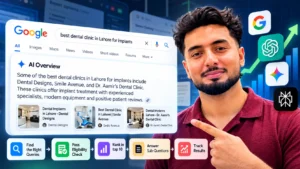

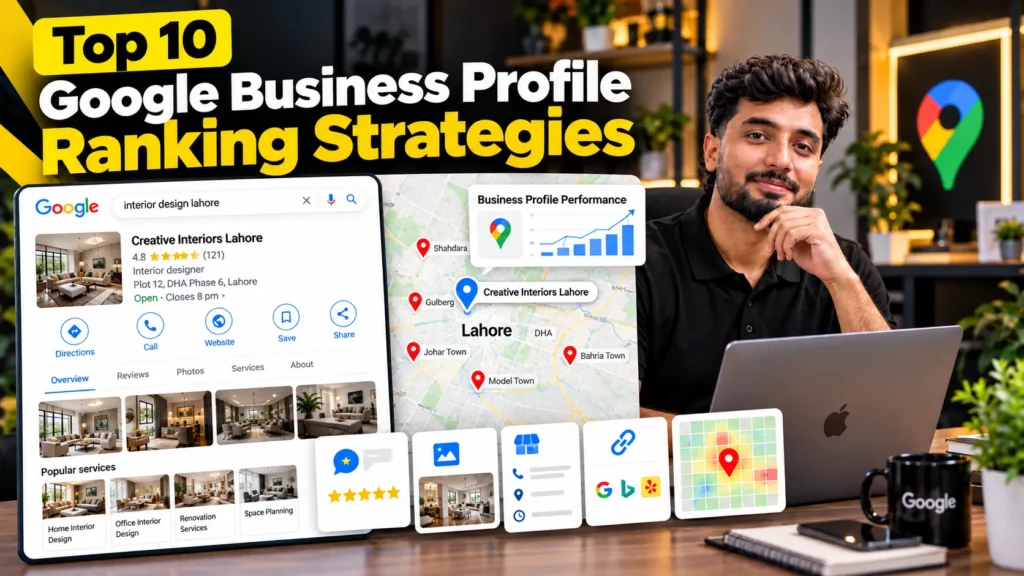
To rank a Google Business Profile higher, build relevance, strengthen prominence and work within the limits of distance. In practice that means choosing the most specific primary category, filling in services and products in the words customers use, linking to a location page that confirms every detail, earning a steady flow of genuine reviews that mention your services, adding real photos and updates, keeping hours and attributes accurate, moving answers from the retired Q&A section into your description and website, building local citations and links, and tracking results with a geo-grid tool rather than a single search.
What actually moves a Business Profile up the map
Google describes three main factors behind local results: relevance (how well a profile matches the search), distance (how close the business is to the searcher) and prominence (how well known it is, including reviews and links from other sites). It also states clearly that you cannot pay for a better local ranking.
Every strategy below works on relevance or prominence. Distance you cannot change without opening a real location, but you can make sure you win the area close to you.
These are the steps I follow when building local SEO for clinics, rent-a-car businesses and service companies.
If your profile is missing from the map completely, fix the problems in my list of local SEO mistakes first; ranking strategies only work on a profile that follows Google’s guidelines.
The 10 strategies at a glance
| # | Strategy | Pillar | How often |
|---|---|---|---|
| 1 | Pick the primary category from competitor evidence | Relevance | Once, then review quarterly |
| 2 | Fill services and products in customers’ words | Relevance | Once, update when offers change |
| 3 | Link to a location page that confirms the profile | Relevance, prominence | Once, refresh twice a year |
| 4 | Earn reviews that mention specific services | Prominence | Every week |
| 5 | Add real photos and short videos | Prominence, conversions | Every month |
| 6 | Use updates for offers, events and seasons | Relevance, engagement | Weekly or fortnightly |
| 7 | Keep hours, special hours and attributes exact | Trust | Before every holiday |
| 8 | Answer common questions outside the old Q&A box | Relevance | Once, then as questions come up |
| 9 | Build citations and local links | Prominence | Monthly |
| 10 | Measure with geo-grids and tagged links | Decision-making | Monthly |
1. Choose your primary category from competitor evidence
The primary category is the single strongest relevance setting on a profile. Instead of guessing, look at who already ranks.
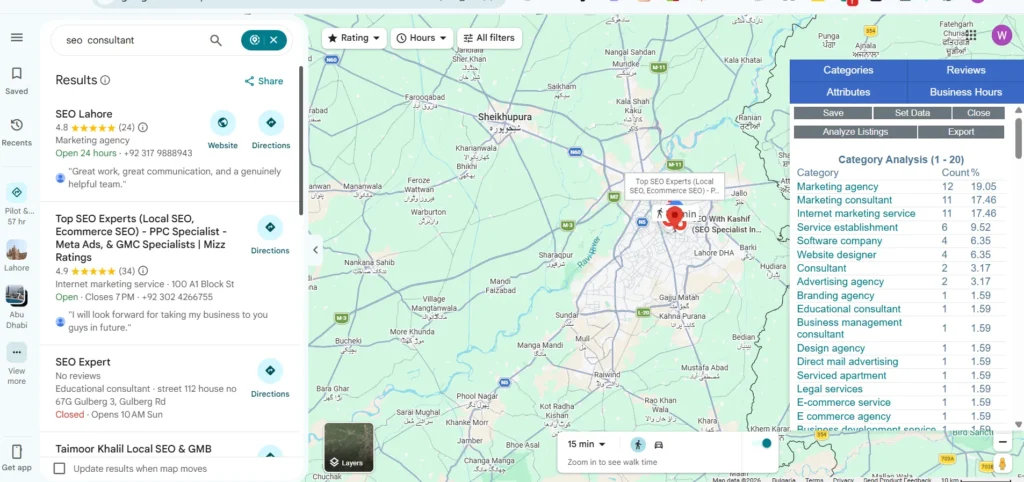
- Search your main service from your business location, such as “dentist” or “car rental”.
- Open the top three businesses in the map results.
- Note their primary categories (browser extensions such as GMB Everywhere or Pleper show these).
- Pick the most specific category that is true for your business.
Then add a few secondary categories that describe other things your business is, not just services it offers. Review categories every few months, because Google adds new ones and competitors change theirs.
2. Fill services and products in the words customers use
The Services and Products sections are often left empty, yet they give Google more ways to match your profile to searches.
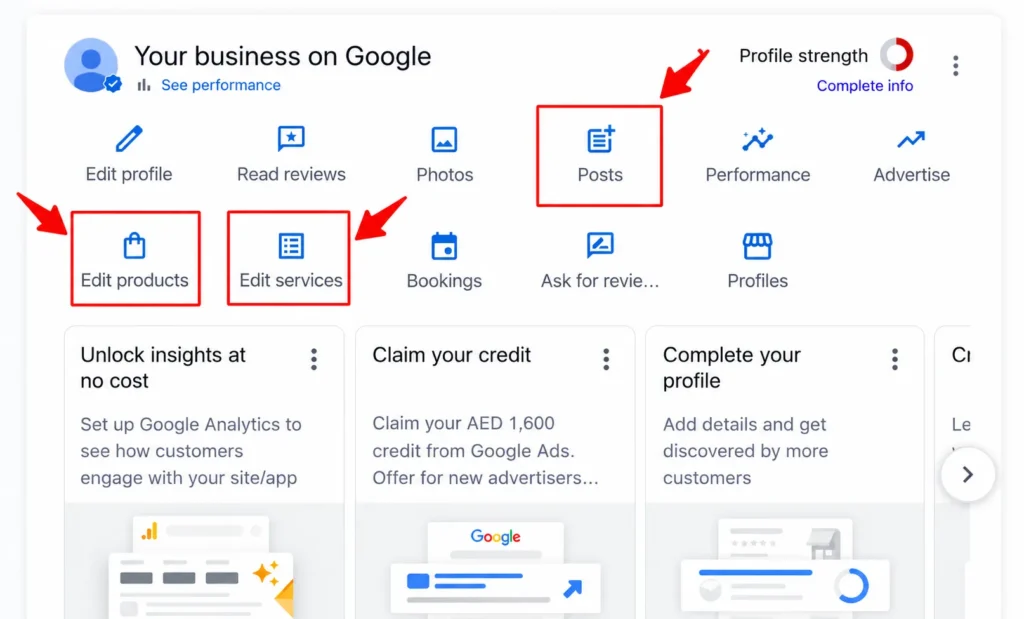
- Services: add every service you actually provide, with a short description. Write “teeth whitening” or “car rental with driver”, not internal names like “Package B”.
- Products: add your main products or packages with a photo, price or price range and a short description.
- Description: use the 750 characters Google allows to explain what you do, where and for whom. Write it for people first; repeating keywords does not help.
In Pakistan, customers often mix English and Urdu terms. Where it fits naturally, describe services the way people say them, for example “AC repair and gas filling” rather than only “HVAC maintenance”.
3. Link to a location page that confirms every detail
The website link on your profile is one of the main ways Google checks what your business does and where. Link it to a page that backs up the profile:
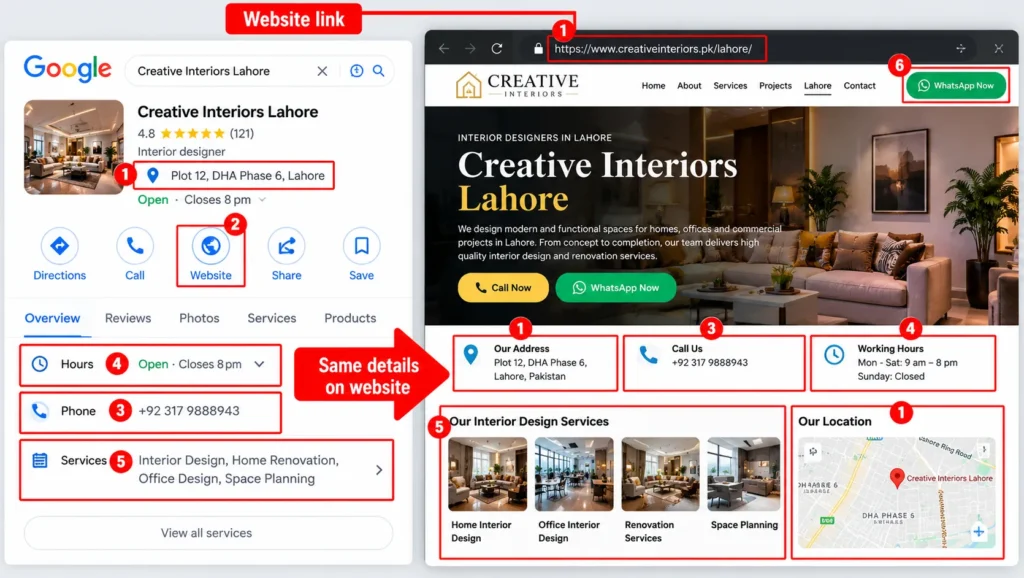
- The same business name, address and phone number as the profile
- The main services listed on the profile, each with more detail
- An embedded Google Map of your location
- Opening hours that match the profile
- LocalBusiness structured data
- Clear call and WhatsApp buttons near the top on mobile
For a single location, this is usually the homepage. For multi-branch businesses, link each profile to its own branch page. Page titles, headings and internal links still matter here; the basics are covered in my list of on-page SEO factors.
4. Earn reviews that mention specific services
Google’s own help page says more reviews and positive ratings can help local ranking. Reviews that mention a service or area also add relevance, and Google can now associate reviews with the specific service a customer used.
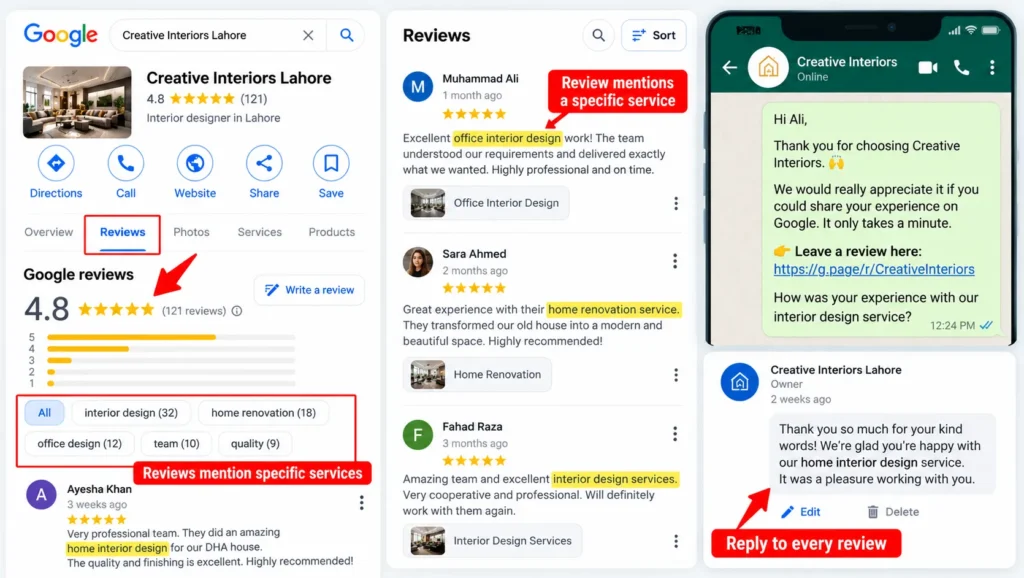
A review system that works:
- Send your short review link on WhatsApp after the job or appointment, to every customer
- Ask open questions such as “How was your visit?” rather than telling customers what to write
- Aim for a steady pace each week instead of large bursts
- Reply to every review, thanking positive reviewers and calmly addressing complaints
Google tightened its review rules in April 2026, so avoid incentives, staff quotas, scripted wording and asking only happy customers. Healthcare businesses depend on reviews more than most, which is why dental SEO puts a review process in place before almost anything else.
5. Add real photos and short videos every month
Photos help customers decide, and recent activity shows Google the business is open and active.
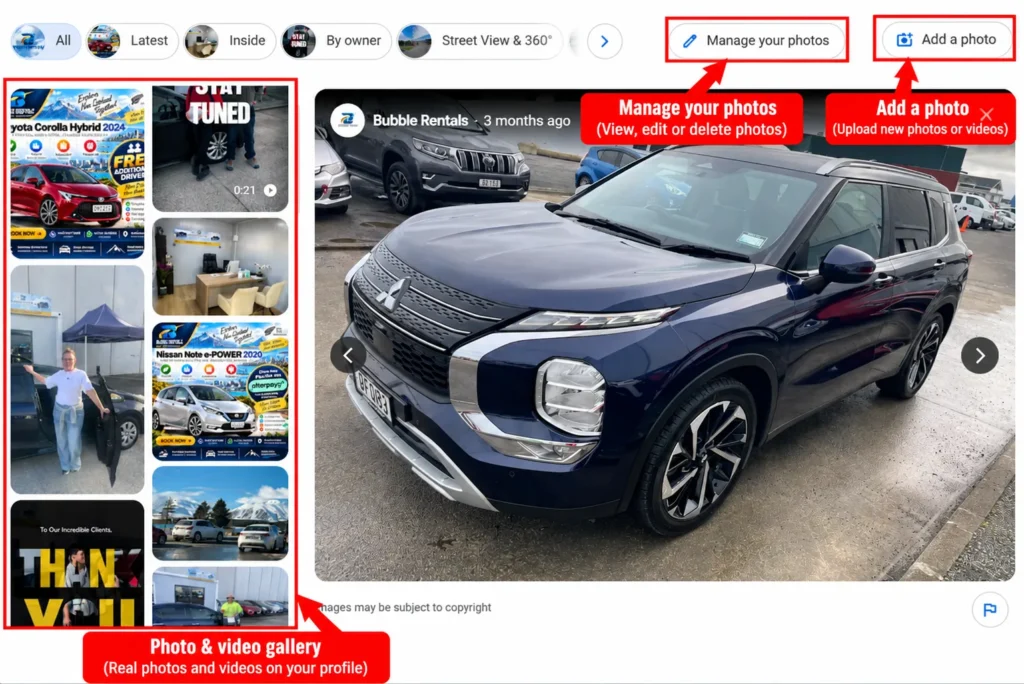
- Exterior: your signboard and entrance, so customers can find you
- Interior: reception, waiting area, workspace
- Team: staff at work, with their consent
- Work: before-and-after results, vehicles, products, completed projects
- Short videos: a walk-through of the premises or a service in action
Google’s photo guidelines ask for images that are well lit, in focus and not heavily altered. Stock photos and AI-generated scenes of your premises work against trust. Upload a few new images each month rather than fifty on day one.
6. Use updates for offers, events and seasons
Business Profile updates (posts) appear on your profile and give customers a reason to act now. They work best when tied to something real:
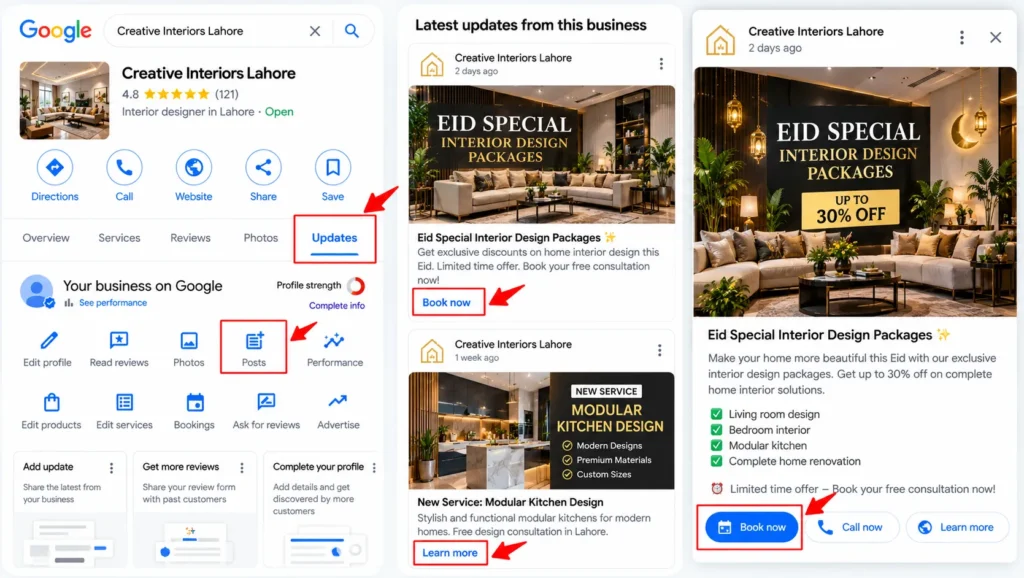
- A new service, product or branch
- A limited offer with a clear end date
- An event, workshop or free consultation day
- Seasonal changes such as Ramadan timings, Eid offers or wedding season packages
Add a photo and a clear button, such as Call, Book or Learn more. Seasonal businesses benefit most; rent-a-car companies, for example, can promote Eid and summer travel packages weeks before demand peaks, which is part of rental car SEO. There is no evidence that posting daily improves rankings, so focus on useful updates rather than volume.
7. Keep hours, special hours and attributes exact
Wrong hours lose customers and trust. If someone arrives at a closed shop because Google said it was open, that experience can turn into a bad review.
- Regular hours: match what is on your door and website
- Special hours: set them ahead of Eid, Ramadan, public holidays and local events
- Attributes: mark what applies, such as wheelchair access, appointment required, online appointments, women-owned or free Wi-Fi
- Phone number: a number that is answered during business hours; Google is also testing AI calls that ask businesses about availability and prices on a customer’s behalf
Accurate details also matter for AI answers, which pull opening hours and services from your profile and website.
8. Answer common questions outside the old Q&A box
Google discontinued the Questions and Answers section on Business Profiles in November 2025 and replaced it with AI-generated answers that draw on your profile, website and reviews. Many guides still recommend seeding Q&A; that option no longer exists.
Where answers should live now:
- Your description and services: prices or price ranges, booking process, areas served
- Website FAQs: clear, short answers on a page linked from the profile
- Review replies: helpful details when customers ask questions in reviews
- Updates: announcements about new services, timings or policies
Clear, consistent facts across these places make it more likely that Google’s AI answers and tools like ChatGPT describe your business correctly, which is the focus of AI search optimisation.
9. Build citations and local links
Prominence is not only about reviews. Google also considers how well known a business is across the web, including links from other websites.
- Citations: consistent listings on reputable Pakistani and international directories, such as Pakistan Yellow Pages and Cylex
- Industry platforms: Marham and Oladoc for doctors, Zameen for property, PakWheels for automotive businesses
- Local links: suppliers, partners, local news coverage, sponsorships and community events
- Social profiles: Facebook, Instagram and LinkedIn pages with matching details
Quality and consistency matter more than volume. A few relevant links from real local sources do more than hundreds of spam directory entries. More ideas are in these link building strategies.
10. Measure with geo-grids and tagged links
Searching your own business from your office shows you the best possible result, not what customers see.
- Geo-grid tracking: tools such as Local Falcon check your position from a grid of points around your location, showing exactly where you rank and where you drop off
- Business Profile Performance: shows searches, calls, direction requests and website clicks
- UTM tags: add tracking parameters to the website link on your profile, so GA4 shows visits and conversions from the profile separately
- Monthly comparison: compare the same grid and metrics each month to judge which changes worked
Rankings across a city depend on distance, so a geo-grid also helps set realistic goals. For areas your profile cannot reach, paid search can fill the gap; the trade-offs are covered in SEO vs PPC.
A 30-day plan for a new or neglected profile
| Week | Focus | Tasks |
|---|---|---|
| Week 1 | Foundations | Verify ownership, fix name and address, choose categories, set hours and special hours |
| Week 2 | Relevance | Add services, products and description; connect a location page with matching details |
| Week 3 | Prominence | Start the review system, upload real photos, publish the first update |
| Week 4 | Reach and tracking | Fix top directory listings, add UTM tags, run a baseline geo-grid scan |
After the first month, keep a simple routine: reviews every week, photos and updates every month, and a geo-grid comparison every month.
Habits that waste time
Some popular advice takes effort without moving rankings:
- Posting every day with no real news or offer
- Uploading dozens of stock photos instead of a few real ones
- Chasing a single keyword ranking checked from your own phone
- Creating extra profiles for nearby areas without a real, staffed location
- Buying review packages that risk review removal or suspension
Frequently asked questions
How long does it take to rank a Google Business Profile?
Changes to categories, services and details can show within a few weeks once Google processes them. Building review volume and local prominence takes months, and competitive areas such as central Lahore or Karachi take longer than smaller cities.
What is the most important Google Business Profile ranking factor?
Google names relevance, distance and prominence as the main factors. On the profile itself, the primary category and the quantity and quality of reviews usually have the biggest effect, while distance limits how far from your location you can rank.
Do Google Business Profile posts help ranking?
Updates are useful for showing offers, events and seasonal changes, and they keep your profile active. There is no evidence that frequent posting alone raises rankings, so focus on useful updates rather than posting every day.
How many reviews do I need to rank on Google Maps?
There is no fixed number. Compare your review count, rating and recency with the top three businesses near you, and aim to match or pass them with a steady flow of genuine reviews.
Can a business without a shop rank on Google Maps?
Yes. Service-area businesses can hide their address, set the areas they serve and still appear in local results, though they usually rank best near their verified business location.
What replaced Q&A on Google Business Profile?
Google removed the Q&A section in November 2025 and now shows AI-generated answers based on your profile, website and reviews. Put common answers in your description, services and website FAQs instead.
Does my website affect my Google Business Profile ranking?
Yes. A website that confirms your name, address, services and hours strengthens relevance, and links pointing to your site add prominence. Linking the profile to a strong location page usually helps both rankings and conversions.