
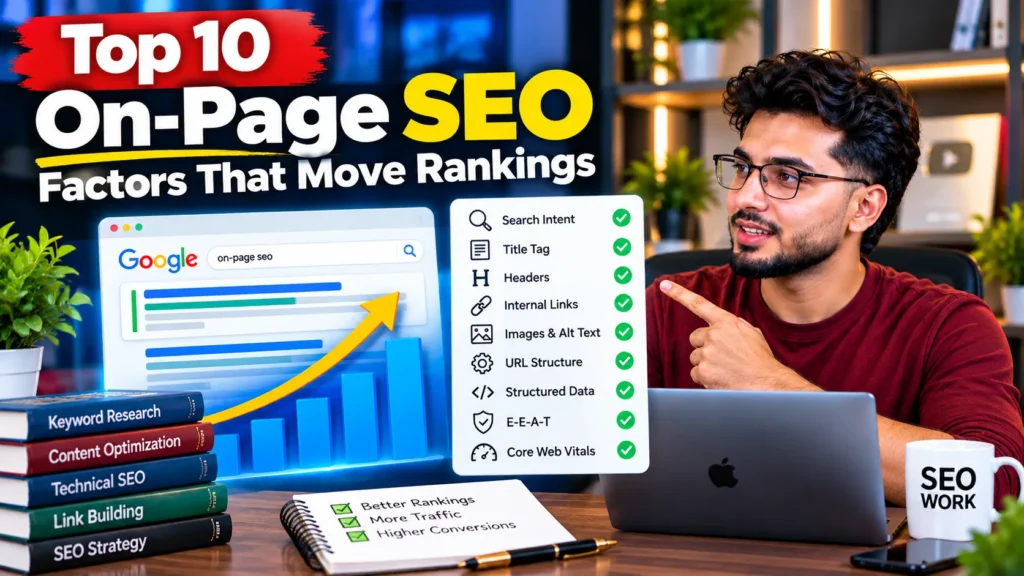
The on-page SEO factors that move rankings most are: matching search intent, helpful and complete content, a clear title tag, a logical heading structure, internal links with descriptive anchor text, visible trust signals (E-E-A-T), good page experience on mobile, optimised images, clean URLs with correct canonicals, and structured data. Intent and content quality do most of the work; the rest help Google understand the page and help users trust it.
What on-page SEO covers
On-page SEO is everything you control on the page itself: the words, the structure, the HTML tags, the images and the links between your own pages. It sits between two other parts of SEO:
- Technical SEO makes sure Google can crawl and index the page.
- Off-page SEO builds trust from outside, mainly through links from other sites.
None of the factors below matter if Google cannot index the page. If a page is missing from search completely, check the causes in why a website is not showing on Google before working on anything here.
The 10 factors ranked by impact
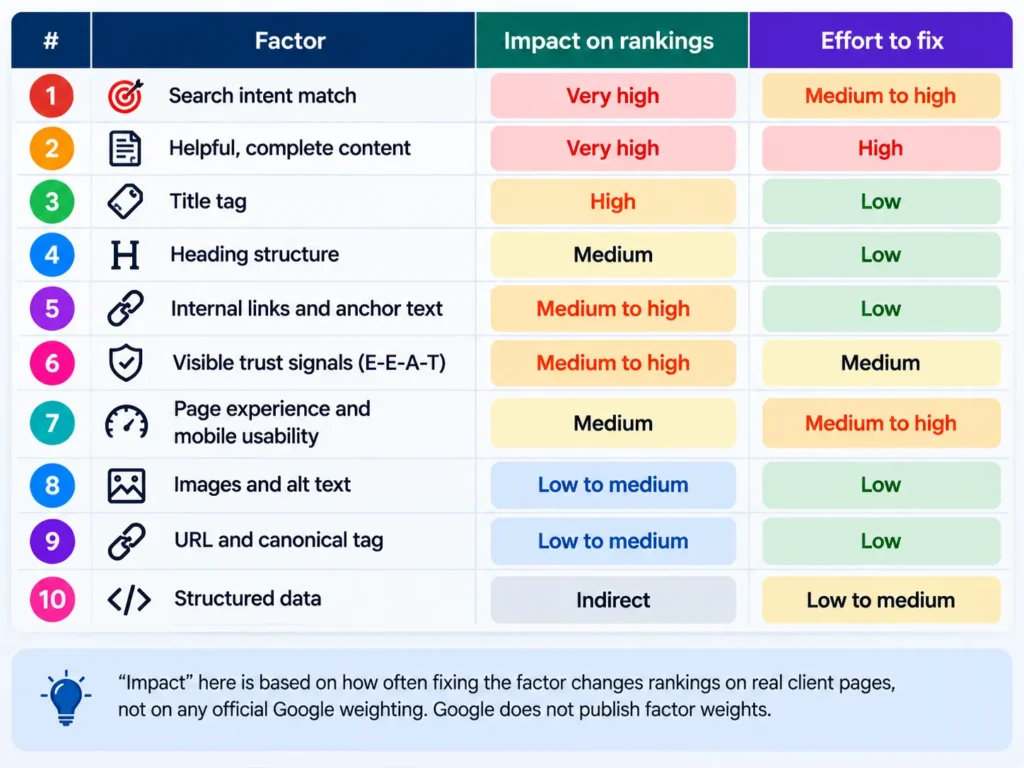
| # | Factor | Impact on rankings | Effort to fix |
|---|---|---|---|
| 1 | Search intent match | Very high | Medium to high |
| 2 | Helpful, complete content | Very high | High |
| 3 | Title tag | High | Low |
| 4 | Heading structure | Medium | Low |
| 5 | Internal links and anchor text | Medium to high | Low |
| 6 | Visible trust signals (E-E-A-T) | Medium to high | Medium |
| 7 | Page experience and mobile usability | Medium | Medium to high |
| 8 | Images and alt text | Low to medium | Low |
| 9 | URL and canonical tag | Low to medium | Low |
| 10 | Structured data | Indirect | Low to medium |
“Impact” here is based on how often fixing the factor changes rankings on real client pages, not on any official Google weighting. Google does not publish factor weights.
1. Match the search intent
Search intent is the reason behind a search. Google ranks the type of page that best satisfies that reason, so a page built for the wrong intent will struggle no matter how well it is optimised.
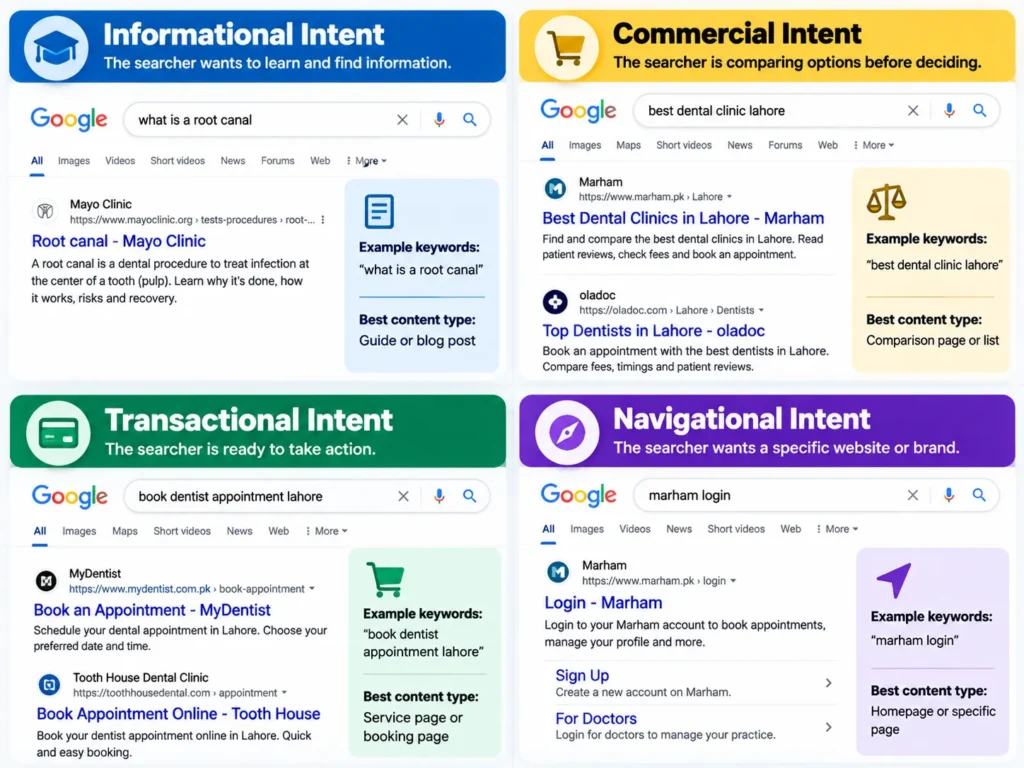
There are four common intent types:
- Informational: the searcher wants to learn (“what is a root canal”)
- Commercial: they are comparing options (“best dental clinic Lahore”)
- Transactional: they are ready to act (“book dentist appointment Lahore”)
- Navigational: they want a specific site (“Marham login”)
The quickest test is to search your target keyword and look at the top results. If Google shows guides, a sales page will not fit. If it shows service pages and maps, a blog post will not fit. Match the page type first, then compete on quality.
2. Publish helpful, complete content
Google’s ranking systems are designed to reward content made for people, not for search engines. Helpful content answers the question fully, adds something the other results do not, and is written by someone who knows the subject.
What this looks like on a page:
- Answer the main question early, then add depth below.
- Cover the sub-questions people ask next, such as cost, time, risks and alternatives.
- Add first-hand detail: real prices, real photos, real examples, your own process.
- Keep it current. Update facts, prices and screenshots when they change.
Length is not the goal. Google’s own SEO Starter Guide says there is no magical word count, minimum or maximum. A 600-word page that answers the question well can outrank a 3,000-word page that does not. Improving pages that already get impressions but few clicks is often the fastest win, and it is the core of content optimisation.
3. Write a clear, specific title tag
The title tag is one of the strongest on-page signals and usually becomes the blue clickable headline in Google results. Google says a good title is unique to the page, clear and concise, and accurately describes the page.
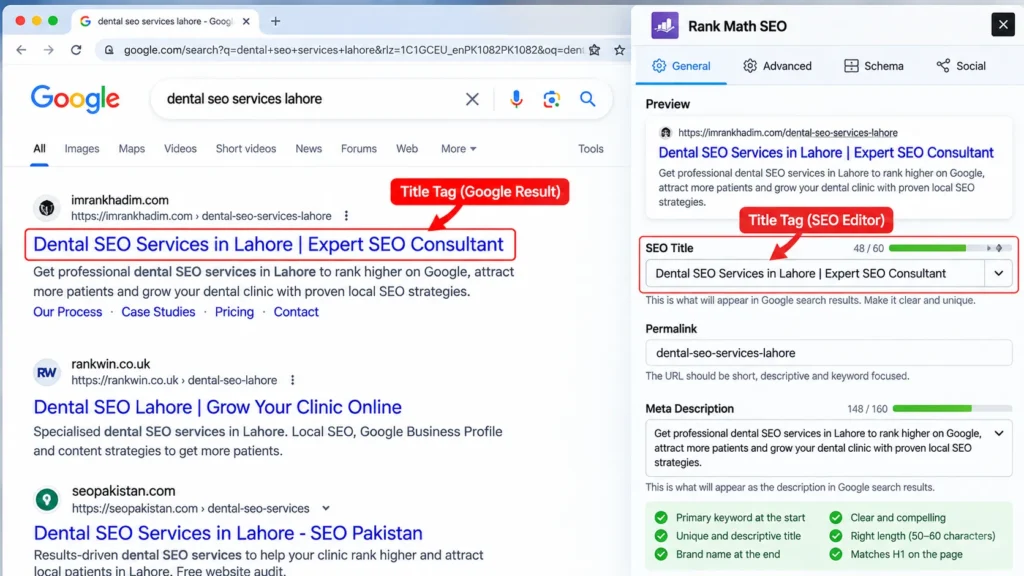
- Put the main topic near the start.
- Make every page’s title different.
- Add your brand at the end, separated by a pipe or a colon, if space allows.
- Avoid repeating the same keyword several times.
There is no official character limit. Google cuts titles to fit the screen width, so roughly 50 to 60 characters usually display in full on desktop. Google may also rewrite your title using your main heading or other text if it thinks that describes the page better, so keep the title and the H1 consistent.
Meta descriptions are related but different. They do not directly affect rankings, but a clear one can improve how many people click. Google often uses page text instead when it better matches the search.
4. Structure the page with clear headings
Headings (H1, H2, H3) break a page into sections that readers and search engines can scan. They help Google understand what each part of the page covers, and they help AI Overviews and other answer engines lift a clean section to quote.
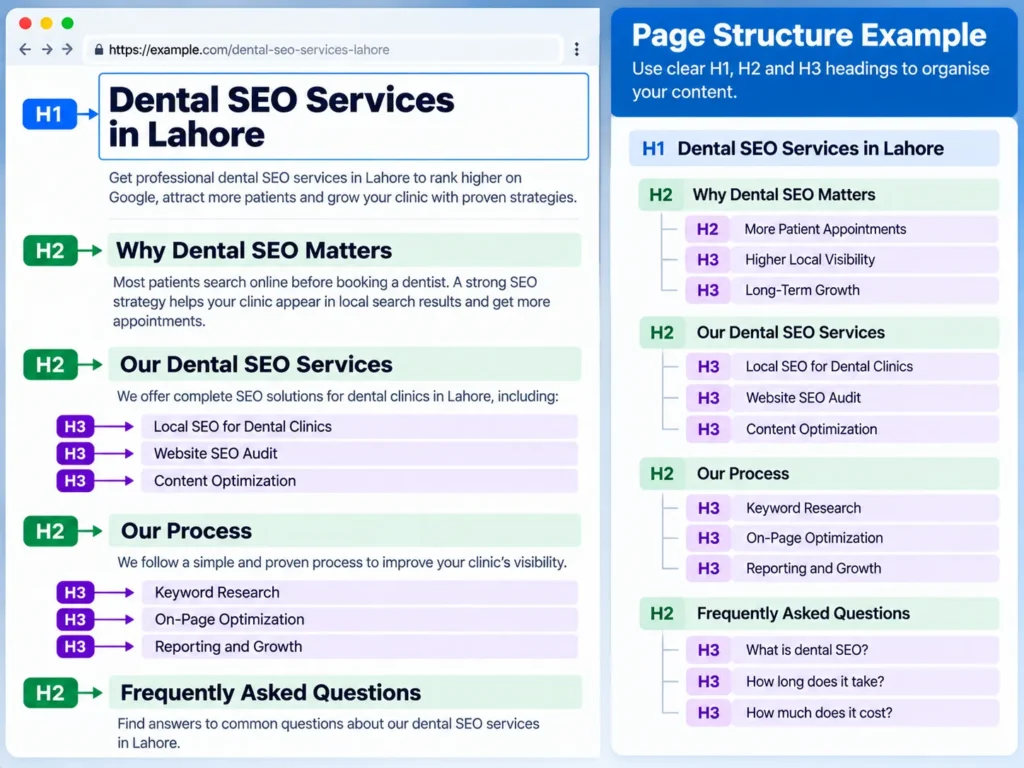
Good heading practice:
- One clear main heading (H1) that states the topic of the page
- H2s for each main section, written as plain phrases or questions people actually search
- H3s for sub-points inside a section
- Short sections that answer one thing each
Google states that the order of headings and the number of headings do not matter for ranking. Use them to make the page easy to follow, not to place keywords.
5. Link between your own pages with descriptive anchor text
Internal links help Google discover pages, understand how they relate and decide which pages matter most on your site. They also pass value from strong pages to weaker ones.
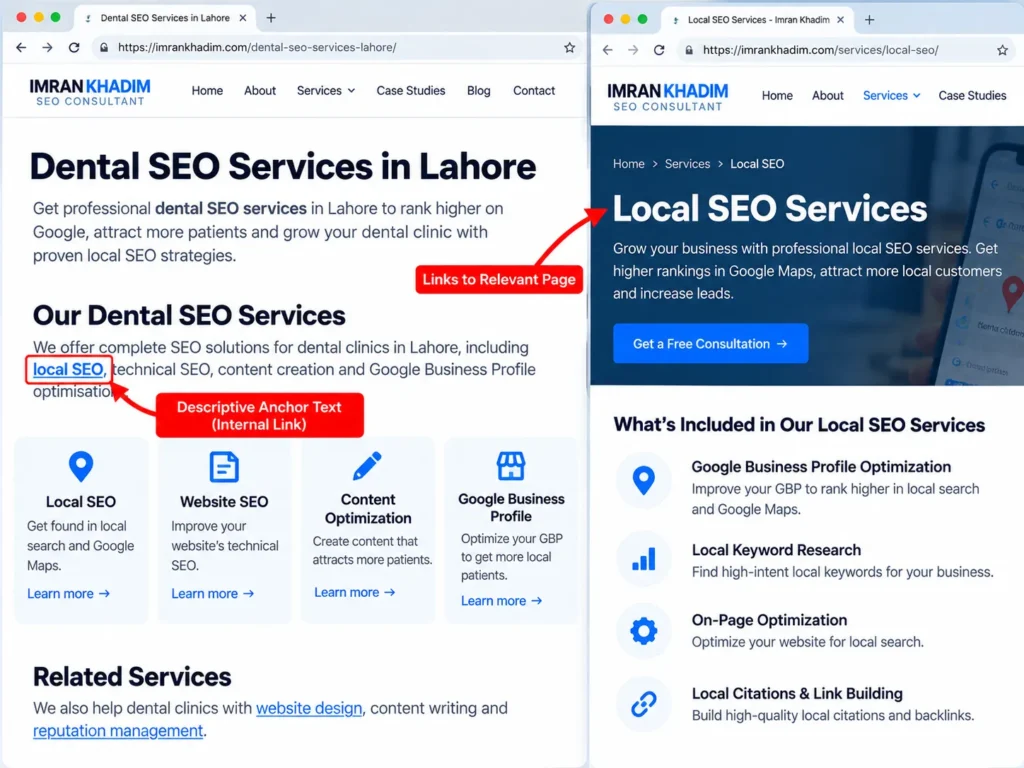
- Use descriptive anchor text. “Our local SEO work” tells Google more than “click here”.
- Keep anchors short and match them to the topic of the target page.
- Link from relevant sections, not from a long list at the bottom.
- Make sure every important page gets internal links. A page with none is hard for Google to find.
When two pages on your site target the same keyword, they compete with each other. Choosing one main page per topic and linking related pages to it solves most of these conflicts.
6. Show trust signals on the page (E-E-A-T)
E-E-A-T stands for Experience, Expertise, Authoritativeness and Trustworthiness. Google is clear that E-E-A-T itself is not a ranking factor. It describes what Google’s systems try to reward, and it is used by human quality raters to check search results.
On-page signals that support it:
- A named author with a short bio and relevant experience
- An About page and real contact details, including a physical address for local businesses
- Sources for statistics and claims
- Reviews, case studies and real photos of your work, team or premises
- Dates showing when the page was published or updated
Trust matters most for health, money and legal topics. A clinic’s treatment pages need practitioner names, qualifications and clear information, which is why dental SEO puts so much weight on medical trust signals.
7. Deliver a good page experience on mobile
Google uses mobile-first indexing, which means it mainly looks at the mobile version of your page. Page experience covers how the page feels to use:
- Core Web Vitals: Largest Contentful Paint (loading), Interaction to Next Paint (responsiveness) and Cumulative Layout Shift (visual stability)
- HTTPS security
- No intrusive pop-ups that block content on mobile
- Readable text and tap targets without zooming
Page experience rarely beats relevance. Google says a great page experience does not override having great, relevant content. But when pages are close in quality, the faster and easier one has the edge. In Pakistan, where most visitors arrive on mid-range Android phones over mobile data, slow pages also lose visitors before they even load. Testing on real devices is part of mobile SEO. Most speed problems are built in when the site is made, so ask about speed before you agree a website design cost.
8. Optimise images and alt text
Images help users understand content, and they can rank in Google Images on their own.
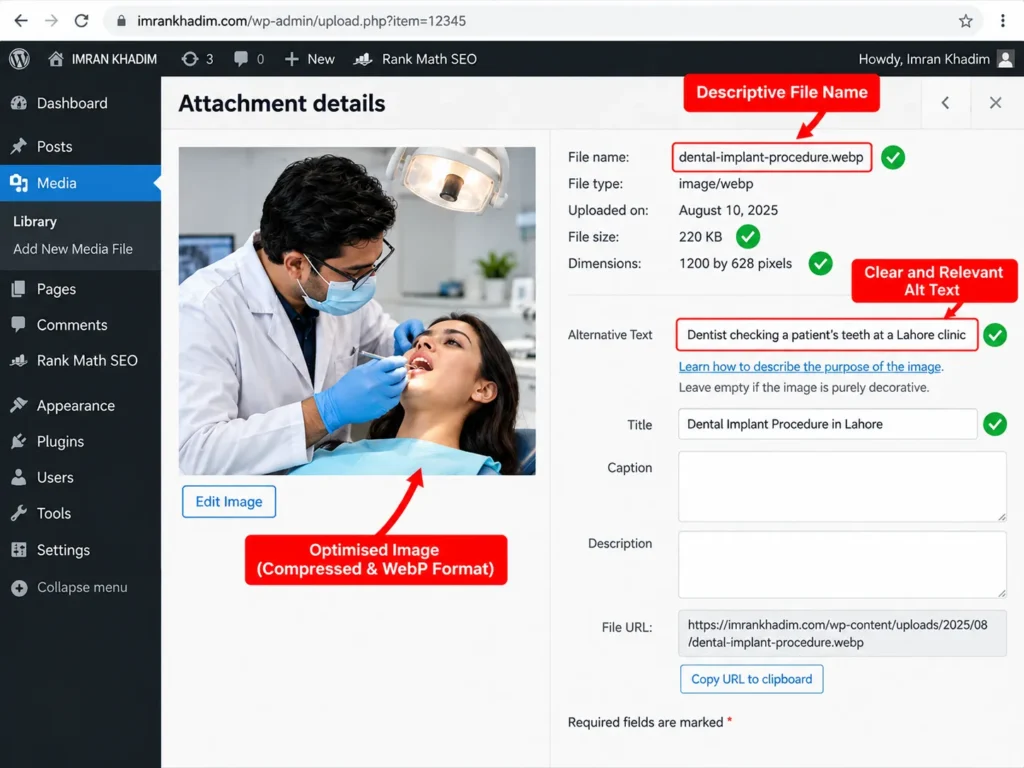
- Alt text: a short, plain description of what the image shows and why it is there. It also helps screen reader users.
- File names:
dental-implant-procedure.webpis more useful thanIMG_4532.jpg. - File size: compress images and use modern formats such as WebP or AVIF to keep pages fast.
- Dimensions: set width and height so the layout does not jump while loading.
- Original images: real photos of your work, products or team build trust better than stock photos.
Alt text should describe the image, not repeat a keyword list. “Dentist checking a patient’s teeth at a Lahore clinic” is good. “dentist Lahore best dentist Lahore dental clinic” is keyword stuffing.
9. Keep URLs clean and canonicals correct
A clear URL helps people understand where a link goes before clicking. Google’s starter guide notes that keywords in the domain or URL path alone have hardly any effect on ranking, so the main goal is readability.
- Use short, readable words separated by hyphens:
/dental-implants-lahore/ - Avoid long parameter strings and random numbers where possible.
- Do not change URLs of ranking pages without a 301 redirect.
The canonical tag tells Google which version of a page is the main one when several URLs show similar content, such as filtered product pages or tracking links. A wrong canonical can quietly remove a page from search. Checking canonicals across a site is part of technical SEO, but every page you publish should have a correct, self-referencing canonical by default.
10. Add structured data
Structured data (schema markup) is code, usually in JSON-LD format, that describes your content in a standard way, such as an Article, a Product, a LocalBusiness or an FAQ.
- It helps Google understand entities on the page: your business, your products, your author.
- It can make pages eligible for rich results, such as star ratings, prices or event details.
- It gives AI search tools clean facts to work with, which supports AI search optimisation.
Structured data is not a direct ranking boost. It improves how your page is understood and displayed. Only mark up information that is visible on the page; marking up content users cannot see goes against Google’s guidelines.
On-page factors that matter less than people think
Some advice keeps circulating even though Google has said it does not help.
| Common belief | Reality |
|---|---|
| The meta keywords tag helps rankings | Google does not use it |
| You need a keyword density of 2 to 3 percent | There is no ideal density; repeating keywords can be treated as keyword stuffing |
| Longer content always ranks better | Length alone does not matter for ranking |
| Headings must be in strict H1, H2, H3 order | Order and number of headings do not matter for Google |
| Keywords in the domain name boost rankings | They have hardly any effect on their own |
| A meta description raises rankings | It affects clicks, not rankings |
| E-E-A-T is a ranking factor you can score | It is a framework, not a single factor |
Most of these points come directly from Google’s SEO Starter Guide. A provider who still promises results through keyword density or meta keywords is working with outdated methods, one of the common SEO hiring mistakes.
A 15-minute on-page check for any page
Use this checklist on your most important pages first, such as service pages and top products.
- Search the main keyword. Does your page type match what ranks?
- Read the first 100 words. Is the main question answered?
- Check the title tag. Is it unique, specific and readable in full?
- Check the H1. Does it match the topic of the title?
- Scan the H2s. Do they cover what people ask next?
- Count internal links in and out. Does the page link to related pages, and do other pages link to it?
- Look for an author, date, sources and contact details.
- Open the page on your phone. Does it load fast and read easily?
- Check image alt text and file sizes.
- View the page source for the canonical tag and any schema.
If you would rather pay someone to run this check across your site, it is usually billed as an hourly or one-off project; typical SEO consultant charges in Pakistan are a useful benchmark.
If you hire someone, ask which of these ten checks their work covers; “on-page optimisation” is one of the vaguest lines in most SEO packages. Add it to your list of questions to ask an SEO expert before you sign.
If you use WordPress, plugins such as Rank Math and Yoast make titles, meta descriptions, canonicals and schema easier to manage, and setting them correctly is part of WordPress SEO.
How on-page factors change for different page types
The same ten factors apply everywhere, but their weight shifts with the page.
| Page type | Factors to focus on first |
|---|---|
| Local service page | Intent, title with service and city, NAP details, reviews, LocalBusiness schema |
| Blog post or guide | Complete answers, headings, internal links, author and date |
| Product page | Unique description, images, price and stock, Product schema, reviews |
| Category page | Short intro text, internal links to products, filters that do not create duplicate URLs |
| Homepage | Clear statement of what you do and where, links to key services, trust signals |
Online stores face extra challenges with duplicate product text, filters and variants, which e-commerce SEO handles at category and product level.
Frequently asked questions
What is the most important on-page SEO factor?
Matching search intent. If your page is not the type of page Google shows for a keyword, other on-page improvements have little effect. After intent, the quality and completeness of the content matter most.
Is the title tag still important for SEO?
Yes. The title tag helps Google understand the page and usually becomes the headline in search results, which affects clicks. Keep it unique, specific and close to the topic of your main heading.
Does keyword density matter in 2026?
No. There is no ideal keyword density. Use the main term naturally, along with related words and questions, and avoid repeating the same phrase, which Google treats as keyword stuffing.
How many words should a page have to rank?
There is no minimum or maximum. Google says content length alone does not matter for ranking. Write as much as needed to answer the question better than the pages already ranking.
Do meta descriptions affect rankings?
No, meta descriptions do not directly affect rankings. They can affect how many people click your result, which is why they are still worth writing clearly for important pages.
Is on-page SEO enough to rank on Google?
For low-competition searches, often yes. For competitive keywords, you also need technical health and links from other websites, because similar pages may already be well optimised on-page. Budgeting for all three is covered in SEO cost in Pakistan.
How long do on-page changes take to show results?
Google needs to recrawl the page first, which can take days to a few weeks. Ranking changes from on-page work usually show within a few weeks to a few months, depending on competition.