


The most common technical SEO issues are pages blocked by noindex or robots.txt, too many low-value URLs in the index, broken links and 404 errors, redirect chains, duplicate URLs without correct canonicals, slow pages with poor Core Web Vitals, mobile usability problems, XML sitemap errors, orphan pages with no internal links, and content that only appears after JavaScript runs. Most can be found for free in Google Search Console and a site crawler, and fixed without rebuilding the site.
What counts as a technical SEO issue
A technical SEO issue is anything in how a website is built or served that stops search engines from crawling, rendering, indexing or ranking its pages properly. Content can be excellent and still fail if Google cannot reach it, load it or tell which version to show.
These problems are very common. In a study of 418,125 site audits run through its own audit tool (published March 2025), SE Ranking found:
- Internal links pointing to redirected pages in 63.87% of reports
- Pages blocked by noindex in 50.58%
- 4XX (not found) errors in 35.73%
- Redirect chains in 21.58%
- No link to the XML sitemap in robots.txt in 23.17%
Those figures show how often issues appear, not how much each one hurts rankings. The list below is ordered by impact, based on what changes results most often on real sites. All of it falls under technical SEO, the foundation that every other part of SEO depends on.
The 10 issues at a glance
| # | Issue | Where to find it | Impact | Typical fix time |
|---|---|---|---|---|
| 1 | Pages blocked from indexing | Search Console Page indexing, URL Inspection | Very high | Minutes |
| 2 | Index bloat from low-value URLs | Page indexing report, site: search, crawler | High | Hours to days |
| 3 | Broken links and 404 errors | Crawler, Search Console | Medium | Hours |
| 4 | Redirect chains and links to redirects | Crawler | Medium | Hours |
| 5 | Duplicate URLs and wrong canonicals | URL Inspection, crawler | High | Hours |
| 6 | Slow pages and poor Core Web Vitals | Core Web Vitals report, PageSpeed Insights | Medium | Days to weeks |
| 7 | Mobile usability problems | Real phone testing, Lighthouse | Medium to high | Days |
| 8 | XML sitemap errors | Search Console Sitemaps, crawler | Medium | Minutes to hours |
| 9 | Orphan pages and deep pages | Crawler plus sitemap comparison | Medium | Hours |
| 10 | Content hidden behind JavaScript | URL Inspection rendered HTML | High on JS sites | Days to weeks |
1. Important pages blocked from indexing
This is the issue that does the most damage in the least time. A single setting can remove a page, or a whole site, from Google.
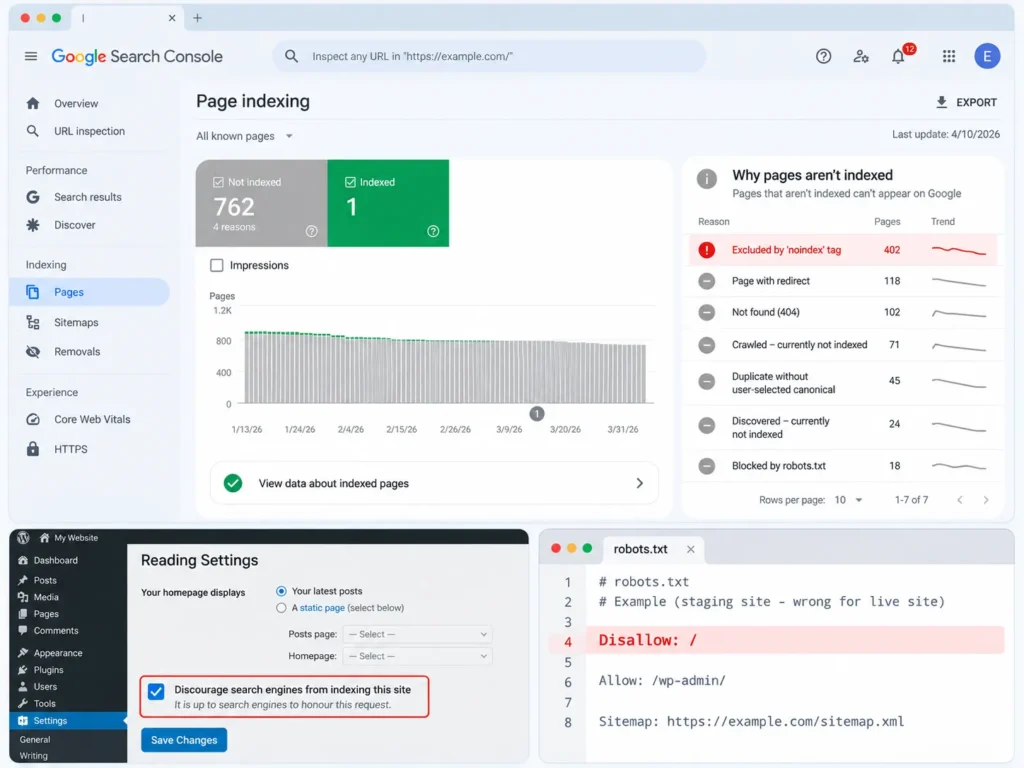
Common causes:
- A
noindexmeta robots tag orX-Robots-Tagheader left on live pages - WordPress’s “Discourage search engines from indexing this site” box left ticked after launch
- A
Disallow: /rule in robots.txt copied over from a staging site - SEO plugin settings that noindex whole post types or categories by mistake
How to fix it: Run the main URLs through the URL Inspection tool in Google Search Console. Remove noindex from any page you want in search, correct robots.txt and then request indexing for key pages.
Not every noindex is a mistake. Thank-you pages, internal search results and login pages should stay out of the index. The problem is noindex on pages that are supposed to rank. If the whole site is missing, my guide on why a website is not showing on Google walks through every cause.
2. Index bloat from low-value URLs
Index bloat happens when Google indexes large numbers of pages that have no search value, such as:
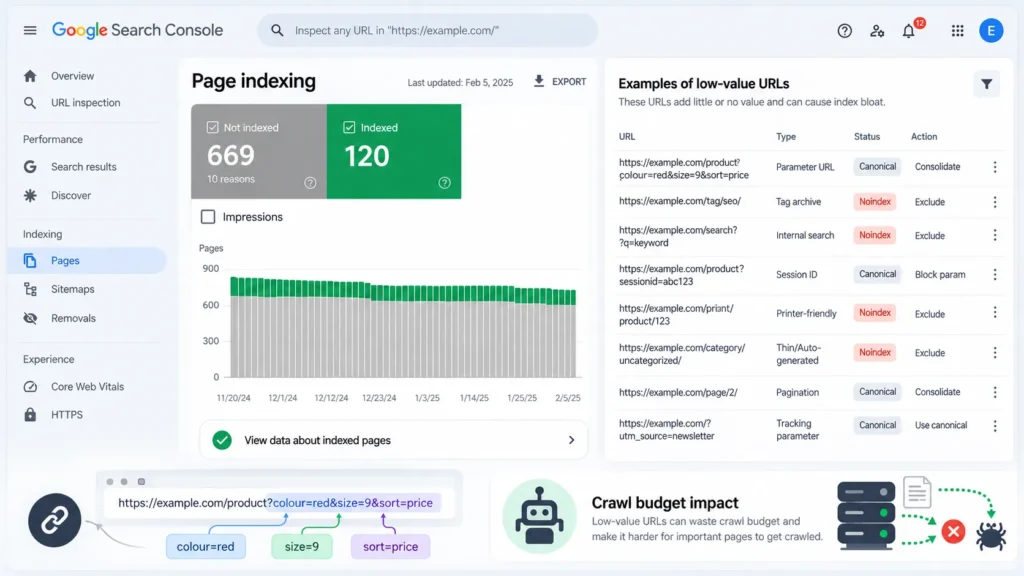
- Filter and sort combinations on shop pages (
?colour=red&size=9&sort=price) - Tag and author archives with one or two posts each
- Internal search result pages
- Session IDs, tracking parameters and printer-friendly versions
- Thin auto-generated pages
These URLs use up crawl attention and dilute the overall quality signals of the site. Large online stores are hit hardest, because filters can create thousands of URLs from a few hundred products.
How to fix it: decide which URL patterns deserve to rank. Noindex or canonicalise the rest, stop linking to parameter URLs where possible, and remove thin archives. Filter and category handling for stores is a core part of e-commerce SEO.
3. Broken internal links and 404 errors
A 404 error means the page does not exist at that address. Broken links waste crawl effort, frustrate visitors and throw away the value of any links pointing to the missing page.
Where they come from:
- Deleted products, services or blog posts
- Changed URLs without redirects
- Typing mistakes in links
- Links to external pages that have since been removed
How to fix it:
- Update internal links to point to the correct live page.
- Add a 301 redirect from the old URL to the closest matching page.
- Let truly retired pages return a 404 or 410 if there is no close match.
- Check which missing pages have backlinks from other sites; those are worth redirecting first. Several of the free backlink checker tools show this for your own site.
A few 404s are normal on any site. Google does not penalise a site for them. They become a problem when important pages or pages with backlinks are broken.
4. Redirect chains and internal links to redirects
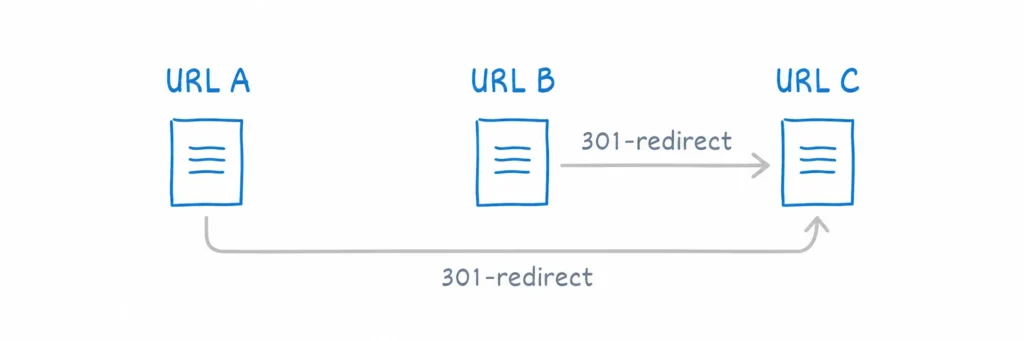
A redirect chain is when URL A redirects to B, which redirects to C. Each hop slows down users and crawlers, and long chains can stop Google from following through to the final page.
Typical causes:
- Several redesigns, each adding new redirects on top of old ones
- Switching from http to https and from non-www to www in separate steps
- Internal links that still point to old URLs
How to fix it:
- Point every redirect straight to the final URL in one hop.
- Update internal links, menus and sitemaps to use final URLs, so no redirect is needed.
- Use 301 (permanent) redirects for permanent moves, not 302 (temporary) ones.
Most chains are created during redesigns and platform changes. Planning redirects before launch costs far less than fixing them afterwards, which is worth building into your website design cost from the start.
5. Duplicate URLs and incorrect canonical tags
The same page can often load at several addresses:
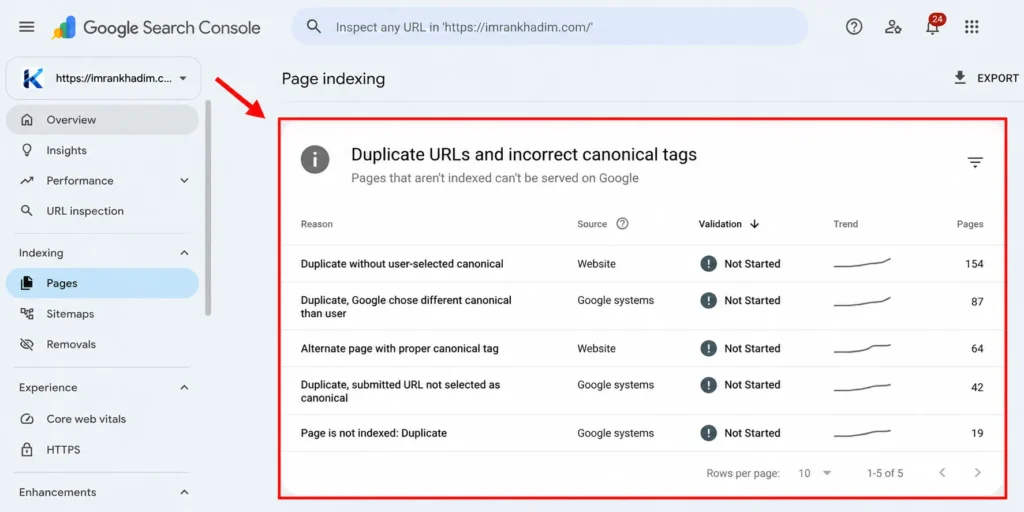
http://andhttps://wwwand non-www- With and without a trailing slash
- With tracking parameters such as
?utm_source=facebook - Product pages reachable through several category paths
Google picks one version to show. If your signals are mixed, it may pick the wrong one or split ranking signals across versions.
How to fix it: Google lists three main ways to tell it your preferred version:
| Method | Strength according to Google |
|---|---|
| 301 redirect to the preferred URL | Strong signal |
rel="canonical" tag on the page | Strong signal |
| Including only the preferred URL in the sitemap | Weak signal |
Redirect all http and www variations to one version, add a self-referencing canonical to every page and keep sitemaps clean. A canonical is a signal, not a command, so Google may still choose a different URL if other signals disagree. Canonicals are one of the page-level checks covered in my list of on-page SEO factors.
There is no “duplicate content penalty” for normal duplication like this. The cost is that the wrong version may rank, or none rank well.
6. Slow pages and poor Core Web Vitals
Core Web Vitals are Google’s measures of real-user page experience. Google’s “good” targets are:
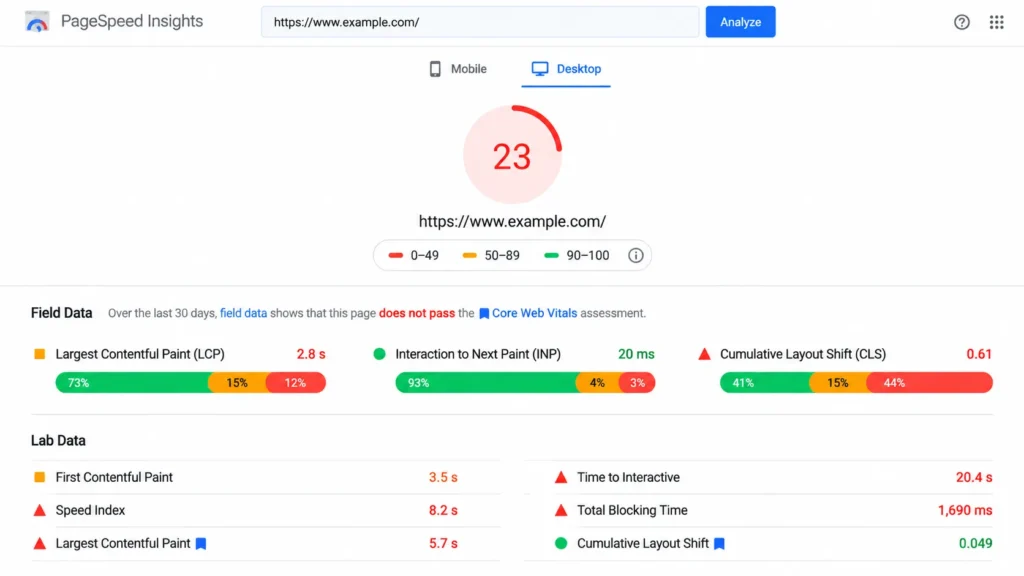
| Metric | Measures | Good |
|---|---|---|
| Largest Contentful Paint (LCP) | How fast the main content loads | 2.5 seconds or less |
| Interaction to Next Paint (INP) | How quickly the page responds to taps and clicks | Under 200 milliseconds |
| Cumulative Layout Shift (CLS) | How much the layout jumps while loading | Under 0.1 |
Google says Core Web Vitals align with what its core ranking systems reward, but good page experience does not outweigh relevant content.
Common causes:
- Large, uncompressed images, especially hero images and sliders
- Heavy page builders, themes and too many plugins
- Render-blocking CSS and JavaScript
- Slow or overloaded shared hosting
- Third-party scripts such as chat widgets, tracking pixels and ad code
How to fix it: compress and resize images, serve them in WebP or AVIF, lazy-load images below the fold, remove unused plugins, add caching and a CDN, and move to better hosting if the server is the bottleneck. Most WordPress speed problems come from themes, builders and plugins, which WordPress SEO work addresses directly.
Check the Core Web Vitals report in Search Console for real-user data. PageSpeed Insights lab scores are useful for testing changes, but they are not what Google uses.
7. Mobile usability problems
Google uses mobile-first indexing, so it mainly crawls and judges the mobile version of your site. If content, links or structured data are missing on mobile, Google may not see them at all.
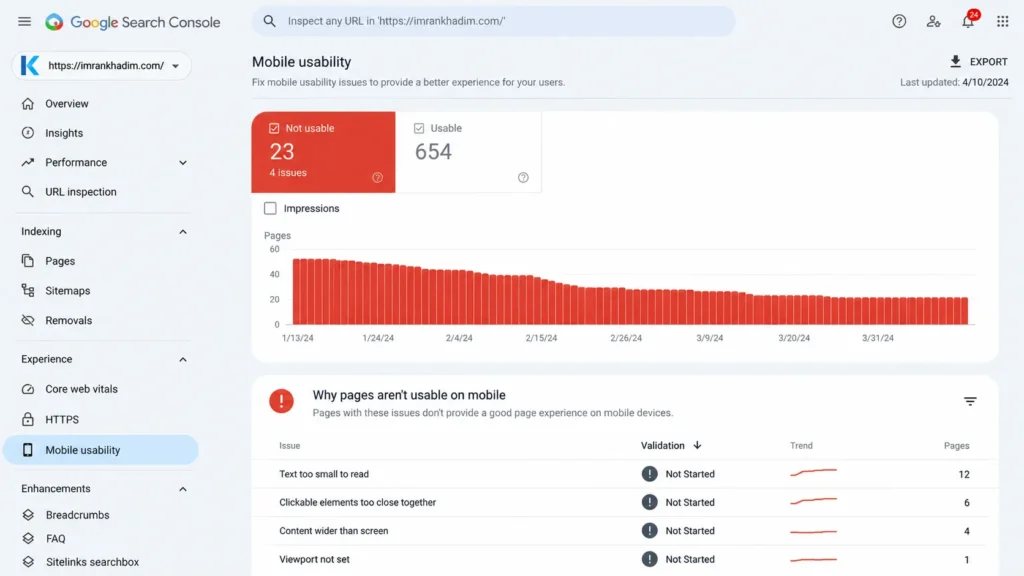
Common problems:
- Text too small to read without zooming
- Buttons and links too close together to tap
- Content wider than the screen
- Pop-ups covering content on load
- Menus or sections hidden on mobile that exist on desktop
How to fix it: use a responsive theme with a correct viewport meta tag, test pages on real mid-range Android phones over mobile data, and make sure the mobile version contains the same main content, links and schema as desktop. In Pakistan, where most visitors browse on phones, this is often where mobile SEO makes the clearest difference.
8. XML sitemap errors
An XML sitemap lists the pages you want Google to find. Errors are common because sitemaps are often generated automatically and never checked.
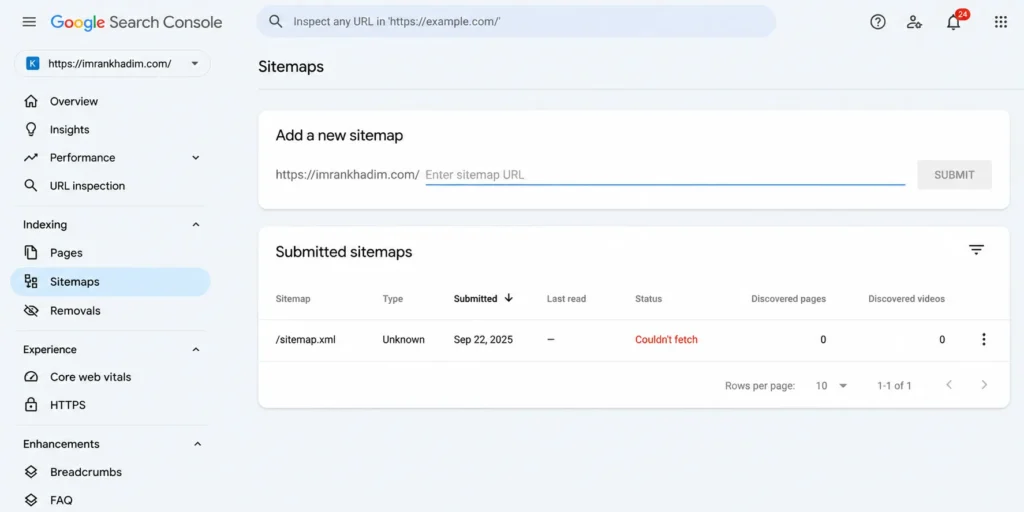
Typical mistakes:
- No sitemap at all, or not submitted in Search Console
- Sitemap not referenced in robots.txt
- Sitemap listing URLs that redirect, return 404 or are noindexed
- Sitemap listing non-canonical versions of pages
- Old sitemaps from a previous site still submitted
How to fix it: generate the sitemap from your CMS or SEO plugin, include only live, indexable, canonical URLs, add a Sitemap: line to robots.txt and submit it under Sitemaps in Search Console. Remove old sitemap submissions that point to retired URLs.
9. Orphan pages and pages buried too deep
An orphan page has no internal links pointing to it. Google may find it through the sitemap, but without internal links it receives little authority and is often crawled less.
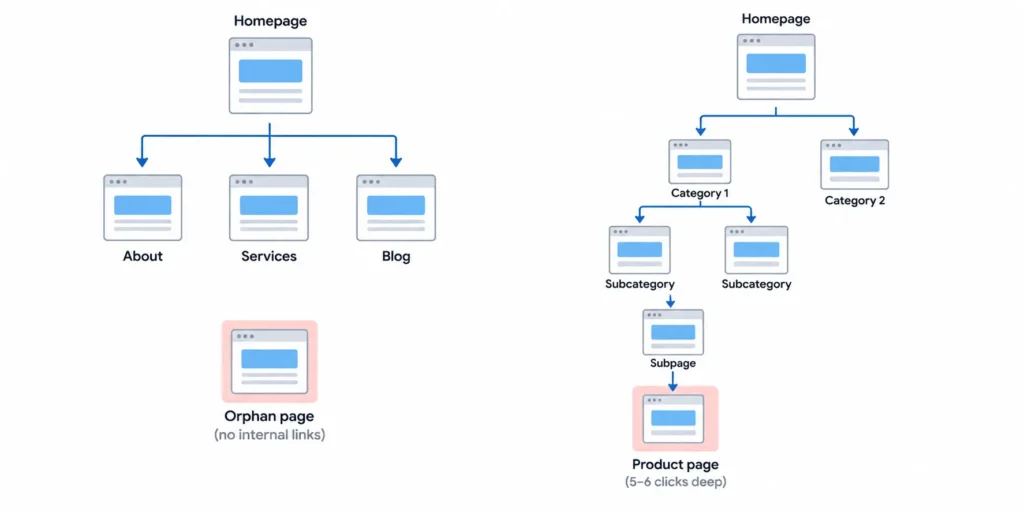
Deep pages have a similar problem. A product or service that takes five or six clicks to reach from the homepage is treated as less important than one linked from the main menu.
How to fix it:
- Compare your crawl with your sitemap. URLs in the sitemap but not found in the crawl are likely orphans.
- Link to important pages from the menu, category pages and related content.
- Keep key pages within three clicks of the homepage where possible.
- Use descriptive anchor text, not “click here”.
A clear internal link structure is shared ground between technical and on-page SEO, and it is one of the cheapest fixes on this list.
10. Content that only appears after JavaScript runs
Sites built with React, Vue, Angular or heavy JavaScript widgets can send Google an almost empty HTML page, with the real content added later by scripts. Google can render JavaScript, but it takes extra time and resources and does not always succeed.
Signs of a problem:
- URL Inspection’s rendered HTML or screenshot is missing text you can see in the browser
- Links are built with
onclickevents instead of normal<a href>tags - Product details, prices or reviews load only after user interaction
How to fix it: use server-side rendering or static generation for important content, make links standard <a href> elements and avoid hiding main content behind clicks or tabs that load data on demand.
This matters beyond Google too. Many AI crawlers fetch raw HTML and do not run JavaScript, so content that only appears after scripts load may be invisible to them. Making key facts available in plain HTML is part of AI search optimisation.
Other technical issues worth checking
These appear less often but can be serious when they do.
| Issue | What to check |
|---|---|
| Mixed content | Images or scripts loading over http on https pages |
| Server errors (5xx) | Page indexing report and hosting logs; often caused by overloaded hosting |
| Soft 404s | Empty category or search pages that return a 200 status |
| Hreflang errors | Missing return links or links to non-canonical URLs on multi-language sites |
| Structured data errors | Search Console enhancement reports and the Rich Results Test |
| Security issues | Search Console’s Security issues report for hacked content or malware |
A hacked site with spam pages can be flagged or dropped from results. If Search Console shows a security issue or manual action, clean-up and a review request come first; this is where Google penalty recovery work begins.
How to find technical SEO issues for free
You do not need paid tools to find most of these problems.
- Google Search Console: Page indexing, Sitemaps, Core Web Vitals, URL Inspection, Security issues and Manual actions reports
- PageSpeed Insights: lab and field data for Core Web Vitals on any URL
- Screaming Frog SEO Spider: the free version crawls up to 500 URLs, enough for most small business sites
- Ahrefs Webmaster Tools: free Site Audit for verified sites
- Bing Webmaster Tools: a second crawler’s view of errors and SEO issues
- Chrome DevTools and Lighthouse: built into the Chrome browser for performance and mobile checks
Which issues to fix first
Fix in order of impact, not in the order a tool lists them.
- Indexing blocks on important pages (issue 1)
- Server errors and security issues that affect the whole site
- Wrong canonicals and duplicate versions of key pages (issue 5)
- Broken pages with backlinks and redirect chains on important URLs (issues 3 and 4)
- Mobile usability on top landing pages (issue 7)
- Index bloat and sitemap clean-up (issues 2 and 8)
- Speed and Core Web Vitals (issue 6)
- Orphan pages, deep pages and JavaScript rendering (issues 9 and 10)
Audit tools often flag hundreds of “issues”, many of them minor warnings. A missing meta description on a tag page is not as urgent as a noindex on your main service page. When comparing SEO providers, check whether technical fixes are actually done or only reported, a common gap in many SEO packages.
Frequently asked questions
What is the most common technical SEO issue?
In SE Ranking’s study of over 418,000 site audits, the most widespread technical issues included internal links pointing to redirects, pages blocked by noindex and 4XX errors. In terms of damage, an accidental noindex or robots.txt block on important pages is usually the most serious.
Do 404 errors hurt SEO?
Not on their own. Google does not penalise a site for having 404 pages. They become a problem when important pages break, when internal links point to them, or when pages with backlinks return 404 instead of redirecting.
How do I check my website for technical SEO issues?
Start with Google Search Console’s Page indexing, Sitemaps and Core Web Vitals reports. Then crawl the site with a tool such as Screaming Frog, whose free version handles up to 500 URLs, and check key pages in PageSpeed Insights.
Is page speed a ranking factor?
Core Web Vitals are part of what Google’s ranking systems consider, but relevance and content quality matter more. Speed makes the biggest difference when competing pages are similar in quality, and it always affects how many visitors stay.
How often should I run a technical SEO audit?
A full audit every three to six months suits most small and medium sites. Check Search Console weekly or monthly for new errors, and always audit after a redesign, migration or platform change.
Can I fix technical SEO issues myself?
Many, yes. Removing noindex tags, fixing broken links, cleaning sitemaps and compressing images are within reach of most site owners. Migrations, JavaScript rendering and complex duplicate URL problems usually need a developer or SEO specialist.
How much does it cost to fix technical SEO issues?
It depends on the size and condition of the site. Small fixes take hours, while large stores or migrations can take weeks. Technical clean-ups are often quoted as one-off projects, and typical SEO consultant charges give a useful benchmark for hourly and project fees.