

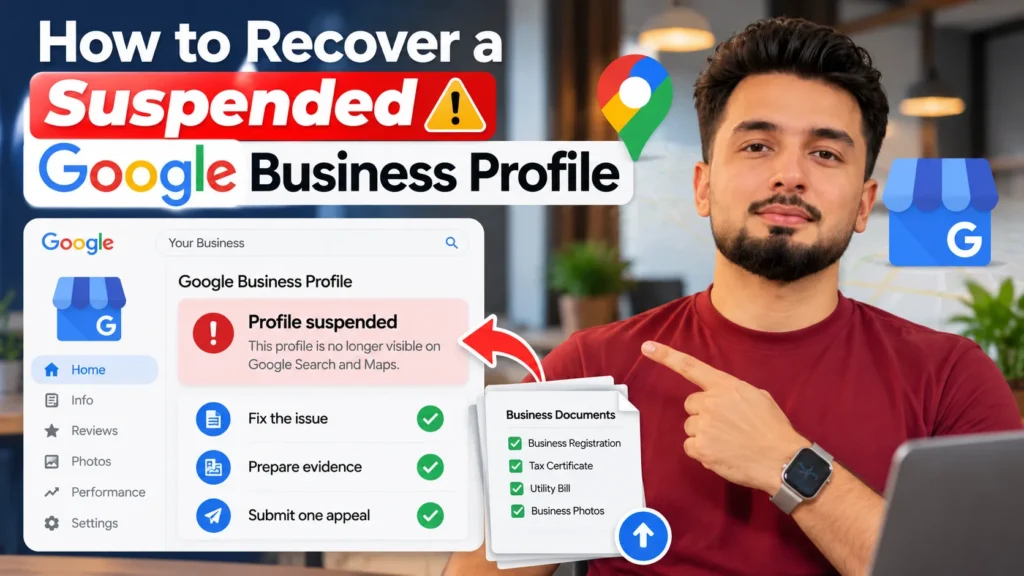
To recover a suspended Google Business Profile, first open the Google Business Profile appeals tool to see the exact reason and policy Google cites. Fix that problem on the profile, such as removing keywords from the name or correcting an ineligible address. Then submit one appeal with documents whose business name and address match the profile, such as a business registration, tax certificate or utility bill. Google says appeal decisions can take up to five business days, and appeals can only be submitted once, so fix everything before you submit. Never create a new profile for the same business while you wait.
Step 1: Confirm what kind of restriction you have
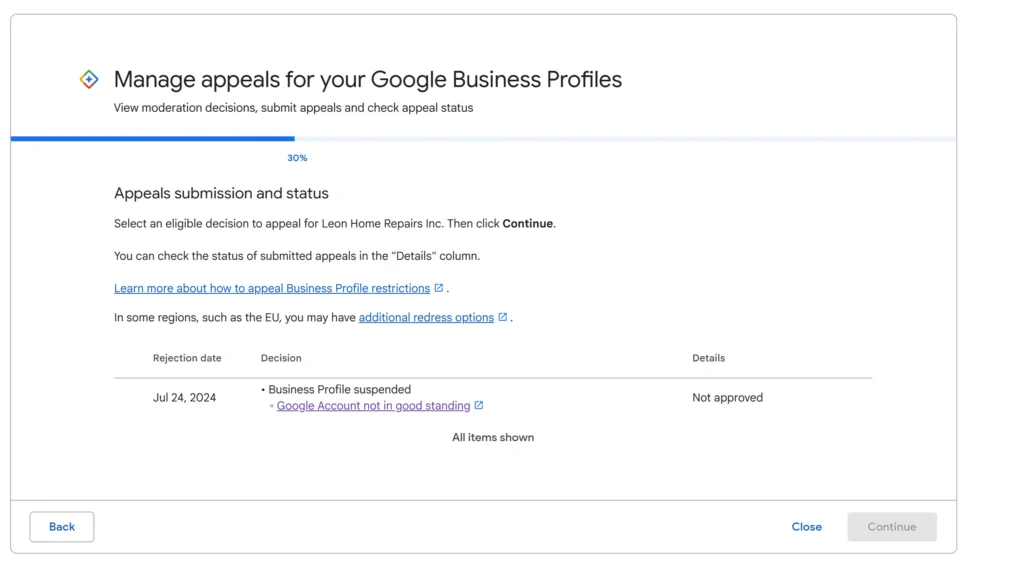
“Suspended” is used loosely. What you see on screen tells you how serious the problem is and where to act.
| What you notice | What it usually means | Where to act |
|---|---|---|
| Your listing still shows on Maps, but you cannot edit it and the dashboard shows a suspension notice | The profile is restricted for management; often called a soft suspension | Appeals tool |
| Your listing has disappeared from Google Maps and Search | The profile is suspended or disabled; often called a hard suspension | Appeals tool |
| You cannot create or claim any profiles, and all your profiles are affected | Your Google account has a restriction, not just one profile | Appeals tool, for the account restriction |
| A single edit, photo or post was rejected but the profile is live | A content restriction, not a suspension | Contact form, or the appeals tool in the UK and EEA |
| A review you reported was not removed | A review decision | Reviews management tool |
“Soft” and “hard” suspension are terms used by local SEO practitioners, not by Google. Google’s help pages talk about profiles being suspended, disabled or removed. What matters is the decision shown in the appeals tool.
Step 2: Read the reason before touching anything
Open the appeals tool while signed in to the Google account that owns or manages the profile. For each decision, Google shows:
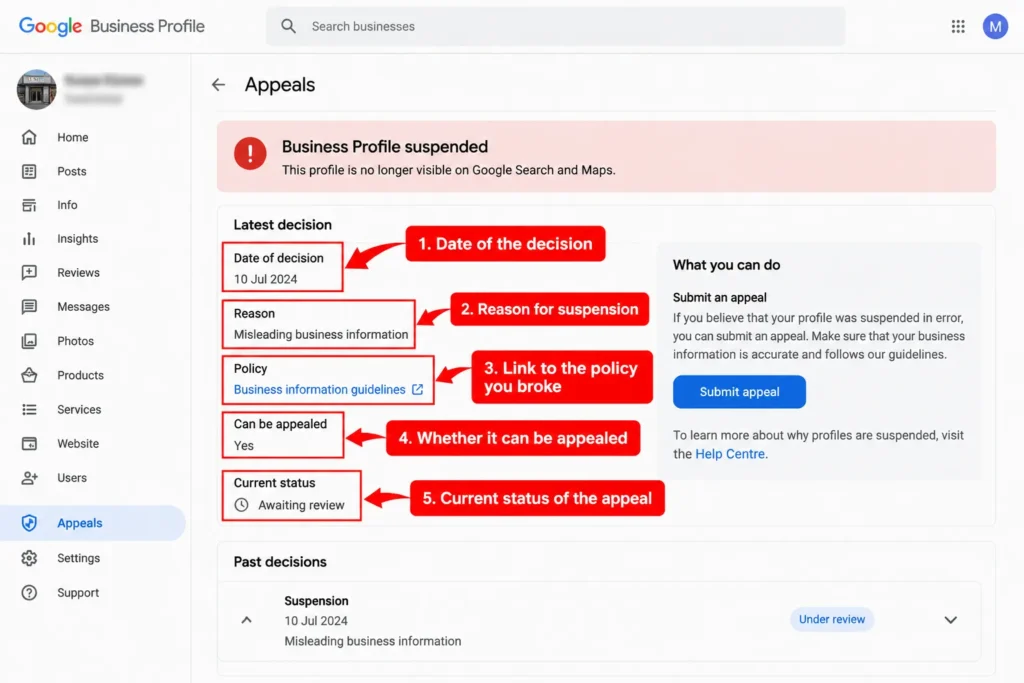
- The date of the decision
- The reason
- A link to the policy you broke
- Whether it can be appealed
- The current status
Also check the email inbox linked to that Google account for messages from Google Business Profile.
Common reasons and what to fix
| Reason category | Typical cause | Fix before appealing |
|---|---|---|
| Business name | Keywords, city names or taglines added to the name | Change the name to exactly what appears on your signboard and documents |
| Address | Virtual office, PO box, coworking desk without signage, or wrong pin | Use your real, staffed location, or hide the address if you are a service-area business |
| Duplicate listings | More than one profile for the same location | Identify the duplicates and keep only one per location |
| Ineligible business | Online-only business with no in-person contact | Accept that the profile may not qualify, or show genuine in-person service |
| Reviews | Incentivised, gated or fake reviews | Stop the practice; do not ask anyone to delete or add reviews before appealing |
| Category or details | Categories, website or phone that do not match the real business | Correct them to match your website and documents |
| Suspicious changes | Many edits in a short time, or a new manager making large changes | Revert unnecessary edits and make no further changes |
The most frequent causes are covered in more detail in my list of local SEO mistakes.
Many suspensions trace back to work done by a cheap provider, such as keyword-stuffed names or bought reviews, which is one of the common SEO hiring mistakes.
Step 3: Fix the cause, then stop editing
An appeal for a profile that still breaks the rules is very likely to fail, and Google says appeals can only be submitted once. Fix everything first.
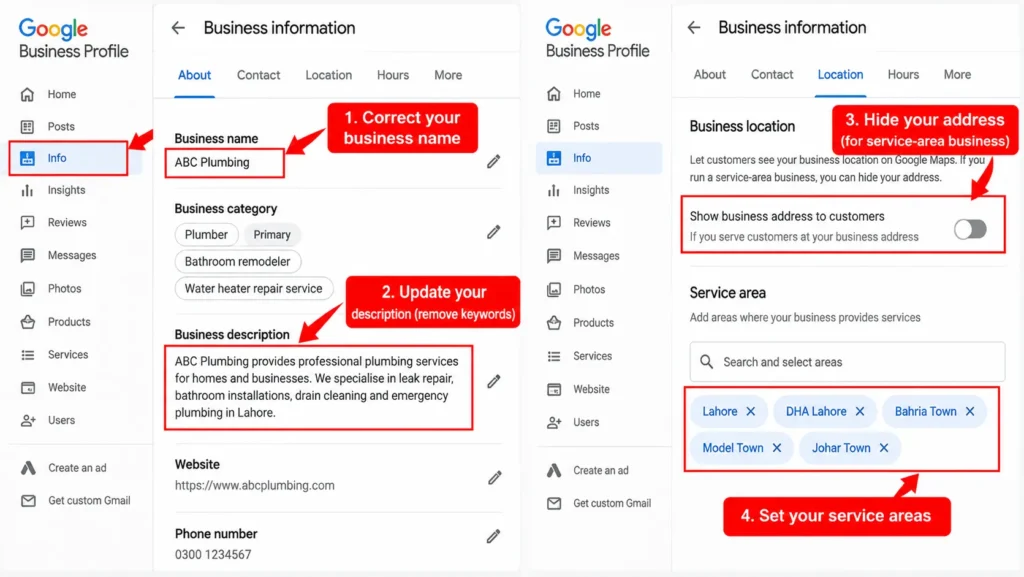
- Correct the name, address, categories, phone number and website so they match your real business.
- Remove keywords from the business description if it is stuffed.
- If your website shows a different name or address, fix the website too, because reviewers may compare them.
- Once the fixes are done, stop. Avoid repeated edits while the appeal is under review.
If you are a service-area business, such as a plumber or home tutor, make sure your address is hidden and your service areas are set. Google’s guidelines say service-area businesses should hide their address.
Step 4: Build an evidence pack Google can accept
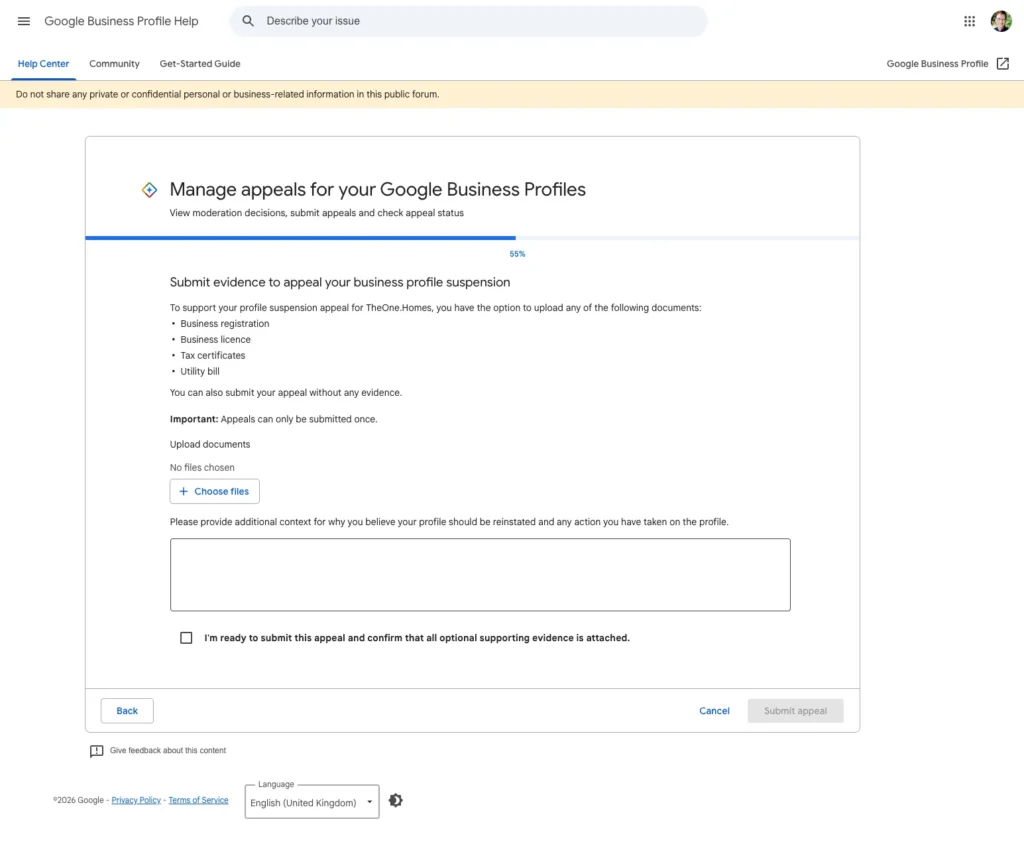
Evidence is what turns an appeal from a claim into proof. Google lists official business registration, a business licence, tax certificates and utility bills such as electricity, phone, water or internet as examples. The business name and address on each document should match the profile.
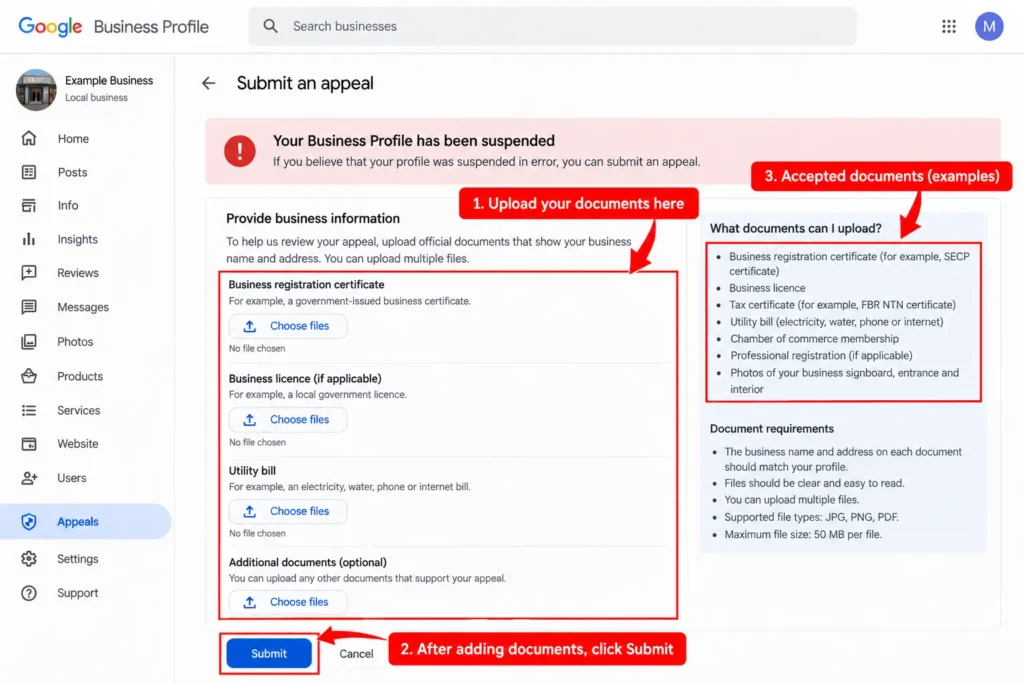
Documents that work for businesses in Pakistan
| Document | What it proves | Tip |
|---|---|---|
| SECP certificate of incorporation | The business legally exists under this name | Best for private limited companies |
| FBR NTN certificate or tax registration | The business name and registered address | Make sure the name matches the profile exactly |
| Utility bill from LESCO, K-Electric, IESCO, SNGPL, SSGC or PTCL | You operate at this address | Recent bills in the business name work best |
| Trade licence or local government registration | Permission to operate at this location | Common for shops, clinics and restaurants |
| Chamber of commerce membership | The business is established locally | Useful as supporting evidence |
| PMDC or professional registration | A doctor or professional practises at this location | Relevant for clinics and individual practitioners |
| Photos of the signboard, entrance and interior | The location is real, staffed and branded | Show the signboard with the business name clearly visible |
What weakens an evidence pack:
- Documents in a different business name or an owner’s personal name only
- A home address on documents when the profile shows a shop address
- Blurry scans or cropped photos where the name or address cannot be read
- Mock-up signboards or photos edited to add a name
You can attach multiple files. If your documents do not match the profile exactly, fix the profile or get updated documents before appealing.
Step 5: Submit the appeal
Google’s process in the appeals tool is short:
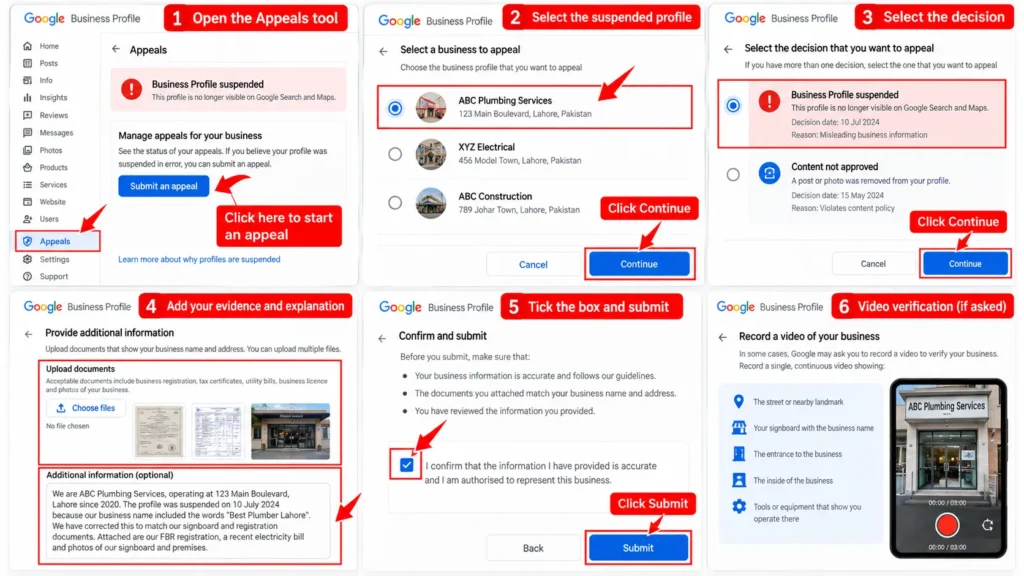
- Open the Google Business Profile appeals tool and confirm you are in the right Google account, or switch accounts.
- Select the suspended profile and select Continue.
- Select the decision you are appealing and select Continue.
- Add your evidence and a short written explanation.
- Tick the box confirming you are ready.
- Submit the appeal.
Google may also ask you to complete a video verification during the process. If it does, record a continuous clip showing the street or nearby landmark, your signboard, the entrance and the inside of the business, including tools or equipment that show you operate there.
How to write the explanation
Keep it short and factual. Reviewers look for evidence, not emotion.
We are [business name], operating at [full address] since [year]. The profile was suspended on [date]. We found that [describe the problem, for example our business name included the words “Best Dentist Lahore”]. We have corrected this to match our signboard and registration documents. Attached are our FBR registration, a recent electricity bill and photos of our signboard and premises showing the same name and address.
Avoid blaming Google, repeating the policy back, or promising to “never do it again” without saying what you changed.
Step 6: Wait for the decision
Google says appeal reviews can take up to five business days, and the decision is sent by email. In the appeals tool, the status shows as one of:
- Submitted: your appeal is in review
- Approved: the profile has been reinstated
- Not approved: the appeal was rejected
- Can’t be appealed: the decision is final in the tool
- Eligible for appeal: you can still submit an appeal
While you wait, do not submit multiple appeals for the same issue and do not create a new profile for the business. Google warns against both.
If the appeal is rejected
A rejection is not always the end, but your options are narrower.
- Read the rejection reason carefully. It may point to something you missed, such as a duplicate listing or mismatched documents.
- Request additional review if offered. Google’s help pages say further review is possible only if a reinstatement request is denied, and it may need evidence you did not include originally.
- Ask in the Google Business Profile Community. Product Experts there can sometimes spot the problem and, in some cases, escalate genuine businesses.
- Contact Google Business Profile support with your profile details and evidence.
- Do not create a new profile. A replacement profile for the same business can be treated as an attempt to get around the suspension.
Businesses in the European Economic Area may also refer appeals to an out-of-court dispute settlement body, according to Google.
What happens to reviews, photos and rankings
Whether a profile comes back with its history depends on the type of restriction and Google’s decision.
- Restricted but still visible: reviews usually stay visible, but you cannot reply or edit the profile until reinstated.
- Removed from Maps: reviews and photos are hidden with the profile. When a profile is reinstated, they are usually restored, though this is not guaranteed.
- Rankings: a reinstated profile often takes some time to return to its previous positions, especially if the name or categories were changed as part of the fix.
This is one reason a suspension is worth fixing properly rather than starting again with a new profile, which would lose all review history anyway.
Special cases
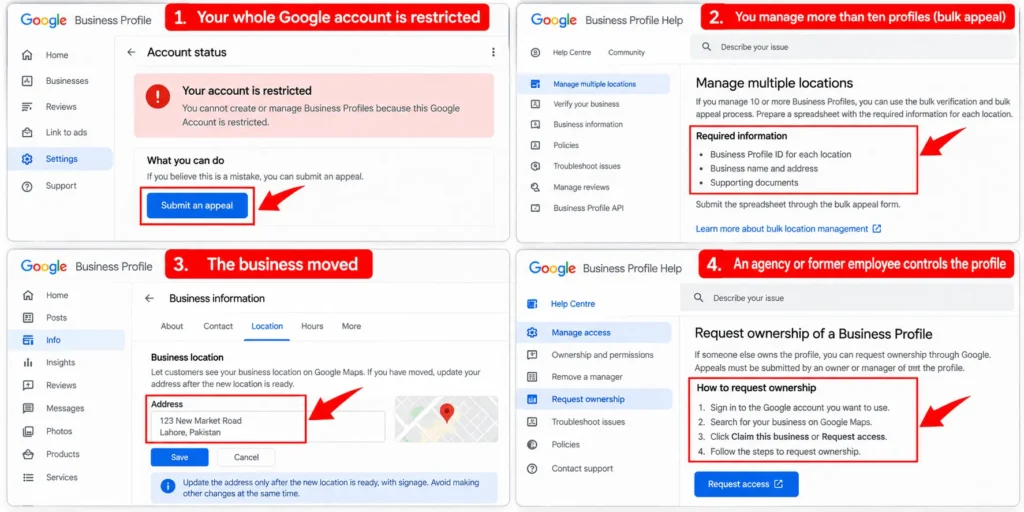
Your whole Google account is restricted
If you cannot create or claim profiles at all, the restriction is on the account. Google says removing an owner’s account removes all locations they own, while suspending a manager’s account does not affect the locations. Appeal the account restriction through the appeals tool.
You manage more than ten profiles
For businesses with many locations, Google uses a bulk appeal process. Prepare a spreadsheet listing each Business Profile ID along with supporting documents. Multi-branch clinics are a common example, and separating practitioner and location profiles correctly is part of dental SEO work.
The business moved
Update the address only after the new location is ready, with signage. A sudden address change combined with other edits can trigger a review; keep other changes to a minimum during a move.
An agency or former employee controls the profile
If someone else owns the profile, request ownership through Google before appealing. Appeals need to come from an owner or manager of the profile.
Keeping the profile safe after reinstatement
Once the profile is back, protect it:
- Keep the business name identical to your signboard and documents
- Make big edits one at a time, not all at once
- Give manager access only to people you trust, and remove old managers
- Run reviews through a simple, policy-compliant system
- Check the profile weekly for edits suggested by others
When the profile is stable, you can start improving it again with the steps in these Google Business Profile ranking strategies.
If your website has also dropped out of search, the causes are different; check why a website is not showing on Google.
When to get help
Most suspensions can be fixed by the business owner with the steps above. Consider professional help if:
- You do not understand the reason Google gives
- Your documents do not match the profile and you are unsure what to change
- You manage many locations with mixed suspension statuses
- Your first appeal has already been rejected
Profile clean-ups, reinstatements and the ongoing work that keeps a profile compliant are part of local SEO.
Frequently asked questions
Why was my Google Business Profile suspended?
The most common reasons are keywords in the business name, an ineligible address such as a virtual office, duplicate profiles, prohibited review practices, and categories or details that do not match the real business. The appeals tool shows the reason and links to the policy involved.
How long does it take to recover a suspended Google Business Profile?
Google says appeal reviews can take up to five business days. Cases needing extra review or more evidence can take longer, and rankings may take time to settle after reinstatement.
How many times can I appeal a suspension?
Google says appeals can only be submitted once, and you should not submit multiple appeals for the same issue. If your request is denied, additional review may be possible with new evidence.
Should I create a new profile after a suspension?
No. Google specifically warns against creating a new Business Profile for the same business. It can make the situation worse and loses all your existing reviews.
What documents does Google accept for reinstatement?
Google lists official business registration, business licences, tax certificates and utility bills. In Pakistan, that can include an SECP certificate, FBR NTN certificate, utility bills from providers such as LESCO or K-Electric, and photos of your signboard and premises.
Will my reviews come back after reinstatement?
Usually, yes. Reviews are typically restored when a suspended profile is reinstated, but Google does not guarantee it, and reviews that broke its policies may not return.
Can a competitor get my Google Business Profile suspended?
Competitors can suggest edits or report a profile, and Google may act if the report shows a real guideline breach. A profile that follows Google’s guidelines, with correct details and genuine reviews, is far less likely to be suspended this way.