

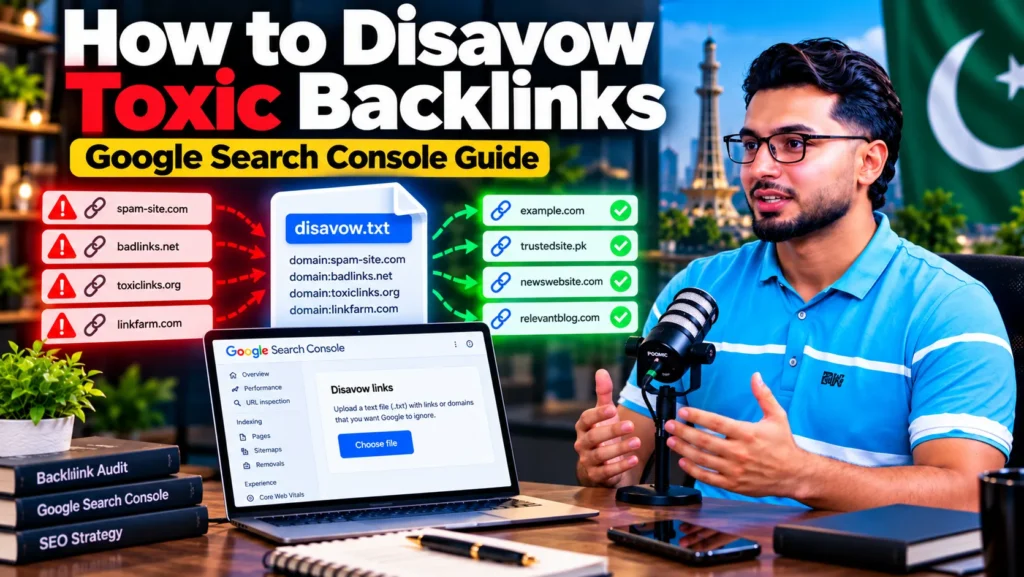
To disavow backlinks, list the bad URLs or domains in a plain .txt file (one per line, using domain:example.com for whole domains), open Google’s disavow links tool, choose your URL-prefix property in Search Console and upload the file. Google says you should only do this if you have many spammy or paid links that have caused, or are likely to cause, a manual action. For most sites, Google already ignores bad links and no disavow is needed.
What disavowing a link actually does
A disavow file asks Google not to count certain links when it assesses your site. It does not delete the links. They stay live on the other websites, and they still appear in the Links report in Search Console.
Think of it as a note to Google that says, “I did not ask for these links and I do not want credit for them.” Google treats the file as a strong suggestion, not a command, and can take a few weeks to process it.
Disavowing is one part of off-page SEO clean-up. It removes risk from bad links, but it never adds value. A site with a clean disavow file and no good links will not rank better because of the file.
Do you need to disavow links at all?
Most websites do not. Google’s own help page states that in most cases it can work out which links to trust without any help, and that the tool is an advanced feature that can harm your site’s performance if used wrongly.

Since the December 2022 link spam update, Google has said its SpamBrain system is used to neutralise the effect of unnatural links. Neutralised links pass no value, good or bad, so there is nothing to disavow.
Use this table to decide:
| Your situation | Should you disavow? |
|---|---|
| You have an “Unnatural links to your site” manual action in Search Console | Yes. Clean up links and disavow the ones you cannot remove, then file a reconsideration request |
| You or a previous SEO bought links, joined link schemes or used PBNs at scale | Usually yes, even without a manual action yet |
| A link seller or “SEO package” built hundreds of guest posts or directory links for you | Likely yes, after an audit |
| A tool shows a high “toxic” score, but you never built links and have no manual action | Usually no |
| You see random spam links from scraper sites, foreign forums or link farms | Usually no; Google typically ignores these |
| Traffic dropped after a core update and you have no link history to worry about | No. Look at content and technical causes first |
Google’s two conditions are the safest test. Disavow only when you have a considerable number of spammy, artificial or low-quality links, and those links have caused or are likely to cause a manual action.
If you are not sure what caused a traffic drop, start with a full SEO audit before touching your links. Disavowing good links by mistake can lower rankings.
What Google counts as a toxic backlink
“Toxic backlink” is a term invented by SEO tools, not by Google. Google talks about link spam. Its spam policies list these as examples of links that break the rules:
- Buying or selling links that pass ranking credit, including paying for posts that contain links
- Exchanging goods or services for links, such as free products in return for a link
- Excessive link exchanges (“link to me and I will link to you”)
- Automated programs used to create links to your site
- Low-quality directory or bookmark site links
- Advertorials or native ads with links that pass ranking credit
- Forum comments with optimised links in the post or signature
- Text ads or text links that do not block ranking credit with
rel="sponsored"orrel="nofollow"
A link is a problem when it looks like it was placed to manipulate rankings. A link from a small, low-traffic but genuine website is not toxic just because its domain rating is low.
Step 1: Collect all your backlinks
You cannot judge links you have not seen. Pull data from more than one source, because no single tool sees every link.
Google Search Console Links report
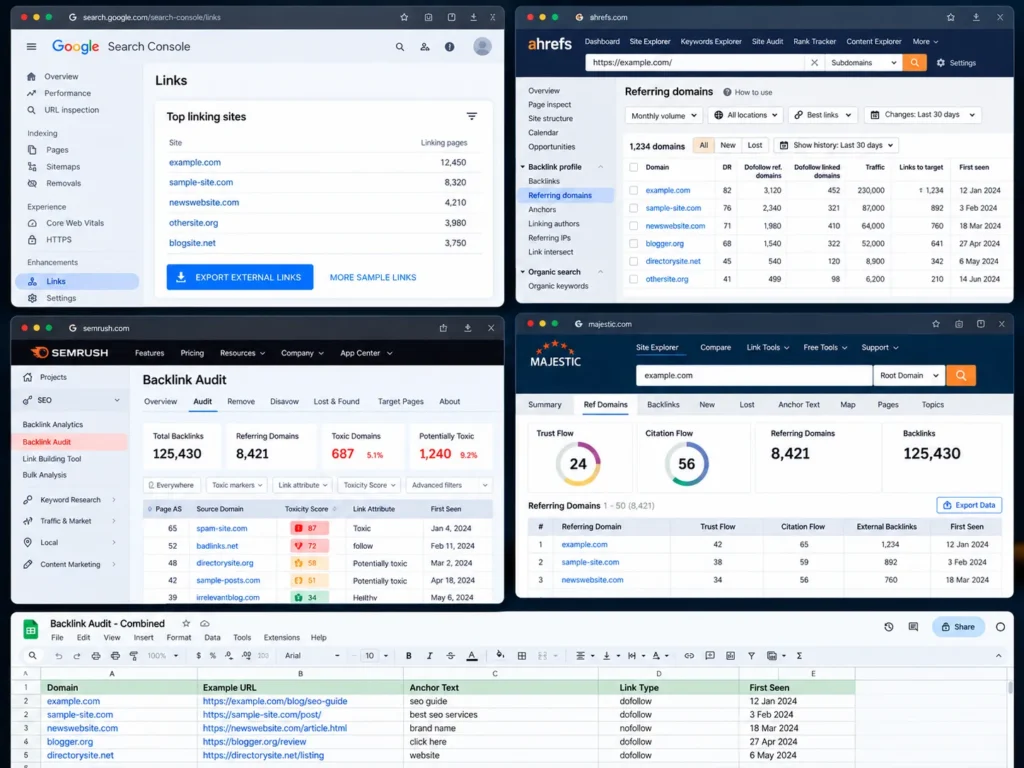
Open Search Console, go to Links, then Top linking sites and click Export external links. Google offers more sample links and latest links exports. This is Google’s own view of your links, so start here.
Third-party backlink tools
Paid tools find links Search Console does not show and add metrics that help you sort them:
- Ahrefs (Site Explorer, Backlinks and Referring domains reports)
- Semrush (Backlink Audit, which gives each link a Toxic Score from 0 to 100)
- Majestic (Trust Flow and Citation Flow)
- Moz Link Explorer (Spam Score)
Export referring domains, not just individual links. One spam domain can send thousands of links, and you will usually disavow it as one line.
Combine and remove duplicates
Put every export into one spreadsheet. Keep one row per referring domain, with columns for example URL, anchor text, link type (dofollow or nofollow) and first-seen date.
Step 2: Audit each referring domain
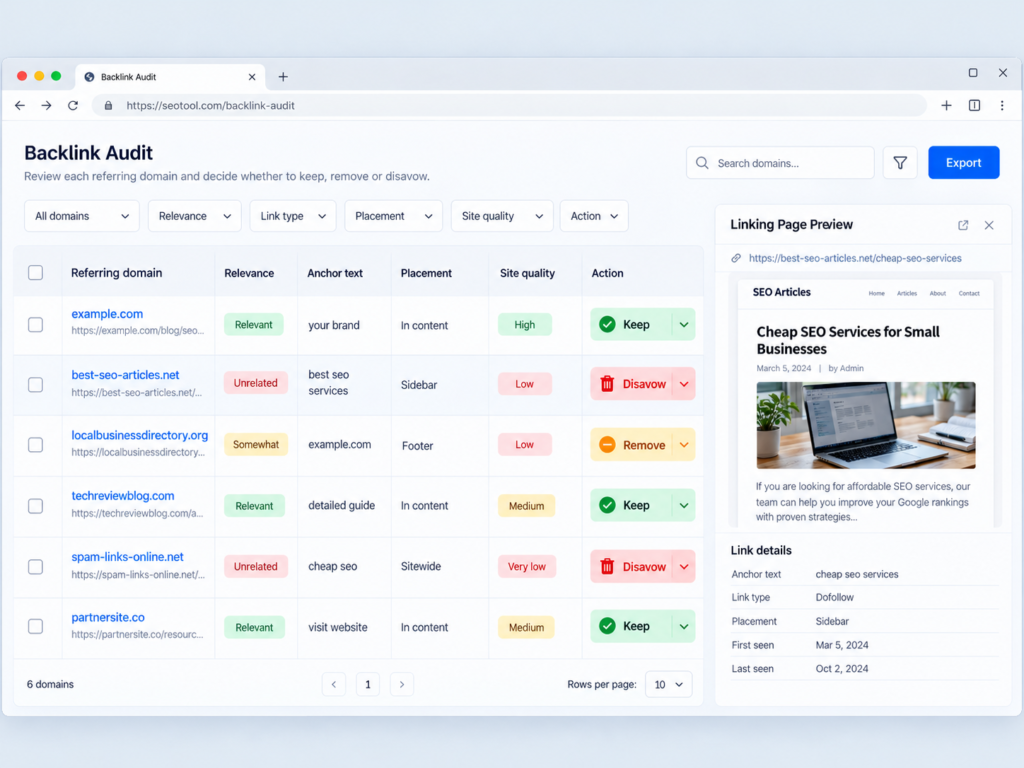
Tool scores are a starting point, not a decision. Open the linking page and judge it yourself. These signals help:
| Signal | Usually fine | Worth a closer look |
|---|---|---|
| Relevance | Same industry, city or audience | Unrelated topics, foreign-language spam |
| Anchor text | Brand name, URL, natural phrases | Exact-match money keywords repeated across many sites |
| Placement | Inside real content written for readers | Footer, sidebar, sitewide or hidden links |
| Site quality | Real articles, real traffic, real contact details | Thin pages, spun text, posts on every topic |
| Outbound links | A few links per page | Dozens of commercial links on every post |
| Pattern | Links gained slowly over time | Hundreds of links appearing in one month |
| Source | Earned mentions, partners, local press | “Write for us” sites that sell posts, PBNs, link farms |
Mark each domain as keep, remove or disavow. Nofollow and sponsored links do not pass ranking credit, so they rarely need to be disavowed.
A common pattern in Pakistan is a cheap monthly SEO plan that delivers “50 backlinks” or “DA 50+ guest posts”. If your SEO packages ever included link quotas like that, check those links first.
Step 3: Try to remove links before disavowing them
For manual actions, Google expects you to make a real effort to remove bad links before disavowing them. Disavow is meant for the links you could not get taken down.
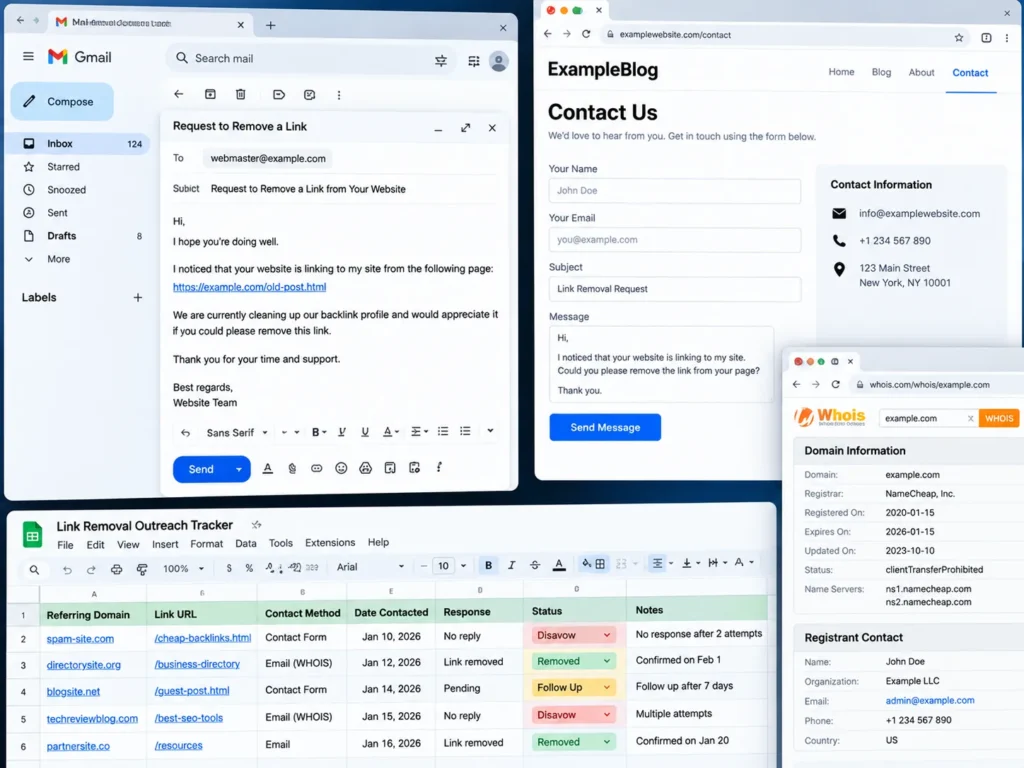
- Contact the site owner through the contact page or WHOIS email and ask for the link to be removed.
- Ask the person who built the links. If an agency placed paid posts, ask them to remove them.
- Keep records. Note the date, the site, who you contacted and the reply. You will need this for a reconsideration request.
- Do not pay removal fees. Some link sellers ask for money to remove links. Disavow those instead.
Without a manual action, removal outreach is optional. Most site owners will simply disavow.
Step 4: Create the disavow file
The file must follow Google’s format exactly. A small mistake can stop the whole file from being processed.
| Rule | Requirement |
|---|---|
| File type | Plain text file ending in .txt |
| Encoding | UTF-8 or 7-bit ASCII |
| Size | Up to 2 MB and 100,000 lines, including blank lines and comments |
| One entry per line | A single URL or a single domain |
| Whole domain | Start the line with domain: |
| URL length | Up to 2,048 characters |
| Comments | Lines starting with # are ignored |
| Not allowed | Disavowing a subfolder such as example.com/blog/ |
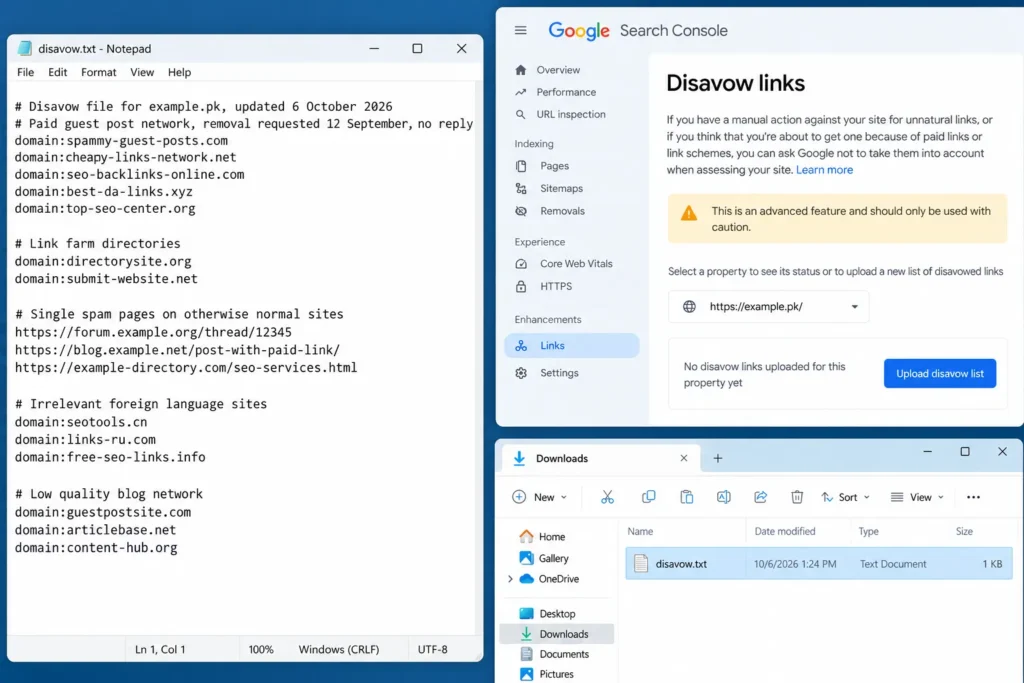
A correctly formatted file looks like this:
# Disavow file for example.pk, updated 6 October 2026
# Paid guest post network, removal requested 12 September, no reply
domain:spammy-guest-posts.com
domain:cheap-links-network.net

# Single spam pages on otherwise normal sites
https://forum.example.org/thread/12345
https://blog.example.net/post-with-paid-link/
Tips that save problems later:
- Prefer
domain:for spam sites. Disavowing one URL leaves every other link from the same site counted. - Do not add
www.orhttps://to domain lines. Writedomain:example.com, notdomain:https://www.example.com. - Write comments for yourself. Google ignores them, but they help you remember why each line is there.
- Use a text editor, not Word. Word processors can add hidden formatting that breaks the file.
Google’s John Mueller has also said publicly that a whole top-level domain can be disavowed with a line such as domain:.xyz. This is not in Google’s official documentation, so only use it if nearly all links from that extension are spam and none matter to you.
Step 5: Upload the file in Google Search Console
The disavow tool is not linked from the main Search Console menu. You open it directly.
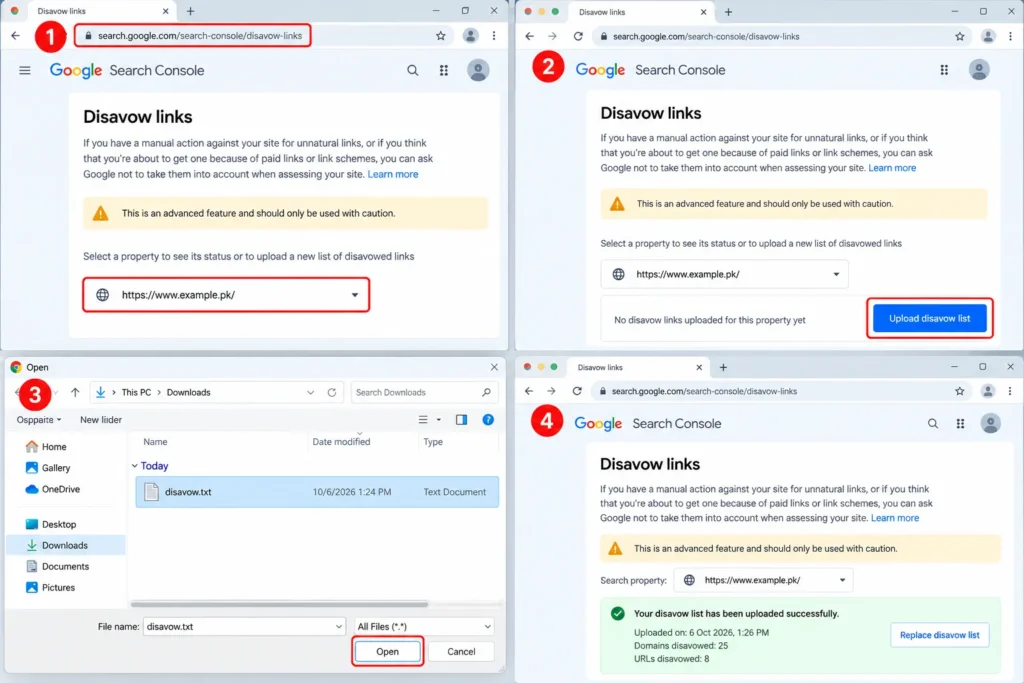
- Open the disavow links tool at
search.google.com/search-console/disavow-linkswhile signed in to the Google account that owns your property. - Choose your property from the drop-down. The tool works with URL-prefix properties. If you only see a Domain property, add and verify a URL-prefix property for the version your site uses, for example
https://www.example.pk/. - Click “Upload disavow list” and select your .txt file.
- Read any errors. If the tool reports a format problem, fix the lines it lists and upload again.
- Confirm the upload. The tool shows how many domains and URLs are now disavowed.
A disavow file covers the property you upload it to and its child properties. If your site has both http:// and https:// properties, Google advises uploading a list for each.
How to update or remove a disavow file
You can only have one active disavow file per property. Uploading a new file replaces the old one completely. It does not add to it.
- To add domains: download the current list from the tool, add the new lines, then upload the full file.
- To remove domains: delete those lines from the full list and upload it again.
- To cancel everything: open the tool, select the property and click Cancel disavowals.
Keep a dated copy of every version you upload. If rankings change after an upload, you need to know exactly what changed.
What happens after you upload
Expect a slow, quiet process rather than an overnight change.
- Processing takes weeks. Google says it can take a few weeks to take the list into account, as pages linking to you are recrawled.
- Links still show in reports. Disavowed links remain in the Search Console Links report and in third-party tools.
- Rankings may not move. If Google was already ignoring those links, nothing changes. That is normal.
- Rankings can drop. If you disavowed links that were helping, you may lose ground. This is why careful auditing matters.
If rankings stay flat for several months after a clean-up, links were probably not the main problem. Weak or outdated pages are a more common cause, and content optimisation is usually the next place to look.
Disavowing links after a manual action
An “Unnatural links to your site” manual action appears in Search Console under Security & Manual Actions, then Manual actions. It means a Google reviewer has found a pattern of manipulative links pointing to your site.
Recovery follows a clear order:
- Audit every link, not just a sample.
- Remove as many bad links as you can and keep records of your outreach.
- Disavow the rest using the steps above.
- Submit a reconsideration request from the Manual actions report. Explain what happened, what you removed, what you disavowed and how you will prevent it happening again. Link to your records in a shared spreadsheet.
- Wait for Google’s reply. Reviews can take days or weeks. If the request is rejected, the reply usually shows example links that still need attention.
A manual action for “Unnatural links from your site” is different. It is about links you sell or place on your own site. Disavowing does not fix it; you need to remove or add rel="nofollow" or rel="sponsored" to those outbound links.
Manual action clean-ups take careful work and documentation. If your site is in this position, a structured Google penalty recovery process is usually faster than trial and error.
Common disavow mistakes
These mistakes cause more damage than the links they were meant to fix.
- Disavowing every link a tool marks as toxic. Tool scores flag many harmless links. Always check the page yourself.
- Uploading a new file that wipes the old one. Forgetting that uploads replace the full list can bring old spam links back into play.
- Using URLs instead of domains for spam sites. The same site often has hundreds of pages linking to you.
- Disavowing local citations. Genuine business directories that list your name, address and phone number support local SEO. Only spam directories built purely for links need attention.
- Treating disavow as a ranking boost. It removes risk; it does not add authority.
- Ignoring the cause. If whoever built the bad links is still building them, new ones will keep arriving.
Negative SEO: should you disavow links a competitor built?
Business owners sometimes find sudden spam links and assume a competitor is attacking them. Google has said for years that it is very good at ignoring this kind of spam, and that negative SEO attacks rarely work.
If you have never bought links and have no manual action, monitor the links but do not rush to disavow. If you see a manual action, or a sharp drop that lines up exactly with a large spam campaign, audit and disavow as described above.
How to stop toxic links coming back
Clean-up is wasted if the same links are built again next month.
- Put link building methods in writing. Your SEO contract should state how links are earned and ban paid links that pass ranking credit.
- Ask for a monthly list of new links built for you, with the URL of each.
- Review the Links report every quarter for new referring domains you do not recognise.
- Avoid link packages sold by quantity. My guide to mistakes when hiring an SEO expert explains why “guaranteed backlinks” are a warning sign.
- Earn links worth keeping. Local press, suppliers, partners, industry associations and useful content bring links you will never need to disavow.
Frequently asked questions
How long does it take for a disavow file to work?
Google says it can take a few weeks to process a disavow list, because it needs to recrawl the pages that link to you. There is no notification when processing finishes, and rankings may not change if Google was already ignoring those links.
Can disavowing links hurt my rankings?
Yes. If you disavow links that were genuinely helping your site, you can lose rankings. Google describes the tool as an advanced feature that can harm performance if used incorrectly.
Should I disavow links with a high Semrush Toxic Score or Moz Spam Score?
Not automatically. These scores are estimates made by third-party tools, not by Google. Open each linking page, check whether it was placed to manipulate rankings, and only disavow when the evidence supports it.
Is it better to disavow a URL or a domain?
For spam sites, disavow the whole domain with domain:example.com. Use single URLs only when the rest of the site is genuine and only one page holds a bad link.
Does the disavow tool work with Domain properties?
The disavow tool is used with URL-prefix properties. If you only have a Domain property in Search Console, add a URL-prefix property for the version of your site that visitors use, verify it, and upload the file there.
Do I need to disavow nofollow links?
Usually not. Nofollow, sponsored and UGC links do not pass ranking credit in the normal way, so disavowing them rarely makes a difference.
Can I undo a disavow?
Yes. Upload a new file without those lines, or click “Cancel disavowals” in the tool to remove the whole list. As with the original file, it can take a few weeks for Google to reflect the change.